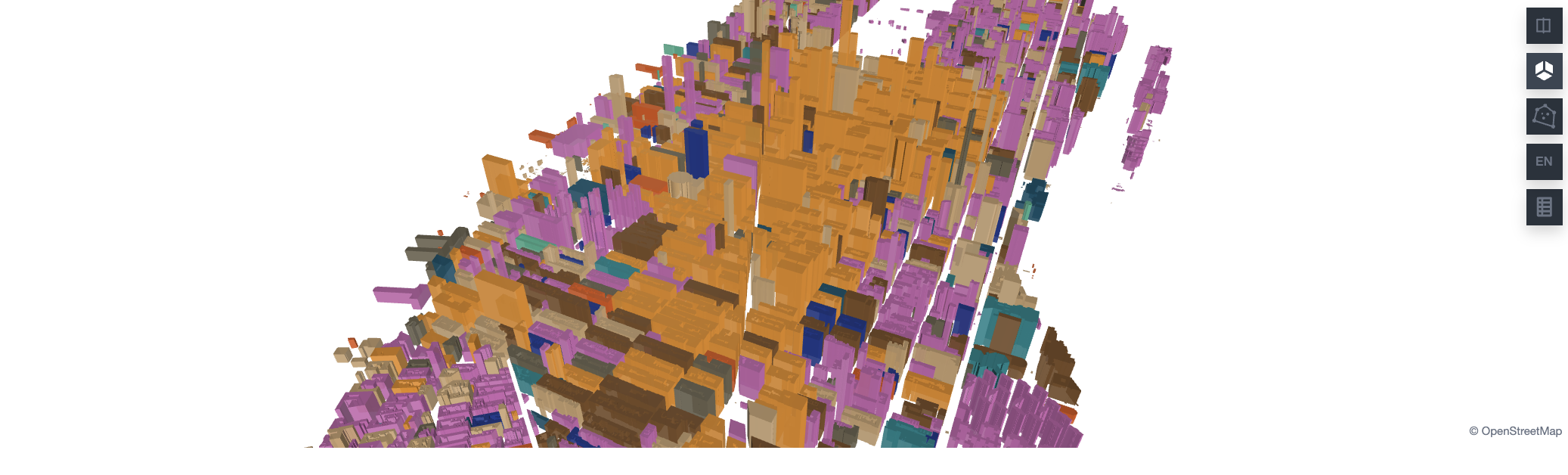
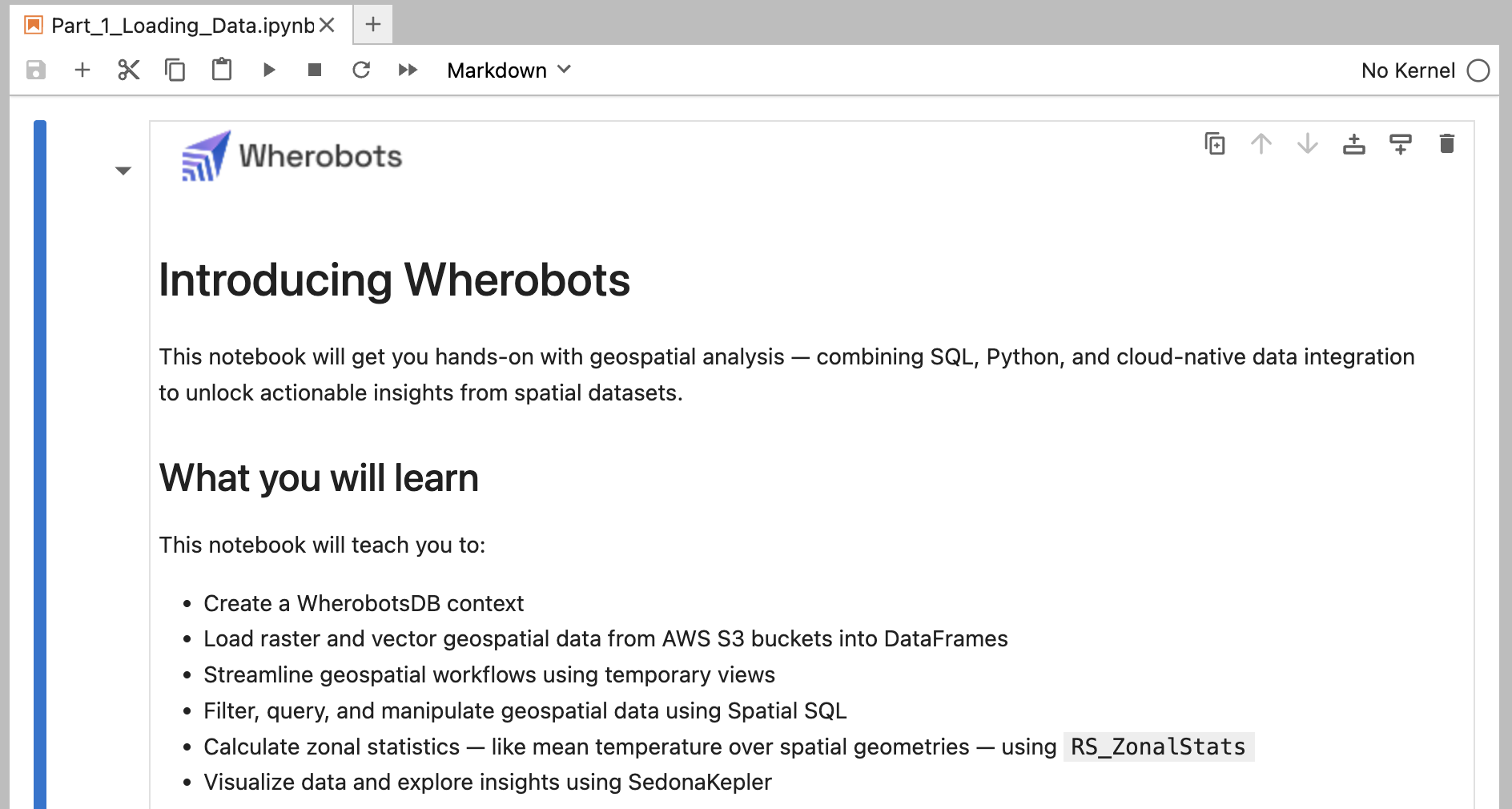
Wherobots Cloud allows you to quickly start Notebook Runtimes, pre-configured JupyterLab environments for spatial computing, eliminating the need for manual infrastructure setup and software configuration.
There are two ways to run a Wherobots notebook. Pick whichever fits how you like to work — both execute on the same Wherobots compute.
Run notebooks in Wherobots Cloud
Start a Notebook Runtime, a pre-configured JupyterLab environment, in your browser. Nothing to install.
Run notebooks in VS Code
Keep notebooks local in VS Code, Cursor, Windsurf, or Kiro and run them against a remote runtime.
How does Wherobots Cloud simplify geospatial analytics?
Wherobots Cloud offers: No installation, scalable processing, enhanced collaboration, pre-built geospatial tools, cost-effectiveness, and easy S3 data integration.
Wherobots Cloud starts a Notebook Runtime right away and opens it in a new browser tab. When the Notebook Runtime is ready, JupyterLab opens in that tab.
Clicking the card starts a Tiny Notebook Runtime in your Organization’s default region, with no dialog. To choose the size and region yourself, see Start a Notebook Runtime. When you’re done, destroy the Notebook Runtime to stop billing.
You aren’t limited to Notebook Runtimes in Wherobots Cloud. With the Wherobots VS Code Extension, you can keep your notebooks on your local machine and run them against remote Wherobots compute — in VS Code and other Code OSS editors, including Cursor, Windsurf, and Kiro.
Organization Availability: Available to all Wherobots Organization Editions (Professional, Innovation, and Enterprise).
Run the Day 1 notebook
Run a notebook you already have
Generate a new notebook with AI
The extension includes an Example Notebooks browser, so you can run the same Wherobots Cloud Example Notebook without leaving your editor.
The Example Notebooks browser in the Wherobots sidebar.
Open Part 1 Loading Data
Under Getting Started, click Part 1 Loading Data.
Create a runtime
Click Create a workspace, then click Create & Start to initiate a Wherobots runtime.A pop-up window will appear notifying you once your runtime is ready.
Starting a runtime begins the provisioning process. Once a runtime has been provisioned, a billable event is occurring.
Create a workspace for a notebook in VS Code.
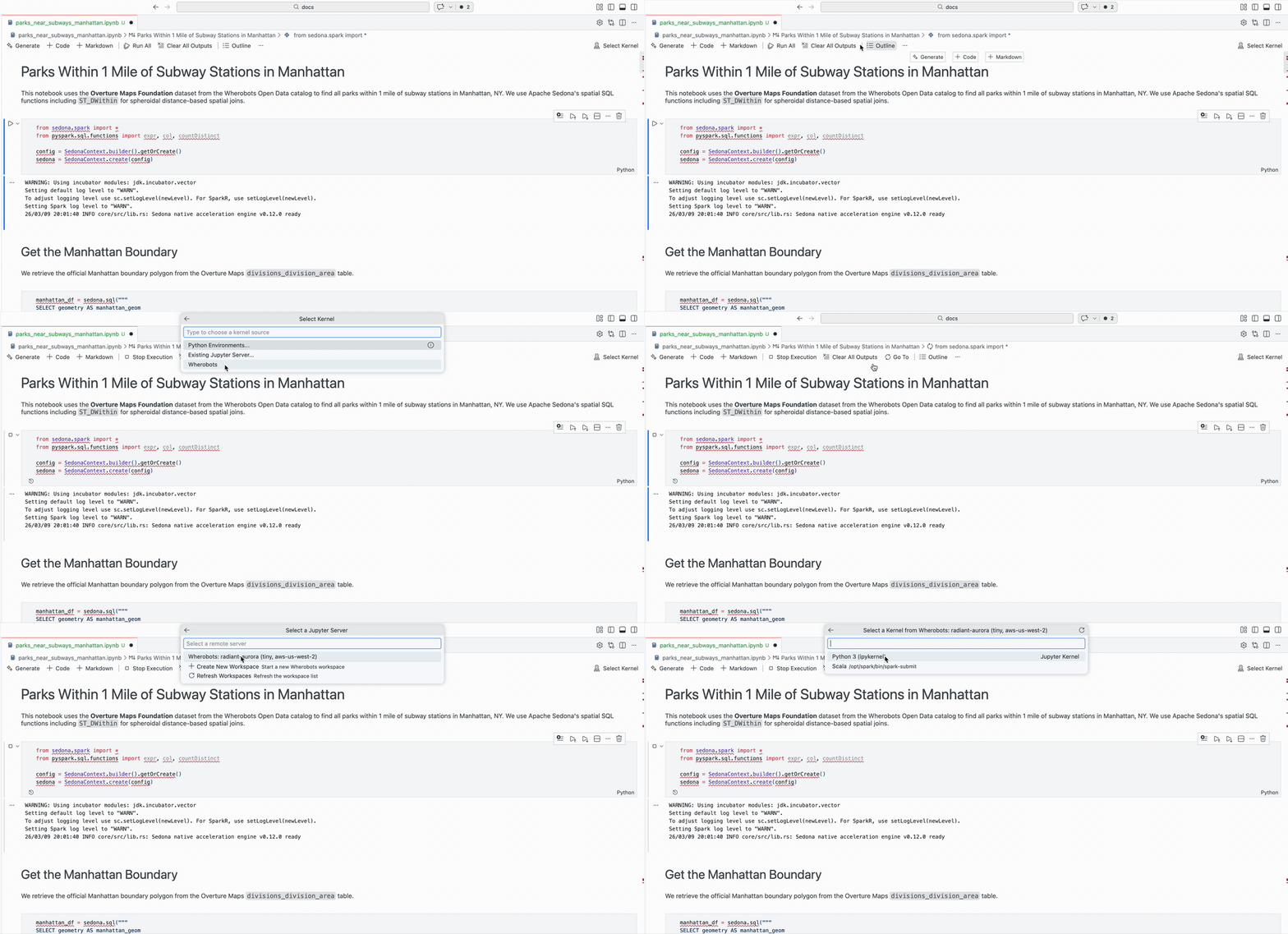
Select the Wherobots kernel
Click the icon on the left-side of the screen and select either the Python or Scala kernel.
Selecting the Wherobots kernel source for a local notebook in VS Code.
Run the notebook cells
Click Run All. Cells run on the runtime, and results appear inline in your editor.
If the list is empty, run Wherobots: Refresh Examples from the Command Palette.
Running a Jupyter notebook that you previously created is very similar to running the Day 1 notebook.After opening the notebook, connect the kernel and run the notebook cells.
Create a runtime
Click Create a workspace, then click Create & Start to initiate a Wherobots runtime.A pop-up window will appear notifying you once your runtime is ready.
Starting a runtime begins the provisioning process. Once a runtime has been provisioned, a billable event is occurring.
Create a workspace for a notebook in VS Code.
Select the Wherobots kernel
Click the icon on the left-side of the screen and select either the Python or Scala kernel.
Selecting the Wherobots kernel source for a local notebook in VS Code.
You can also hover over your active runtime in the ** Workspaces** section and click the icon to access ypo
Run the notebook cells
Click Run All. Cells run on the runtime, and results appear inline in your editor.
This works with any local notebook. Bring your existing work to Wherobots compute and datasets.
Open chat in Agent mode
Open your editor’s AI assistant and switch it to Agent mode. Choose an advanced model — the latest Claude Opus, Claude Sonnet, Gemini Pro, or GPT Codex — for the best results.
Describe the notebook you want
Prompt the assistant in plain language, and it writes the notebook for you:
Create a notebook that finds all parks within 1 mile of subway stations in Manhattan using the Overture Maps dataset. Run each cell.
Create a runtime
Click Create a workspace, then click Create & Start to initiate a Wherobots runtime.A pop-up window will appear notifying you once your runtime is ready.
Starting a runtime begins the provisioning process. Once a runtime has been provisioned, a billable event is occurring.
Create a workspace for a notebook in VS Code.
Select the Wherobots kernel
Click the icon on the left-side of the screen and select either the Python or Scala kernel.
Selecting the Wherobots kernel source for a local notebook in VS Code.
Run the notebook cells
Click Run All. Cells run on the runtime, and results appear inline in your editor.
Read spatial files, speed up large datasets, and run spatial joins in the next three example notebooks.
Connect Your Data
Connect external data sources and browse catalogs in Data Catalogs.
Query Overture Maps Tables
Reference Overture tables correctly, filter on nested fields, and limit results to a country or region.
Set Up Agentic Tools
Install the Wherobots VS Code Extension for VS Code, Cursor, Windsurf, Kiro, and other editors.
Was this page helpful?
{"docsConfig":{"theme":"aspen","$schema":"https://www.mintlify.com/docs.json","name":"Wherobots","colors":{"primary":"#6612c5","light":"#6612c5","dark":"#6612c5"},"logo":{"light":"https://mintcdn.com/wherobots/q2h_5BmXeWMz6JRH/logo/light.png?fit=max\u0026auto=format\u0026n=q2h_5BmXeWMz6JRH\u0026q=85\u0026s=5a1512dbd3547c3df4e8f4779a1e4cfa","dark":"https://mintcdn.com/wherobots/q2h_5BmXeWMz6JRH/logo/dark.png?fit=max\u0026auto=format\u0026n=q2h_5BmXeWMz6JRH\u0026q=85\u0026s=8d84ac8734585eb38f09b1ea4c0d8e5c","href":"/"},"favicon":"https://mintcdn.com/wherobots/q2h_5BmXeWMz6JRH/favicon.png?fit=max\u0026auto=format\u0026n=q2h_5BmXeWMz6JRH\u0026q=85\u0026s=aa88d68dcd661ed008af0d0a8c4bcd47","api":{"playground":{"display":"interactive"},"examples":{"defaults":"required","languages":["curl","python","javascript","go","java"],"prefill":true}},"appearance":{"default":"light"},"navbar":{"links":[{"href":"/changelog","label":"Changelog"},{"href":"/support","label":"Support"}],"primary":{"type":"button","label":"Open Wherobots Cloud","href":"https://cloud.wherobots.com"}},"footer":{"socials":{"linkedin":"https://www.linkedin.com/company/wherobots","x":"https://x.com/wherobots","github":"https://github.com/wherobots","youtube":"https://www.youtube.com/channel/UCFC5QjLyQ3wanshI5xUH0aw","discord":"https://sedona.apache.org/1.5.2/community/contact"},"links":[{"header":"Resources","items":[{"label":"Support","href":"/support"},{"label":"Changelog","href":"/changelog"},{"label":"Cloud availability","href":"/availability"}]},{"header":"Legal","items":[{"label":"Terms of service","href":"/terms-of-service"},{"label":"Privacy policy","href":"/privacy-policy"}]}]},"seo":{"metatags":{"canonical":"https://docs.wherobots.com","googlebot":"index, follow","robots":"index, follow","keywords":"Managed Apache Sedona, Apache Sedona, Wherobots docs, Wherobots documentation, Iceberg tables, Spatial SQL API, Wherobots Cloud Python SDK, RasterFlow, Map Matching, Spatial Data Catalog, Wherobots Airflow Provider","description":"Official Wherobots Documentation. Learn how to conduct scalable spatial analysis with WherobotsDB—the serverless cloud platform from the creators of Apache Sedona.","google-site-verification":"CN6rS8bQ0T0qVXswDOc12YyKdEE_tnmlk97_Qr6Ui_A","indexing":"all"}},"fonts":{"heading":{"family":"Figtree"},"body":{"family":"Figtree"}},"styling":{"codeblocks":"system","latex":false},"integrations":{"amplitude":{"apiKey":"ee314e073a5b08c12a78aef591a50bc1"},"ga4":{"measurementId":"G-D4ED50QSVC"}},"contextual":{"options":["copy","view","download-spec"],"display":"header"},"navigation":{"pages":[]}},"deployment":{"deploymentMetadataValue":{"subdomain":"wherobots","hasAudioNarration":false,"actualSubdomain":"wherobots","customDomains":["docs.wherobots.com"],"gitSource":{"type":"github","owner":"wherobots","repo":"docs","deployBranch":"main","contentDirectory":"","isPrivate":true,"mountPath":"","label":""},"chroma":{"liveDeploymentHistoryId":"6ae51b616b62f7aaad8920bf","collectionId":"4f10ad36-1938-4c3f-8122-63fd7f7e449e","schemaVersion":"v3","latestBuiltDeploymentHistoryId":"6ae51b616b62f7aaad8920bf"},"feedback":{"thumbs":true},"entitlements":{"AI_CHAT":{"status":"ENABLED"},"CONTEXTUAL_FEEDBACK":{"status":"ENABLED"},"CODE_SNIPPET_FEEDBACK":{"status":"ENABLED"},"WEB_MCP":{"status":"ENABLED"},"NARRATION":{"status":"ENABLED"}},"buildId":"6ae51b616b62f7aaad8920bf","clientVersion":"0.0.4044","searchFilterCounts":[{"language":"default","tag":"Reference","count":1810},{"language":"default","tag":"WherobotsDB","count":879},{"language":"default","tag":"Python","count":449},{"language":"default","tag":"SQL","count":422},{"language":"default","tag":"Geometry Functions","count":267},{"language":"default","tag":"DataFrame functions","count":209},{"language":"default","tag":"GeoPandas API","count":159},{"language":"default","tag":"GeoSeries","count":130},{"language":"default","tag":"Raster Functions","count":109},{"language":"default","tag":"Accessors","count":94}]},"assistantConfig":{"enableAskAiButton":true,"enableAskAiSearchBar":false},"basePath":"","hasChatPermissions":true,"hasWebMcpPermissions":true,"toggles":[{"name":"kill-isr","enabled":true,"variant":{"name":"disabled","enabled":false,"feature_enabled":true},"impressionData":false},{"name":"agent-mintlify-slack","enabled":true,"variant":{"name":"disabled","enabled":false,"feature_enabled":true},"impressionData":false},{"name":"agent-integrations-settings","enabled":true,"variant":{"name":"disabled","enabled":false,"feature_enabled":true},"impressionData":false},{"name":"automations-pr-grouping","enabled":true,"variant":{"name":"disabled","enabled":false,"feature_enabled":true},"impressionData":false},{"name":"custom-prefix","enabled":true,"variant":{"name":"disabled","enabled":false,"feature_enabled":true},"impressionData":false},{"name":"analytics-v7","enabled":true,"variant":{"name":"disabled","enabled":false,"feature_enabled":true},"impressionData":false},{"name":"user-flows-analytics","enabled":true,"variant":{"name":"disabled","enabled":false,"feature_enabled":true},"impressionData":false},{"name":"no-publish-flow","enabled":true,"variant":{"name":"disabled","enabled":false,"feature_enabled":true},"impressionData":false},{"name":"workos-onboarding","enabled":true,"variant":{"name":"disabled","enabled":false,"feature_enabled":true},"impressionData":false},{"name":"llms-txt-v2","enabled":true,"variant":{"name":"disabled","enabled":false,"feature_enabled":true},"impressionData":false},{"name":"snapshot-serving-live","enabled":true,"variant":{"name":"disabled","enabled":false,"feature_enabled":true},"impressionData":false},{"name":"stripTemperatureMiddleware","enabled":true,"variant":{"name":"disabled","enabled":false,"feature_enabled":true},"impressionData":false},{"name":"support-platform-pylon-zendesk","enabled":true,"variant":{"name":"disabled","enabled":false,"feature_enabled":true},"impressionData":false},{"name":"snapshot-serving","enabled":true,"variant":{"name":"disabled","enabled":false,"feature_enabled":true},"impressionData":false},{"name":"instant-rollback","enabled":true,"variant":{"name":"disabled","enabled":false,"feature_enabled":true},"impressionData":false},{"name":"granular-notifications-server","enabled":true,"variant":{"name":"disabled","enabled":false,"feature_enabled":true},"impressionData":false},{"name":"granular-notifications","enabled":true,"variant":{"name":"disabled","enabled":false,"feature_enabled":true},"impressionData":false},{"name":"automations-fable","enabled":true,"variant":{"name":"disabled","enabled":false,"feature_enabled":true},"impressionData":false},{"name":"fixed-ai-action-pricing","enabled":true,"variant":{"name":"disabled","enabled":false,"feature_enabled":true},"impressionData":false},{"name":"automation-resolve-merge-conflict","enabled":true,"variant":{"name":"disabled","enabled":false,"feature_enabled":true},"impressionData":false},{"name":"scoped-publishing","enabled":true,"variant":{"name":"disabled","enabled":false,"feature_enabled":true},"impressionData":false},{"name":"mintql","enabled":true,"variant":{"name":"disabled","enabled":false,"feature_enabled":true},"impressionData":false},{"name":"page-level-analytics","enabled":true,"variant":{"name":"disabled","enabled":false,"feature_enabled":true},"impressionData":false},{"name":"editor-version-history-v2","enabled":true,"variant":{"name":"disabled","enabled":false,"feature_enabled":true},"impressionData":false},{"name":"billing-page-v2","enabled":true,"variant":{"name":"disabled","enabled":false,"feature_enabled":true},"impressionData":false},{"name":"full-page-search","enabled":true,"variant":{"name":"disabled","enabled":false,"feature_enabled":true},"impressionData":false},{"name":"workspace-projects","enabled":true,"variant":{"name":"disabled","enabled":false,"feature_enabled":true},"impressionData":false},{"name":"assistant-v5","enabled":true,"variant":{"name":"disabled","enabled":false,"feature_enabled":true},"impressionData":false},{"name":"byok-sep-25","enabled":true,"variant":{"name":"disabled","enabled":false,"feature_enabled":true},"impressionData":false},{"name":"fork-pr-previews","enabled":true,"variant":{"name":"disabled","enabled":false,"feature_enabled":true},"impressionData":false},{"name":"revalidation-jwt","enabled":true,"variant":{"name":"disabled","enabled":false,"feature_enabled":true},"impressionData":false},{"name":"vite-origin","enabled":true,"variant":{"name":"disabled","enabled":false,"feature_enabled":true},"impressionData":false},{"name":"billing-updated-9-15","enabled":true,"variant":{"name":"disabled","enabled":false,"feature_enabled":true},"impressionData":false},{"name":"workos-sso-scim","enabled":true,"variant":{"name":"disabled","enabled":false,"feature_enabled":true},"impressionData":false},{"name":"hobby-abuse-scan","enabled":true,"variant":{"name":"disabled","enabled":false,"feature_enabled":true},"impressionData":false},{"name":"dashboard-inbox","enabled":true,"variant":{"name":"disabled","enabled":false,"feature_enabled":true},"impressionData":false},{"name":"workos-signup","enabled":true,"variant":{"name":"disabled","enabled":false,"feature_enabled":true},"impressionData":false},{"name":"turbopuffer-dual-write","enabled":true,"variant":{"name":"disabled","enabled":false,"feature_enabled":true},"impressionData":false},{"name":"workos-enabled","enabled":true,"variant":{"name":"disabled","enabled":false,"feature_enabled":true},"impressionData":false},{"name":"approve-review-flow","enabled":true,"variant":{"name":"disabled","enabled":false,"feature_enabled":true},"impressionData":false},{"name":"sso-setup-deadline-banner","enabled":true,"variant":{"name":"disabled","enabled":false,"feature_enabled":true},"impressionData":false}],"googleFontsInlined":true},"customCss":[],"page":{"pagePath":"get-started/wherobots-cloud/start-notebook","slug":"/get-started/wherobots-cloud/start-notebook","pageMetadata":{"title":"Start Your First Notebook","description":"[**Wherobots Cloud**](https://cloud.wherobots.com/) allows you to quickly start Notebook Runtimes, pre-configured JupyterLab environments for spatial computing, eliminating the need for manual infrastructure setup and software configuration.","href":"/get-started/wherobots-cloud/start-notebook"},"description":{"compiledSource":"\"use strict\";\nconst {jsx: _jsx, jsxs: _jsxs} = arguments[0];\nconst {useMDXComponents: _provideComponents} = arguments[0];\nfunction _createMdxContent(props) {\n const _components = {\n a: \"a\",\n p: \"p\",\n strong: \"strong\",\n ..._provideComponents(),\n ...props.components\n };\n return _jsxs(_components.p, {\n children: [_jsx(_components.a, {\n href: \"https://cloud.wherobots.com/\",\n children: _jsx(_components.strong, {\n children: \"Wherobots Cloud\"\n })\n }), \" allows you to quickly start Notebook Runtimes, pre-configured JupyterLab environments for spatial computing, eliminating the need for manual infrastructure setup and software configuration.\"]\n });\n}\nfunction MDXContent(props = {}) {\n const {wrapper: MDXLayout} = {\n ..._provideComponents(),\n ...props.components\n };\n return MDXLayout ? _jsx(MDXLayout, {\n ...props,\n children: _jsx(_createMdxContent, {\n ...props\n })\n }) : _createMdxContent(props);\n}\nreturn {\n default: MDXContent\n};\n","frontmatter":{},"scope":{}},"pageType":"default","mdx":{"mdxSource":{"compiledSource":"\"use strict\";const{Fragment:_Fragment,jsx:_jsx,jsxs:_jsxs}=arguments[0];const{useMDXComponents:_provideComponents}=arguments[0];const Button=({href,children})=>{const _components={a:`a`,..._provideComponents()};return _jsx(`div`,{className:`not-prose group mint-mt-3`,children:_jsx(_components.a,{href,children:_jsx(`button`,{className:`mint-flex mint-items-center mint-space-x-2.5 mint-py-1 mint-px-4 bg-primary-dark dark:mint-bg-white mint-text-white dark:mint-text-gray-950 mint-rounded-xl mint-font-medium hover:mint-bg-[#7c4dff] dark:hover:mint-bg-[#7c4dff] mint-transition-colors mint-duration-200`,children:_jsx(`span`,{children})})})})};function _createMdxContent(props){const _components={a:`a`,blockquote:`blockquote`,code:`code`,em:`em`,li:`li`,ol:`ol`,p:`p`,strong:`strong`,tbody:`tbody`,td:`td`,th:`th`,thead:`thead`,tr:`tr`,..._provideComponents(),...props.components},{Accordion,Card,CardGroup,Frame,Heading,Icon,Info,Note,OptimizedImage,Step,Steps,Tab,Table,Tabs,Tip,_MdxComponentBoundary}=_components;if(!Accordion)_missingMdxReference(`Accordion`,true);if(!Card)_missingMdxReference(`Card`,true);if(!CardGroup)_missingMdxReference(`CardGroup`,true);if(!Frame)_missingMdxReference(`Frame`,true);if(!Heading)_missingMdxReference(`Heading`,true);if(!Icon)_missingMdxReference(`Icon`,true);if(!Info)_missingMdxReference(`Info`,true);if(!Note)_missingMdxReference(`Note`,true);if(!OptimizedImage)_missingMdxReference(`OptimizedImage`,true);if(!Step)_missingMdxReference(`Step`,true);if(!Steps)_missingMdxReference(`Steps`,true);if(!Tab)_missingMdxReference(`Tab`,true);if(!Table)_missingMdxReference(`Table`,true);if(!Tabs)_missingMdxReference(`Tabs`,true);if(!Tip)_missingMdxReference(`Tip`,true);if(!_MdxComponentBoundary)_missingMdxReference(`_MdxComponentBoundary`,true);return _jsxs(_Fragment,{children:[_jsx(Frame,{children:_jsx(OptimizedImage,{src:`https://mintcdn.com/wherobots/GrWfTlqud5HZFYRl/images/get-started/get-started-images/load-data.png?fit=max\u0026auto=format\u0026n=GrWfTlqud5HZFYRl\u0026q=85\u0026s=4cdcfd487aaa3217893c8331a87ba2b3`,alt:`Notebook`,\"data-og-width\":`2074`,width:`2074`,\"data-og-height\":`628`,height:`628`,\"data-path\":`images/get-started/get-started-images/load-data.png`,\"data-optimize\":`true`,\"data-opv\":`3`,srcset:`https://mintcdn.com/wherobots/GrWfTlqud5HZFYRl/images/get-started/get-started-images/load-data.png?w=280\u0026fit=max\u0026auto=format\u0026n=GrWfTlqud5HZFYRl\u0026q=85\u0026s=b0551b1ca0bf60942abf34e6da1f2e7d 280w, https://mintcdn.com/wherobots/GrWfTlqud5HZFYRl/images/get-started/get-started-images/load-data.png?w=560\u0026fit=max\u0026auto=format\u0026n=GrWfTlqud5HZFYRl\u0026q=85\u0026s=8f7223cb635c9c3f860974abf1e063e5 560w, https://mintcdn.com/wherobots/GrWfTlqud5HZFYRl/images/get-started/get-started-images/load-data.png?w=840\u0026fit=max\u0026auto=format\u0026n=GrWfTlqud5HZFYRl\u0026q=85\u0026s=3f3da9c6bb3e3d9438435f43628ec388 840w, https://mintcdn.com/wherobots/GrWfTlqud5HZFYRl/images/get-started/get-started-images/load-data.png?w=1100\u0026fit=max\u0026auto=format\u0026n=GrWfTlqud5HZFYRl\u0026q=85\u0026s=dc557c5aa678eea0dd3d90493a9ef435 1100w, https://mintcdn.com/wherobots/GrWfTlqud5HZFYRl/images/get-started/get-started-images/load-data.png?w=1650\u0026fit=max\u0026auto=format\u0026n=GrWfTlqud5HZFYRl\u0026q=85\u0026s=a2424fdecac68d94cc16b279cf69ce7e 1650w, https://mintcdn.com/wherobots/GrWfTlqud5HZFYRl/images/get-started/get-started-images/load-data.png?w=2500\u0026fit=max\u0026auto=format\u0026n=GrWfTlqud5HZFYRl\u0026q=85\u0026s=370feda32289c9689b449b53a241116f 2500w`})}),`\n`,_jsx(_components.p,{children:`There are two ways to run a Wherobots notebook. Pick whichever fits how you like to work — both execute on the same Wherobots compute.`}),`\n`,_jsxs(CardGroup,{cols:2,children:[_jsx(Card,{title:`Run notebooks in Wherobots Cloud`,icon:`cloud`,href:`#run-the-introducing-wherobots-notebook`,children:_jsx(_components.p,{children:`Start a Notebook Runtime, a pre-configured JupyterLab environment, in your browser. Nothing to install.`})}),_jsx(Card,{title:`Run notebooks in VS Code`,icon:`code`,href:`#run-notebooks-from-vs-code`,children:_jsx(_components.p,{children:`Keep notebooks local in VS Code, Cursor, Windsurf, or Kiro and run them against a remote runtime.`})})]}),`\n`,_jsx(Accordion,{title:`How does Wherobots Cloud simplify geospatial analytics?`,icon:`circle-question`,iconType:`solid`,id:`how-does-wherobots-cloud-simplify-geospatial-analytics`,children:_jsx(_components.p,{children:`Wherobots Cloud offers: No installation, scalable processing, enhanced collaboration, pre-built geospatial tools, cost-effectiveness, and easy S3 data integration.`})}),`\n`,_jsx(Heading,{level:`2`,id:`what-will-you-learn`,children:`What will you learn?`}),`\n`,_jsx(_components.p,{children:`This notebook offers a hands-on guide to geospatial analysis using Apache Sedona within Wherobots.`}),`\n`,_jsx(_components.p,{children:`You’ll learn how to:`}),`\n`,_jsxs(_components.ol,{children:[`\n`,_jsx(_components.li,{children:`Load vector (NYC buildings) and raster (Central Park elevation) data from S3.`}),`\n`,_jsx(_components.li,{children:`Perform SQL-based analyses, like calculating building elevations using zonal statistics.`}),`\n`,_jsx(_components.li,{children:`Visualize your findings with SedonaKepler.`}),`\n`]}),`\n`,_jsx(Heading,{level:`2`,id:`before-you-start`,children:`Before you start`}),`\n`,_jsxs(_components.p,{children:[`You will need a `,_jsx(_components.strong,{children:`Wherobots Organization`}),` to follow this tutorial. You can start with a free Professional Edition trial.`]}),`\n`,_jsxs(Table,{children:[_jsx(_components.thead,{children:_jsxs(_components.tr,{children:[_jsx(_components.th,{children:`Register new Organization or Login to Wherobots Cloud`}),_jsx(_components.th,{})]})}),_jsx(_components.tbody,{children:_jsxs(_components.tr,{children:[_jsx(_components.td,{children:_jsx(_MdxComponentBoundary,{name:`Button`,children:_jsx(Button,{href:`https://cloud.wherobots.com/auth/signup?redirect=%2F`,children:`Register`})})}),_jsx(_components.td,{children:_jsx(_MdxComponentBoundary,{name:`Button`,children:_jsx(Button,{href:`https://cloud.wherobots.com/`,children:`Login`})})})]})})]}),`\n`,_jsxs(_components.p,{children:[`For more information on setting up your Organization, see `,_jsx(_components.a,{href:`/get-started/wherobots-cloud/create-account/#register-for-a-professional-edition-trial`,children:`Register for a Professional Edition trial`}),`.`]}),`\n`,_jsx(Heading,{level:`2`,id:`run-the-introducing-wherobots-notebook`,children:`Run the Introducing Wherobots Notebook`}),`\n`,_jsx(_components.p,{children:`Let’s open the Introducing Wherobots Notebook – your initial hands-on guide to Wherobots.`}),`\n`,_jsx(`span`,{id:`start-the-runtime`,className:`scroll-mt-(--scroll-mt)`}),`\n`,_jsx(`span`,{id:`start-a-jupyter-runtime`,className:`scroll-mt-(--scroll-mt)`}),`\n`,_jsx(Heading,{level:`3`,id:`start-a-notebook-runtime`,children:`Start a Notebook Runtime`}),`\n`,_jsxs(Steps,{children:[_jsx(Step,{children:_jsxs(_components.p,{children:[`Log in to `,_jsx(_components.a,{href:`https://cloud.wherobots.com/`,children:`Wherobots Cloud`}),`. The `,_jsx(_components.strong,{children:`Code`}),` page opens.`]})}),_jsxs(Step,{children:[_jsxs(_components.p,{children:[`Under `,_jsx(_components.strong,{children:`Solution Notebooks`}),`, click `,_jsx(_components.strong,{children:`Getting started`}),`.`]}),_jsx(Frame,{children:_jsx(OptimizedImage,{src:`https://mintcdn.com/wherobots/nu6ThpURIl3k3UEE/images/get-started/get-started-images/sample-notebooks.png?fit=max\u0026auto=format\u0026n=nu6ThpURIl3k3UEE\u0026q=85\u0026s=e85f40bf3566d896badd0f0ce1928340`,alt:`Solution Notebooks on the Code page`,\"data-og-width\":`2880`,width:`2880`,\"data-og-height\":`702`,height:`702`,\"data-path\":`images/get-started/get-started-images/sample-notebooks.png`,\"data-optimize\":`true`,\"data-opv\":`3`,srcset:`https://mintcdn.com/wherobots/nu6ThpURIl3k3UEE/images/get-started/get-started-images/sample-notebooks.png?w=280\u0026fit=max\u0026auto=format\u0026n=nu6ThpURIl3k3UEE\u0026q=85\u0026s=d5b84abe83626988e2f1c54e8bbcf739 280w, https://mintcdn.com/wherobots/nu6ThpURIl3k3UEE/images/get-started/get-started-images/sample-notebooks.png?w=560\u0026fit=max\u0026auto=format\u0026n=nu6ThpURIl3k3UEE\u0026q=85\u0026s=cdd488e7f10fc4aece56cf2c0a4618f9 560w, https://mintcdn.com/wherobots/nu6ThpURIl3k3UEE/images/get-started/get-started-images/sample-notebooks.png?w=840\u0026fit=max\u0026auto=format\u0026n=nu6ThpURIl3k3UEE\u0026q=85\u0026s=8833b3b299721dbd6b501ce9344cb896 840w, https://mintcdn.com/wherobots/nu6ThpURIl3k3UEE/images/get-started/get-started-images/sample-notebooks.png?w=1100\u0026fit=max\u0026auto=format\u0026n=nu6ThpURIl3k3UEE\u0026q=85\u0026s=09d817626e3ee4f929327211d79d58ef 1100w, https://mintcdn.com/wherobots/nu6ThpURIl3k3UEE/images/get-started/get-started-images/sample-notebooks.png?w=1650\u0026fit=max\u0026auto=format\u0026n=nu6ThpURIl3k3UEE\u0026q=85\u0026s=7ef90a74b14aa6f5a308814a8def9f07 1650w, https://mintcdn.com/wherobots/nu6ThpURIl3k3UEE/images/get-started/get-started-images/sample-notebooks.png?w=2500\u0026fit=max\u0026auto=format\u0026n=nu6ThpURIl3k3UEE\u0026q=85\u0026s=9fc8ed11e8df35b2956b79a722bc0972 2500w`})}),_jsx(_components.p,{children:`Wherobots Cloud starts a Notebook Runtime right away and opens it in a new browser tab. When the Notebook Runtime is ready, JupyterLab opens in that tab.`}),_jsx(Note,{children:_jsxs(_components.p,{children:[`Clicking the card starts a Tiny Notebook Runtime in your Organization’s default region, with no dialog. To choose the size and region yourself, see `,_jsx(_components.a,{href:`/develop/notebook-management/notebook-instance-management#start-a-notebook-runtime`,children:`Start a Notebook Runtime`}),`. When you’re done, `,_jsx(_components.a,{href:`/develop/notebook-management/notebook-instance-management#destroy-a-notebook-runtime`,children:`destroy the Notebook Runtime`}),` to stop billing.`]})})]})]}),`\n`,_jsx(Heading,{level:`3`,id:`run-the-example-notebook`,children:`Run the example notebook`}),`\n`,_jsxs(Steps,{children:[_jsxs(Step,{children:[_jsxs(_components.p,{children:[`A new Jupyter Notebook tab will open, displaying `,_jsx(_components.strong,{children:`Part_1_Loading_Data.ipynb`}),`.`]}),_jsx(Accordion,{title:`Don't see the Day 1 Notebook?`,icon:`circle-question`,iconType:`solid`,id:`dont-see-the-day-1-notebook`,children:_jsxs(_components.p,{children:[`If the notebook doesn’t open automatically, use the file browser to find and open `,_jsx(_components.strong,{children:`/examples/Getting_Started/Part_1_Loading_Data.ipynb`}),`.`]})})]}),_jsxs(Step,{children:[_jsxs(_components.p,{children:[`Click `,_jsx(Icon,{icon:`play`,iconType:`solid`}),` (`,_jsx(_components.strong,{children:`Play`}),`) to run each cell indiviudally.`]}),_jsx(Frame,{children:_jsx(OptimizedImage,{src:`https://mintcdn.com/wherobots/GrWfTlqud5HZFYRl/images/get-started/get-started-images/getting-started.png?fit=max\u0026auto=format\u0026n=GrWfTlqud5HZFYRl\u0026q=85\u0026s=c6ee5754156ba13ec15fad644582f87b`,alt:`Run the selected cells`,\"data-og-width\":`1888`,width:`1888`,\"data-og-height\":`1010`,height:`1010`,\"data-path\":`images/get-started/get-started-images/getting-started.png`,\"data-optimize\":`true`,\"data-opv\":`3`,srcset:`https://mintcdn.com/wherobots/GrWfTlqud5HZFYRl/images/get-started/get-started-images/getting-started.png?w=280\u0026fit=max\u0026auto=format\u0026n=GrWfTlqud5HZFYRl\u0026q=85\u0026s=1c038fb72cfd48fb5f1f90930803d28d 280w, https://mintcdn.com/wherobots/GrWfTlqud5HZFYRl/images/get-started/get-started-images/getting-started.png?w=560\u0026fit=max\u0026auto=format\u0026n=GrWfTlqud5HZFYRl\u0026q=85\u0026s=021708abfbfe41c6c2a1024daca29384 560w, https://mintcdn.com/wherobots/GrWfTlqud5HZFYRl/images/get-started/get-started-images/getting-started.png?w=840\u0026fit=max\u0026auto=format\u0026n=GrWfTlqud5HZFYRl\u0026q=85\u0026s=610dc3d2a44995f7c47110a99e6ea9a6 840w, https://mintcdn.com/wherobots/GrWfTlqud5HZFYRl/images/get-started/get-started-images/getting-started.png?w=1100\u0026fit=max\u0026auto=format\u0026n=GrWfTlqud5HZFYRl\u0026q=85\u0026s=73ccd5494a49a82f005bc7be5c182da3 1100w, https://mintcdn.com/wherobots/GrWfTlqud5HZFYRl/images/get-started/get-started-images/getting-started.png?w=1650\u0026fit=max\u0026auto=format\u0026n=GrWfTlqud5HZFYRl\u0026q=85\u0026s=7d5f5c67b3b7e0f8023de965fd2f36d2 1650w, https://mintcdn.com/wherobots/GrWfTlqud5HZFYRl/images/get-started/get-started-images/getting-started.png?w=2500\u0026fit=max\u0026auto=format\u0026n=GrWfTlqud5HZFYRl\u0026q=85\u0026s=059564aaa8f9857c4531549d0479740a 2500w`})})]})]}),`\n`,_jsx(Heading,{level:`2`,id:`run-notebooks-from-vs-code`,children:`Run notebooks from VS Code`}),`\n`,_jsxs(_components.p,{children:[`You aren’t limited to Notebook Runtimes in Wherobots Cloud. With the `,_jsx(_components.a,{href:`/develop/agentic-tools`,children:`Wherobots VS Code Extension`}),`, you can keep your notebooks on your local machine and run them against remote Wherobots compute — in VS Code and other Code OSS editors, including `,_jsx(_components.a,{href:`/develop/agentic-tools/editors#cursor`,children:`Cursor`}),`, `,_jsx(_components.a,{href:`/develop/agentic-tools/editors#other-code-oss-editors`,children:`Windsurf`}),`, and `,_jsx(_components.a,{href:`/develop/agentic-tools/editors#kiro`,children:`Kiro`}),`.`]}),`\n`,_jsx(Info,{children:_jsxs(_components.p,{children:[_jsx(_components.strong,{children:`Organization Availability:`}),` Available to all Wherobots Organization Editions (Professional, Innovation, and Enterprise).`]})}),`\n`,_jsxs(Tabs,{children:[_jsxs(Tab,{title:`Run the Day 1 notebook`,id:`run-the-day-1-notebook`,children:[_jsxs(_components.p,{children:[`The extension includes an `,_jsx(_components.strong,{children:`Example Notebooks`}),` browser, so you can run the same Wherobots Cloud Example Notebook without leaving your editor.`]}),_jsxs(Steps,{children:[_jsxs(Step,{title:`Open the Example Notebooks view`,icon:`book-open`,children:[_jsxs(_components.p,{children:[`In the Wherobots sidebar, expand `,_jsx(_components.strong,{children:`Example Notebooks`}),` to browse the `,_jsx(_components.a,{href:`/examples`,children:`Wherobots example notebooks`}),`.`]}),_jsx(Frame,{caption:`The Example Notebooks browser in the Wherobots sidebar.`,children:_jsx(OptimizedImage,{src:`https://mintcdn.com/wherobots/ZOrGdgBivXhwZvd2/get-started/get-started-images/example-notebooks.png?fit=max\u0026auto=format\u0026n=ZOrGdgBivXhwZvd2\u0026q=85\u0026s=a8e5365834979c6d4319aaf5577b81c4`,alt:`Wherobots sidebar showing the Example Notebooks browser with the Getting_Started folder expanded`,style:{display:`block`,margin:`0 auto`,maxWidth:`300px`},\"data-og-width\":`740`,width:`740`,\"data-og-height\":`598`,height:`598`,\"data-path\":`get-started/get-started-images/example-notebooks.png`,\"data-optimize\":`true`,\"data-opv\":`3`,srcset:`https://mintcdn.com/wherobots/ZOrGdgBivXhwZvd2/get-started/get-started-images/example-notebooks.png?w=280\u0026fit=max\u0026auto=format\u0026n=ZOrGdgBivXhwZvd2\u0026q=85\u0026s=99ec9f56b74a875e424643c121a452d5 280w, https://mintcdn.com/wherobots/ZOrGdgBivXhwZvd2/get-started/get-started-images/example-notebooks.png?w=560\u0026fit=max\u0026auto=format\u0026n=ZOrGdgBivXhwZvd2\u0026q=85\u0026s=b0c58cc002b38b4ee152fbd99fda8edb 560w, https://mintcdn.com/wherobots/ZOrGdgBivXhwZvd2/get-started/get-started-images/example-notebooks.png?w=840\u0026fit=max\u0026auto=format\u0026n=ZOrGdgBivXhwZvd2\u0026q=85\u0026s=20ad779c8c40ee5d7bf355b700b29a50 840w, https://mintcdn.com/wherobots/ZOrGdgBivXhwZvd2/get-started/get-started-images/example-notebooks.png?w=1100\u0026fit=max\u0026auto=format\u0026n=ZOrGdgBivXhwZvd2\u0026q=85\u0026s=9179655a227e6597186fdabd82206232 1100w, https://mintcdn.com/wherobots/ZOrGdgBivXhwZvd2/get-started/get-started-images/example-notebooks.png?w=1650\u0026fit=max\u0026auto=format\u0026n=ZOrGdgBivXhwZvd2\u0026q=85\u0026s=daaa1b64ea2adc2d7d0aed821df9a36b 1650w, https://mintcdn.com/wherobots/ZOrGdgBivXhwZvd2/get-started/get-started-images/example-notebooks.png?w=2500\u0026fit=max\u0026auto=format\u0026n=ZOrGdgBivXhwZvd2\u0026q=85\u0026s=7a2ad1ac7bdb757449639021945df21b 2500w`})})]}),_jsx(Step,{title:`Open Part 1 Loading Data`,icon:`notebook`,children:_jsxs(_components.p,{children:[`Under `,_jsx(_components.strong,{children:`Getting Started`}),`, click `,_jsx(_components.strong,{children:`Part 1 Loading Data`}),`.`]})}),_jsxs(Step,{title:`Create a runtime`,icon:`server`,children:[_jsxs(_components.p,{children:[`Click `,_jsx(_components.strong,{children:`Create a workspace`}),`, then click `,_jsx(_components.strong,{children:`Create \u0026 Start`}),` to initiate a Wherobots runtime.`]}),_jsx(_components.p,{children:`A pop-up window will appear notifying you once your runtime is ready.`}),_jsx(Note,{children:_jsxs(_components.p,{children:[`Starting a runtime begins the provisioning process. Once a runtime has been provisioned, a `,_jsx(_components.a,{href:`/get-started/organization-management/billing-overview#what-starts-a-billable-event`,children:`billable event is occurring`}),`.`]})}),_jsx(Frame,{caption:`Create a workspace for a notebook in VS Code.`,children:_jsx(OptimizedImage,{src:`https://mintcdn.com/wherobots/ZOrGdgBivXhwZvd2/get-started/get-started-images/run-notebook.gif?s=f11c90f065ed192be6462580b8d2f1bc`,alt:`Creating a workspace and starting a Wherobots runtime in VS Code`,\"data-og-width\":`1000`,width:`1000`,\"data-og-height\":`645`,height:`645`,\"data-path\":`get-started/get-started-images/run-notebook.gif`,\"data-optimize\":`true`,\"data-opv\":`3`})})]}),_jsxs(Step,{title:`Select the Wherobots kernel`,icon:`plug`,children:[_jsxs(_components.p,{children:[`Click the `,_jsx(Icon,{icon:`plug`}),` icon on the left-side of the screen and select either the `,_jsx(_components.strong,{children:`Python`}),` or `,_jsx(_components.strong,{children:`Scala`}),` kernel.`]}),_jsx(Frame,{caption:`Selecting the Wherobots kernel source for a local notebook in VS Code.`,children:_jsx(OptimizedImage,{src:`https://mintcdn.com/wherobots/ZOrGdgBivXhwZvd2/get-started/get-started-images/connect-kernel.gif?s=a1c3892c08527d54b838dbec079d2c16`,alt:`Selecting the Wherobots kernel and running all cells`,\"data-og-width\":`1200`,width:`1200`,\"data-og-height\":`773`,height:`773`,\"data-path\":`get-started/get-started-images/connect-kernel.gif`,\"data-optimize\":`true`,\"data-opv\":`3`})})]}),_jsx(Step,{title:`Run the notebook cells`,icon:`play`,children:_jsxs(_components.p,{children:[`Click `,_jsx(_components.strong,{children:`Run All`}),`. Cells run on the runtime, and results appear inline in your editor.`]})})]}),_jsx(Tip,{children:_jsxs(_components.p,{children:[`If the list is empty, run `,_jsx(_components.code,{children:`Wherobots: Refresh Examples`}),` from the Command Palette.`]})})]}),_jsxs(Tab,{title:`Run a notebook you already have`,id:`run-a-notebook-you-already-have`,children:[_jsx(_components.p,{children:`Running a Jupyter notebook that you previously created is very similar to running the Day 1 notebook.`}),_jsx(_components.p,{children:`After opening the notebook, connect the kernel and run the notebook cells.`}),_jsxs(Steps,{children:[_jsxs(Step,{title:`Create a runtime`,icon:`server`,children:[_jsxs(_components.p,{children:[`Click `,_jsx(_components.strong,{children:`Create a workspace`}),`, then click `,_jsx(_components.strong,{children:`Create \u0026 Start`}),` to initiate a Wherobots runtime.`]}),_jsx(_components.p,{children:`A pop-up window will appear notifying you once your runtime is ready.`}),_jsx(Note,{children:_jsxs(_components.p,{children:[`Starting a runtime begins the provisioning process. Once a runtime has been provisioned, a `,_jsx(_components.a,{href:`/get-started/organization-management/billing-overview#what-starts-a-billable-event`,children:`billable event is occurring`}),`.`]})}),_jsx(Frame,{caption:`Create a workspace for a notebook in VS Code.`,children:_jsx(OptimizedImage,{src:`https://mintcdn.com/wherobots/ZOrGdgBivXhwZvd2/get-started/get-started-images/run-notebook.gif?s=f11c90f065ed192be6462580b8d2f1bc`,alt:`Creating a workspace and starting a Wherobots runtime in VS Code`,\"data-og-width\":`1000`,width:`1000`,\"data-og-height\":`645`,height:`645`,\"data-path\":`get-started/get-started-images/run-notebook.gif`,\"data-optimize\":`true`,\"data-opv\":`3`})})]}),_jsxs(Step,{title:`Select the Wherobots kernel`,icon:`plug`,children:[_jsxs(_components.p,{children:[`Click the `,_jsx(Icon,{icon:`plug`}),` icon on the left-side of the screen and select either the `,_jsx(_components.strong,{children:`Python`}),` or `,_jsx(_components.strong,{children:`Scala`}),` kernel.`]}),_jsx(Frame,{caption:`Selecting the Wherobots kernel source for a local notebook in VS Code.`,children:_jsx(OptimizedImage,{src:`https://mintcdn.com/wherobots/ZOrGdgBivXhwZvd2/get-started/get-started-images/connect-kernel.gif?s=a1c3892c08527d54b838dbec079d2c16`,alt:`Selecting the Wherobots kernel and running all cells`,\"data-og-width\":`1200`,width:`1200`,\"data-og-height\":`773`,height:`773`,\"data-path\":`get-started/get-started-images/connect-kernel.gif`,\"data-optimize\":`true`,\"data-opv\":`3`})}),_jsx(Tip,{children:_jsxs(_components.p,{children:[`You can also hover over your active runtime in the ** Workspaces** section and click the `,_jsx(Icon,{icon:`plug`}),` icon to access ypo`]})})]}),_jsx(Step,{title:`Run the notebook cells`,icon:`play`,children:_jsxs(_components.p,{children:[`Click `,_jsx(_components.strong,{children:`Run All`}),`. Cells run on the runtime, and results appear inline in your editor.`]})})]}),_jsx(Tip,{children:_jsxs(_components.p,{children:[`This works with `,_jsx(_components.strong,{children:`any`}),` local notebook. Bring your existing work to Wherobots compute and datasets.`]})})]}),_jsxs(Tab,{title:`Generate a new notebook with AI`,id:`generate-a-new-notebook-with-ai`,children:[_jsxs(Steps,{children:[_jsx(Step,{title:`Open chat in Agent mode`,icon:`message-bot`,children:_jsxs(_components.p,{children:[`Open your editor’s AI assistant and switch it to `,_jsx(_components.strong,{children:`Agent`}),` mode. Choose an advanced model — the latest `,_jsx(_components.strong,{children:`Claude Opus`}),`, `,_jsx(_components.strong,{children:`Claude Sonnet`}),`, `,_jsx(_components.strong,{children:`Gemini Pro`}),`, or `,_jsx(_components.strong,{children:`GPT Codex`}),` — for the best results.`]})}),_jsxs(Step,{title:`Describe the notebook you want`,icon:`wand-magic-sparkles`,children:[_jsx(_components.p,{children:`Prompt the assistant in plain language, and it writes the notebook for you:`}),_jsxs(_components.blockquote,{children:[`\n`,_jsx(_components.p,{children:_jsx(_components.em,{children:`Create a notebook that finds all parks within 1 mile of subway stations in Manhattan using the Overture Maps dataset. Run each cell.`})}),`\n`]})]}),_jsxs(Step,{title:`Create a runtime`,icon:`server`,children:[_jsxs(_components.p,{children:[`Click `,_jsx(_components.strong,{children:`Create a workspace`}),`, then click `,_jsx(_components.strong,{children:`Create \u0026 Start`}),` to initiate a Wherobots runtime.`]}),_jsx(_components.p,{children:`A pop-up window will appear notifying you once your runtime is ready.`}),_jsx(Note,{children:_jsxs(_components.p,{children:[`Starting a runtime begins the provisioning process. Once a runtime has been provisioned, a `,_jsx(_components.a,{href:`/get-started/organization-management/billing-overview#what-starts-a-billable-event`,children:`billable event is occurring`}),`.`]})}),_jsx(Frame,{caption:`Create a workspace for a notebook in VS Code.`,children:_jsx(OptimizedImage,{src:`https://mintcdn.com/wherobots/sQRlg2xOr4yRMlZ8/develop/vscode-extension/images/select-kernel-run-all.gif?s=79fb67e63e026bc92ae3c109ebede3d4`,alt:`Creating a workspace and starting a Wherobots runtime in VS Code`,\"data-og-width\":`1080`,width:`1080`,\"data-og-height\":`523`,height:`523`,\"data-path\":`develop/vscode-extension/images/select-kernel-run-all.gif`,\"data-optimize\":`true`,\"data-opv\":`3`})})]}),_jsxs(Step,{title:`Select the Wherobots kernel`,icon:`plug`,children:[_jsxs(_components.p,{children:[`Click the `,_jsx(Icon,{icon:`plug`}),` icon on the left-side of the screen and select either the `,_jsx(_components.strong,{children:`Python`}),` or `,_jsx(_components.strong,{children:`Scala`}),` kernel.`]}),_jsx(Frame,{caption:`Selecting the Wherobots kernel source for a local notebook in VS Code.`,children:_jsx(OptimizedImage,{src:`https://mintcdn.com/wherobots/ZOrGdgBivXhwZvd2/get-started/get-started-images/connect-kernel.gif?s=a1c3892c08527d54b838dbec079d2c16`,alt:`Selecting the Wherobots kernel and running all cells`,\"data-og-width\":`1200`,width:`1200`,\"data-og-height\":`773`,height:`773`,\"data-path\":`get-started/get-started-images/connect-kernel.gif`,\"data-optimize\":`true`,\"data-opv\":`3`})})]}),_jsx(Step,{title:`Run the notebook cells`,icon:`play`,children:_jsxs(_components.p,{children:[`Click `,_jsx(_components.strong,{children:`Run All`}),`. Cells run on the runtime, and results appear inline in your editor.`]})})]}),_jsx(Info,{children:_jsxs(_components.p,{children:[`The assistant discovers datasets and tables through the `,_jsx(_components.a,{href:`/develop/mcp/mcp-server-overview`,children:`Wherobots MCP Server`}),`.`]})})]})]}),`\n`,_jsxs(_components.p,{children:[`For installation and the complete walkthrough, see `,_jsx(_components.a,{href:`/develop/vscode-extension/notebooks`,children:`AI-Assisted Notebook Development`}),`.`]}),`\n`,_jsx(Heading,{level:`2`,id:`next-steps`,children:`Next steps`}),`\n`,_jsxs(CardGroup,{cols:2,children:[_jsx(Card,{title:`Continue the Beginner Learning Path`,icon:`rocket`,href:`/tutorials/example-notebooks/part-2-reading-spatial-files`,children:_jsx(_components.p,{children:`Read spatial files, speed up large datasets, and run spatial joins in the next three example notebooks.`})}),_jsx(Card,{title:`Connect Your Data`,icon:`database`,href:`/get-started/initial-storage/data-hub`,children:_jsx(_components.p,{children:`Connect external data sources and browse catalogs in Data Catalogs.`})}),_jsx(Card,{title:`Query Overture Maps Tables`,icon:`code`,href:`/tutorials/spatial-catalog/introduction#query-overture-maps-tables`,children:_jsx(_components.p,{children:`Reference Overture tables correctly, filter on nested fields, and limit results to a country or region.`})}),_jsx(Card,{title:`Set Up Agentic Tools`,icon:`gear`,href:`/develop/agentic-tools`,children:_jsx(_components.p,{children:`Install the Wherobots VS Code Extension for VS Code, Cursor, Windsurf, Kiro, and other editors.`})})]})]})}function MDXContent(props={}){const{wrapper:MDXLayout}={..._provideComponents(),...props.components};return MDXLayout?_jsx(MDXLayout,{...props,children:_jsx(_createMdxContent,{...props})}):_createMdxContent(props)}return{Button,default:MDXContent};function _missingMdxReference(id,component){throw new Error(`Expected `+(component?`component`:`object`)+\" `\"+id+\"` to be defined: you likely forgot to import, pass, or provide it.\")}","frontmatter":{},"scope":{"codeStyling":"system","config":{},"pageMetadata":{"title":"Start Your First Notebook","description":"[**Wherobots Cloud**](https://cloud.wherobots.com/) allows you to quickly start Notebook Runtimes, pre-configured JupyterLab environments for spatial computing, eliminating the need for manual infrastructure setup and software configuration.","href":"/get-started/wherobots-cloud/start-notebook"}}},"mdxSourceWithNoJs":null},"mdxExtracts":{"tableOfContents":[{"title":"What will you learn?","slug":"what-will-you-learn","depth":2,"children":[]},{"title":"Before you start","slug":"before-you-start","depth":2,"children":[]},{"title":"Run the Introducing Wherobots Notebook","slug":"run-the-introducing-wherobots-notebook","depth":2,"children":[{"title":"Start a Notebook Runtime","slug":"start-a-notebook-runtime","depth":3,"children":[]},{"title":"Run the example notebook","slug":"run-the-example-notebook","depth":3,"children":[]}]},{"title":"Run notebooks from VS Code","slug":"run-notebooks-from-vs-code","depth":2,"children":[]},{"title":"Next steps","slug":"next-steps","depth":2,"children":[]}],"codeExamples":{}},"jsLinks":[],"dynamicCss":".mint-mt-3 {\n margin-top: 0.75rem\n}\n.mint-flex {\n display: flex\n}\n.mint-items-center {\n align-items: center\n}\n.mint-space-x-2\\.5 > :not([hidden]) ~ :not([hidden]) {\n --tw-space-x-reverse: 0;\n margin-right: calc(0.625rem * var(--tw-space-x-reverse));\n margin-left: calc(0.625rem * calc(1 - var(--tw-space-x-reverse)))\n}\n.mint-rounded-xl {\n border-radius: 0.75rem\n}\n.mint-px-4 {\n padding-left: 1rem;\n padding-right: 1rem\n}\n.mint-py-1 {\n padding-top: 0.25rem;\n padding-bottom: 0.25rem\n}\n.mint-font-medium {\n font-weight: 500\n}\n.mint-text-white {\n --tw-text-opacity: 1;\n color: rgb(255 255 255 / var(--tw-text-opacity, 1))\n}\n.mint-transition-colors {\n transition-property: color, background-color, border-color, text-decoration-color, fill, stroke;\n transition-timing-function: cubic-bezier(0.4, 0, 0.2, 1);\n transition-duration: 150ms\n}\n.mint-duration-200 {\n transition-duration: 200ms\n}\n.hover\\:mint-bg-\\[\\#7c4dff\\]:hover {\n --tw-bg-opacity: 1;\n background-color: rgb(124 77 255 / var(--tw-bg-opacity, 1))\n}\n.dark\\:mint-bg-white:is(.dark *) {\n --tw-bg-opacity: 1;\n background-color: rgb(255 255 255 / var(--tw-bg-opacity, 1))\n}\n.dark\\:mint-text-gray-950:is(.dark *) {\n --tw-text-opacity: 1;\n color: rgb(3 7 18 / var(--tw-text-opacity, 1))\n}\n.dark\\:hover\\:mint-bg-\\[\\#7c4dff\\]:hover:is(.dark *) {\n --tw-bg-opacity: 1;\n background-color: rgb(124 77 255 / var(--tw-bg-opacity, 1))\n}","subdomain":"wherobots","siteName":"Wherobots","title":"Start Your First Notebook - Wherobots","navMaps":{"firstHrefInVersion":{},"firstHrefInLanguage":{}},"lastModified":"2026-10-29T22:24:01.577Z","originalFileLocation":"get-started/wherobots-cloud/start-notebook.mdx"},"headHtml":"\u003cscript data-mint-head>(function(){var d=document.documentElement,p=null;if(!p){try{p=localStorage.getItem(\"isDarkMode\")}catch(e){}if(p==='true')p='dark';else if(p==='false')p='light';if(p!=='light'\u0026\u0026p!=='dark'\u0026\u0026p!=='system')p=\"light\"}var r=p==='system'?(matchMedia(\"(prefers-color-scheme: dark)\").matches?'dark':'light'):p;d.classList.remove(r==='dark'?'light':'dark');d.classList.add(r);d.setAttribute(\"data-theme-preference\",p)})();\u003c/script>\u003cmeta data-mint-head name=\"description\" content=\"Wherobots Cloud allows you to quickly start Notebook Runtimes, pre-configured JupyterLab environments for spatial computing, eliminating the need for manual infrastructure setup and software configuration.\">\u003cmeta data-mint-head name=\"keywords\" content=\"Managed Apache Sedona, Apache Sedona, Wherobots docs, Wherobots documentation, Iceberg tables, Spatial SQL API, Wherobots Cloud Python SDK, RasterFlow, Map Matching, Spatial Data Catalog, Wherobots Airflow Provider\">\u003cmeta data-mint-head name=\"application-name\" content=\"Wherobots\">\u003cmeta data-mint-head name=\"generator\" content=\"Mintlify\">\u003cmeta data-mint-head name=\"robots\" content=\"index, follow\">\u003clink data-mint-head rel=\"icon\" type=\"image/png\" sizes=\"192x192\" href=\"/mintlify-assets/_mintlify/favicons/wherobots/pvz71JLOQQJkmmD3/_generated/favicon/android-chrome-192x192.png\" media=\"(prefers-color-scheme: light)\">\u003clink data-mint-head rel=\"apple-touch-icon\" type=\"image/png\" sizes=\"180x180\" href=\"/mintlify-assets/_mintlify/favicons/wherobots/pvz71JLOQQJkmmD3/_generated/favicon/apple-touch-icon.png\">\u003clink data-mint-head rel=\"icon\" type=\"image/png\" sizes=\"16x16\" href=\"/mintlify-assets/_mintlify/favicons/wherobots/pvz71JLOQQJkmmD3/_generated/favicon/favicon-16x16.png\" media=\"(prefers-color-scheme: light)\">\u003clink data-mint-head rel=\"icon\" type=\"image/png\" sizes=\"32x32\" href=\"/mintlify-assets/_mintlify/favicons/wherobots/pvz71JLOQQJkmmD3/_generated/favicon/favicon-32x32.png\" media=\"(prefers-color-scheme: light)\">\u003clink data-mint-head rel=\"shortcut icon\" type=\"image/x-icon\" href=\"/mintlify-assets/_mintlify/favicons/wherobots/pvz71JLOQQJkmmD3/_generated/favicon/favicon.ico\" media=\"(prefers-color-scheme: light)\">\u003clink data-mint-head rel=\"icon\" type=\"image/png\" sizes=\"192x192\" href=\"/mintlify-assets/_mintlify/favicons/wherobots/pvz71JLOQQJkmmD3/_generated/favicon-dark/android-chrome-192x192.png\" media=\"(prefers-color-scheme: dark)\">\u003clink data-mint-head rel=\"icon\" type=\"image/png\" sizes=\"16x16\" href=\"/mintlify-assets/_mintlify/favicons/wherobots/pvz71JLOQQJkmmD3/_generated/favicon-dark/favicon-16x16.png\" media=\"(prefers-color-scheme: dark)\">\u003clink data-mint-head rel=\"icon\" type=\"image/png\" sizes=\"32x32\" href=\"/mintlify-assets/_mintlify/favicons/wherobots/pvz71JLOQQJkmmD3/_generated/favicon-dark/favicon-32x32.png\" media=\"(prefers-color-scheme: dark)\">\u003clink data-mint-head rel=\"shortcut icon\" type=\"image/x-icon\" href=\"/mintlify-assets/_mintlify/favicons/wherobots/pvz71JLOQQJkmmD3/_generated/favicon-dark/favicon.ico\" media=\"(prefers-color-scheme: dark)\">\u003cmeta data-mint-head property=\"og:title\" content=\"Start Your First Notebook - Wherobots\">\u003cmeta data-mint-head property=\"og:description\" content=\"Wherobots Cloud allows you to quickly start Notebook Runtimes, pre-configured JupyterLab environments for spatial computing, eliminating the need for manual infrastructure setup and software configuration.\">\u003cmeta data-mint-head property=\"og:site_name\" content=\"Wherobots\">\u003cmeta data-mint-head property=\"og:url\" content=\"https://docs.wherobots.com/get-started/wherobots-cloud/start-notebook\">\u003cmeta data-mint-head property=\"og:type\" content=\"website\">\u003cmeta data-mint-head property=\"og:image\" content=\"https://wherobots.mintlify.app/_mintlify/api/og/v2?division=Get+started\u0026amp;title=Start+Your+First+Notebook\u0026amp;description=%5B**Wherobots+Cloud**%5D%28https%3A%2F%2Fcloud.wherobots.com%2F%29+allows+you+to+quickly+start+Notebook+Runtimes%2C+pre-configured+JupyterLab+environments+for+spatial+computing%2C\u0026amp;theme=ad650514d2ff8766a2ea2396\u0026amp;signature=16b1ee1858ba0c65a5fb97a362feb696e9a95365f5271f6d5f0a157d4d1a960a\">\u003cmeta data-mint-head property=\"og:image:width\" content=\"1200\">\u003cmeta data-mint-head property=\"og:image:height\" content=\"630\">\u003cmeta data-mint-head name=\"twitter:card\" content=\"summary_large_image\">\u003cmeta data-mint-head name=\"twitter:title\" content=\"Start Your First Notebook - Wherobots\">\u003cmeta data-mint-head name=\"twitter:description\" content=\"Wherobots Cloud allows you to quickly start Notebook Runtimes, pre-configured JupyterLab environments for spatial computing, eliminating the need for manual infrastructure setup and software configuration.\">\u003cmeta data-mint-head name=\"twitter:image\" content=\"https://wherobots.mintlify.app/_mintlify/api/og/v2?division=Get+started\u0026amp;title=Start+Your+First+Notebook\u0026amp;description=%5B**Wherobots+Cloud**%5D%28https%3A%2F%2Fcloud.wherobots.com%2F%29+allows+you+to+quickly+start+Notebook+Runtimes%2C+pre-configured+JupyterLab+environments+for+spatial+computing%2C\u0026amp;theme=ad650514d2ff8766a2ea2396\u0026amp;signature=16b1ee1858ba0c65a5fb97a362feb696e9a95365f5271f6d5f0a157d4d1a960a\">\u003cmeta data-mint-head name=\"twitter:image:width\" content=\"1200\">\u003cmeta data-mint-head name=\"twitter:image:height\" content=\"630\">\u003cmeta data-mint-head name=\"msapplication-config\" content=\"/mintlify-assets/_mintlify/favicons/wherobots/pvz71JLOQQJkmmD3/_generated/favicon/browserconfig.xml\">\u003cmeta data-mint-head name=\"apple-mobile-web-app-title\" content=\"Wherobots\">\u003cmeta data-mint-head name=\"msapplication-TileColor\" content=\"#6612c5\">\u003cmeta data-mint-head name=\"googlebot\" content=\"index, follow\">\u003cmeta data-mint-head name=\"google-site-verification\" content=\"CN6rS8bQ0T0qVXswDOc12YyKdEE_tnmlk97_Qr6Ui_A\">\u003cmeta data-mint-head name=\"indexing\" content=\"all\">\u003clink data-mint-head rel=\"canonical\" href=\"https://docs.wherobots.com/get-started/wherobots-cloud/start-notebook\">\u003clink data-mint-head rel=\"alternate\" type=\"application/xml\" href=\"/sitemap.xml\">\u003clink data-mint-head rel=\"alternate\" type=\"text/markdown\" href=\"/get-started/wherobots-cloud/start-notebook.md\">\u003cscript data-mint-head type=\"application/ld+json\">{\"@context\":\"https://schema.org\",\"@graph\":[{\"@type\":\"Organization\",\"@id\":\"https://docs.wherobots.com/#organization\",\"name\":\"Wherobots\",\"url\":\"https://docs.wherobots.com\",\"logo\":{\"@type\":\"ImageObject\",\"url\":\"https://mintcdn.com/wherobots/q2h_5BmXeWMz6JRH/logo/light.png?fit=max\u0026auto=format\u0026n=q2h_5BmXeWMz6JRH\u0026q=85\u0026s=5a1512dbd3547c3df4e8f4779a1e4cfa\"}},{\"@type\":\"WebSite\",\"@id\":\"https://docs.wherobots.com#website\",\"name\":\"Wherobots\",\"url\":\"https://docs.wherobots.com\",\"publisher\":{\"@id\":\"https://docs.wherobots.com/#organization\"}},{\"@type\":\"WebPage\",\"@id\":\"https://docs.wherobots.com/get-started/wherobots-cloud/start-notebook#webpage\",\"url\":\"https://docs.wherobots.com/get-started/wherobots-cloud/start-notebook\",\"name\":\"Start Your First Notebook\",\"description\":\"Wherobots Cloud allows you to quickly start Notebook Runtimes, pre-configured JupyterLab environments for spatial computing, eliminating the need for manual infrastructure setup and software configuration.\",\"dateModified\":\"2026-10-29T22:24:01.577Z\",\"isPartOf\":{\"@id\":\"https://docs.wherobots.com#website\"},\"breadcrumb\":{\"@id\":\"https://docs.wherobots.com/get-started/wherobots-cloud/start-notebook#breadcrumb\"}},{\"@type\":\"BreadcrumbList\",\"@id\":\"https://docs.wherobots.com/get-started/wherobots-cloud/start-notebook#breadcrumb\",\"itemListElement\":[{\"@type\":\"ListItem\",\"position\":1,\"name\":\"Get started\",\"item\":\"https://docs.wherobots.com/index\"},{\"@type\":\"ListItem\",\"position\":2,\"name\":\"Start Your First Notebook\",\"item\":\"https://docs.wherobots.com/get-started/wherobots-cloud/start-notebook\"}]},{\"@type\":[\"Article\",\"TechArticle\"],\"@id\":\"https://docs.wherobots.com/get-started/wherobots-cloud/start-notebook#article\",\"headline\":\"Start Your First Notebook\",\"name\":\"Start Your First Notebook\",\"description\":\"Wherobots Cloud allows you to quickly start Notebook Runtimes, pre-configured JupyterLab environments for spatial computing, eliminating the need for manual infrastructure setup and software configuration.\",\"url\":\"https://docs.wherobots.com/get-started/wherobots-cloud/start-notebook\",\"mainEntityOfPage\":{\"@id\":\"https://docs.wherobots.com/get-started/wherobots-cloud/start-notebook#webpage\"},\"dateModified\":\"2026-10-29T22:24:01.577Z\",\"publisher\":{\"@id\":\"https://docs.wherobots.com/#organization\"},\"isPartOf\":{\"@id\":\"https://docs.wherobots.com#website\"}}]}\u003c/script>\u003cscript data-mint-head type=\"application/ld+json\">{\"@context\":\"https://schema.org\",\"@type\":\"WebSite\",\"name\":\"Wherobots\",\"creator\":{\"@type\":\"Organization\",\"name\":\"Mintlify\",\"url\":\"https://mintlify.com\"}}\u003c/script>","siteName":"Wherobots","nav":{"global":null,"tabs":[{"tab":"Get started","pages":[{"group":"Get started","root":{"title":"Wherobots documentation","sidebarTitle":"Overview","mode":"wide","href":""},"pages":[{"title":"Create a Wherobots Account","description":"Create a Wherobots Account to access Wherobots Cloud and its suite of geospatial data processing and analytics tools.","href":"/get-started/wherobots-cloud/create-account"},{"title":"Start Your First Notebook","href":"/get-started/wherobots-cloud/start-notebook"},{"group":"Concepts","icon":"compass","expanded":false,"pages":[{"title":"Wherobots Platform Overview","description":"Learn how WherobotsDB and RasterFlow, the two Wherobots products, work together in Wherobots Cloud to process spatial data and Earth imagery","sidebarTitle":"Platform Overview","href":"/get-started/wherobots-fundamentals/platform-overview"},{"title":"What is Apache Sedona?","href":"/apache-sedona"},{"title":"Introduction to Spatial Data","href":"/get-started/wherobots-fundamentals/intro-to-spatial-data"},{"title":"Glossary: Key Spatial Terms and Concepts","sidebarTitle":"Key Spatial Terms and Concepts","href":"/get-started/wherobots-fundamentals/glossary"}]}]}]},{"tab":"Build \u0026 Deploy","pages":[{"title":"Build \u0026 Deploy","href":"/develop/overview"}]},{"tab":"Spatial Data Engineering","pages":[{"title":"Spatial Data Engineering","href":"/data-engineering"}]},{"tab":"AI for Earth","pages":[{"title":"AI for Earth","href":"/ai-for-earth"}]},{"tab":"Reference","pages":[{"title":"Reference","href":"/reference/overview"}]},{"tab":"Administration","pages":[{"title":"Administration","href":"/get-started/organization-management/overview"}]},{"tab":"Examples","pages":[{"title":"Examples","href":"/examples"}]},{"tab":"Changelog","pages":[{"title":"Changelog","href":"/changelog"}]},{"tab":"Terms \u0026 Support","pages":[{"title":"Terms \u0026 Support","href":"/terms-of-service"}]}]},"basePath":"","title":"Start Your First Notebook - Wherobots","buildId":"dpl_DeHjVRGfFnhYQwHnfC2pjeXXv8h9","deploymentId":"dpl_DeHjVRGfFnhYQwHnfC2pjeXXv8h9","dynamics":["07c022d89b","a74be98ba7"],"chunks":["Frame-DXXFP6nH.js","DynamicMarkdown-B54_zNBF.js","zoom-image-lightbox-BG6oD64b.js","lightbox-handle-r17bVUz3.js"]}