Ask questions, approve actions, read and check answers, and manage chats in Waldo.
This page covers a Waldo chat from prompt to checked answer. To open Waldo and write your first prompt, see Give Waldo your first prompt.
Waldo is in public preview. It’s available in every Organization Edition, including the free Professional Edition trial. Features and limits may change before general availability.
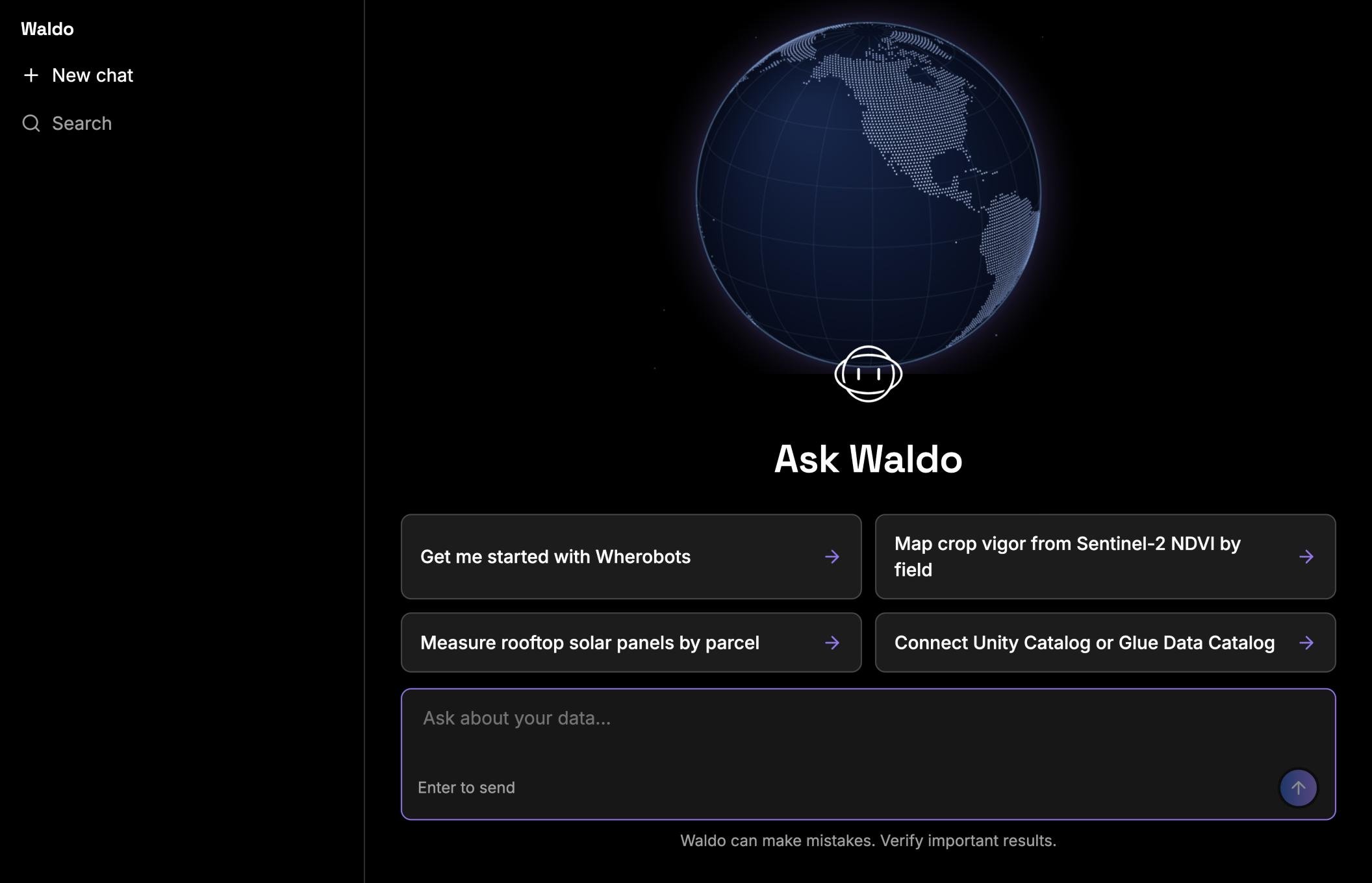
A new chat opens on the Ask Waldo page. Type in the Ask about your data box, or click a suggested prompt to start.
A new Waldo chat
How a chat works
1
You give Waldo a prompt
Name the place, what you want measured, and the output you want.
2
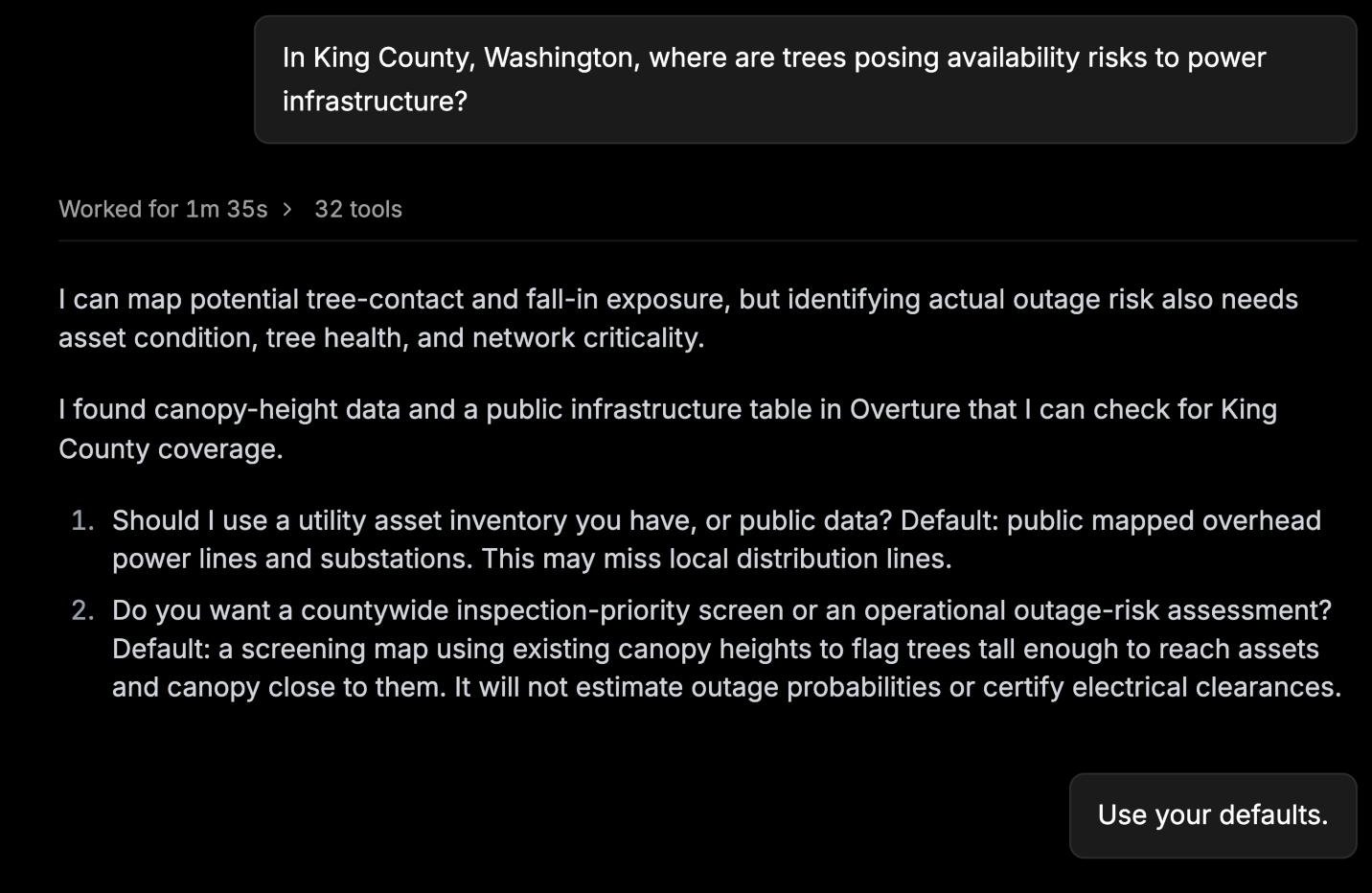
Waldo asks you to clarify
When a prompt has more than one reading, Waldo asks up to three questions and suggests a default for each. Answer them, or reply “use your defaults”.
Clarifying questions, each with a default
3
Waldo finds the data
Waldo searches the catalogs you can access and checks table schemas.
4
Waldo writes and runs code
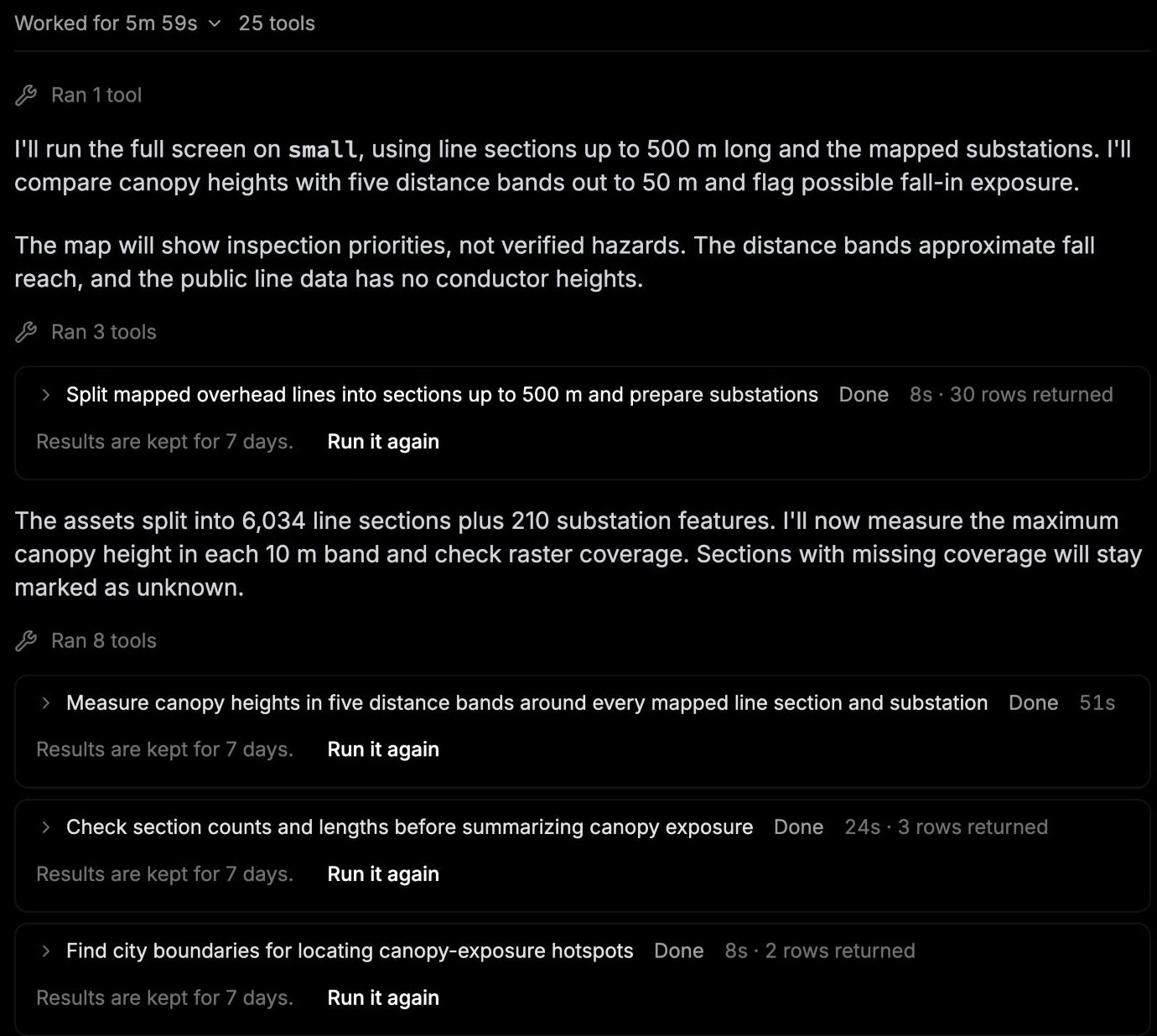
Waldo writes Python or SQL and runs it. Each step shows in the chat as it runs.
Each step Waldo ran, with its result
5
Waldo asks before it uses compute or changes anything
Starting a runtime, running a task, or changing a file needs your approval in the chat. See Approve actions.
6
Waldo returns the answer
A short summary, tables, a map card, and the method and data Waldo used.
Read the answer
Each answer starts with the result in one or two sentences, then tables and a map card.
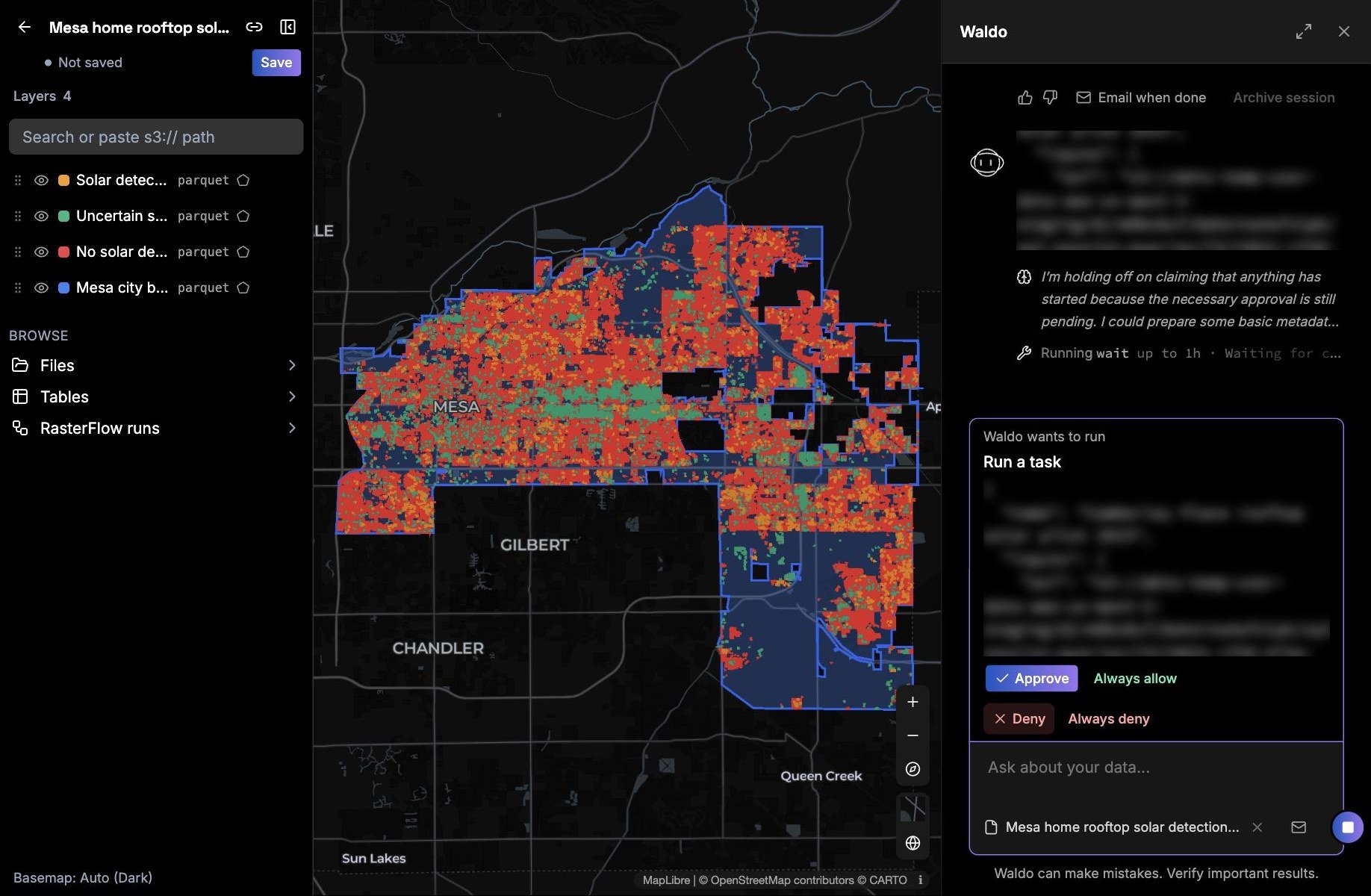
Maps. Click Open the map to view the results in Wherobots Map. Click Save to keep the map.
Tables. Key numbers and the top results.
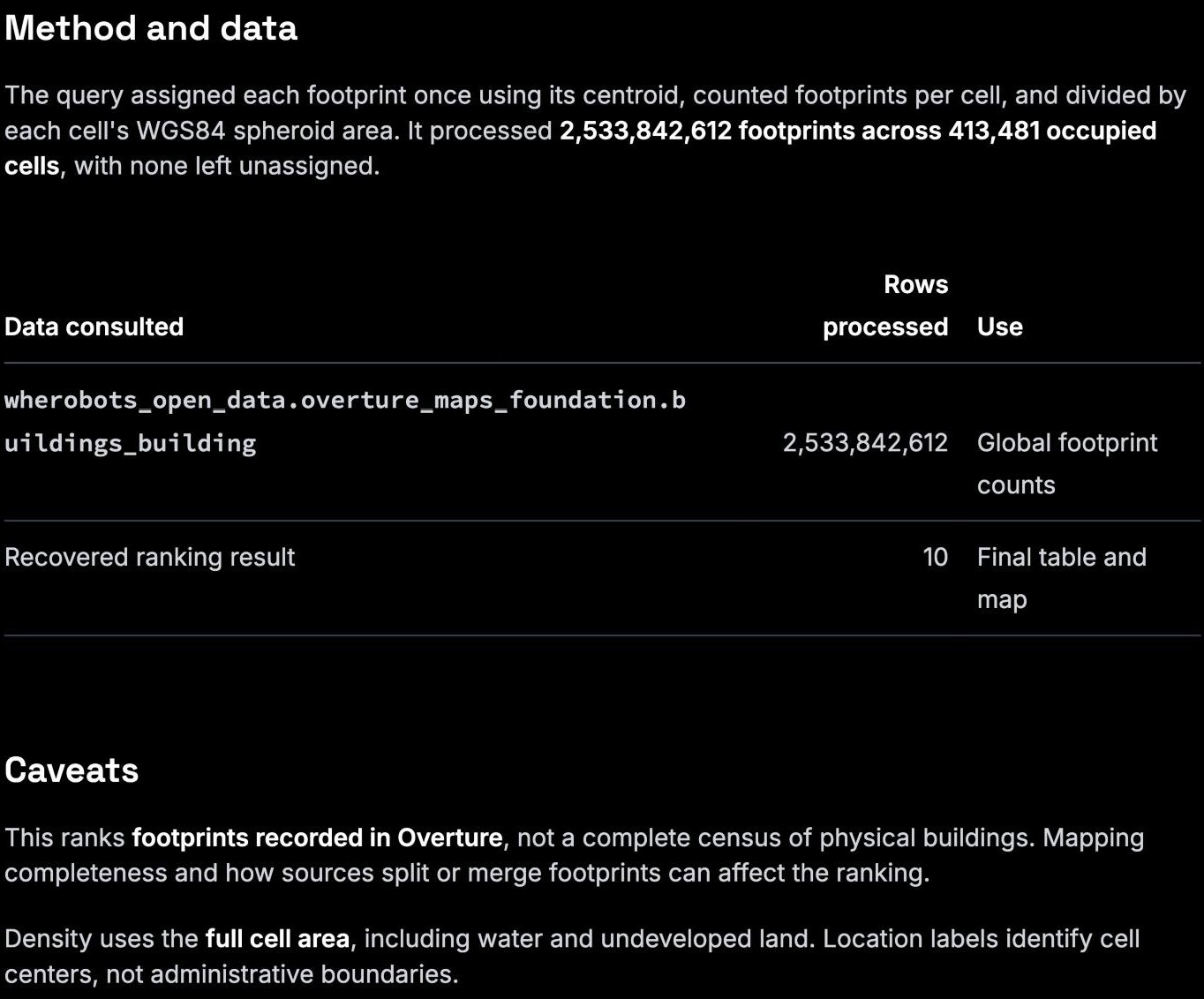
Method and caveats. The datasets and definitions Waldo used, their dates, and what the result doesn’t cover.
Results in Wherobots Map, with the Waldo chat alongside
The method, data, and caveats at the end of an answer
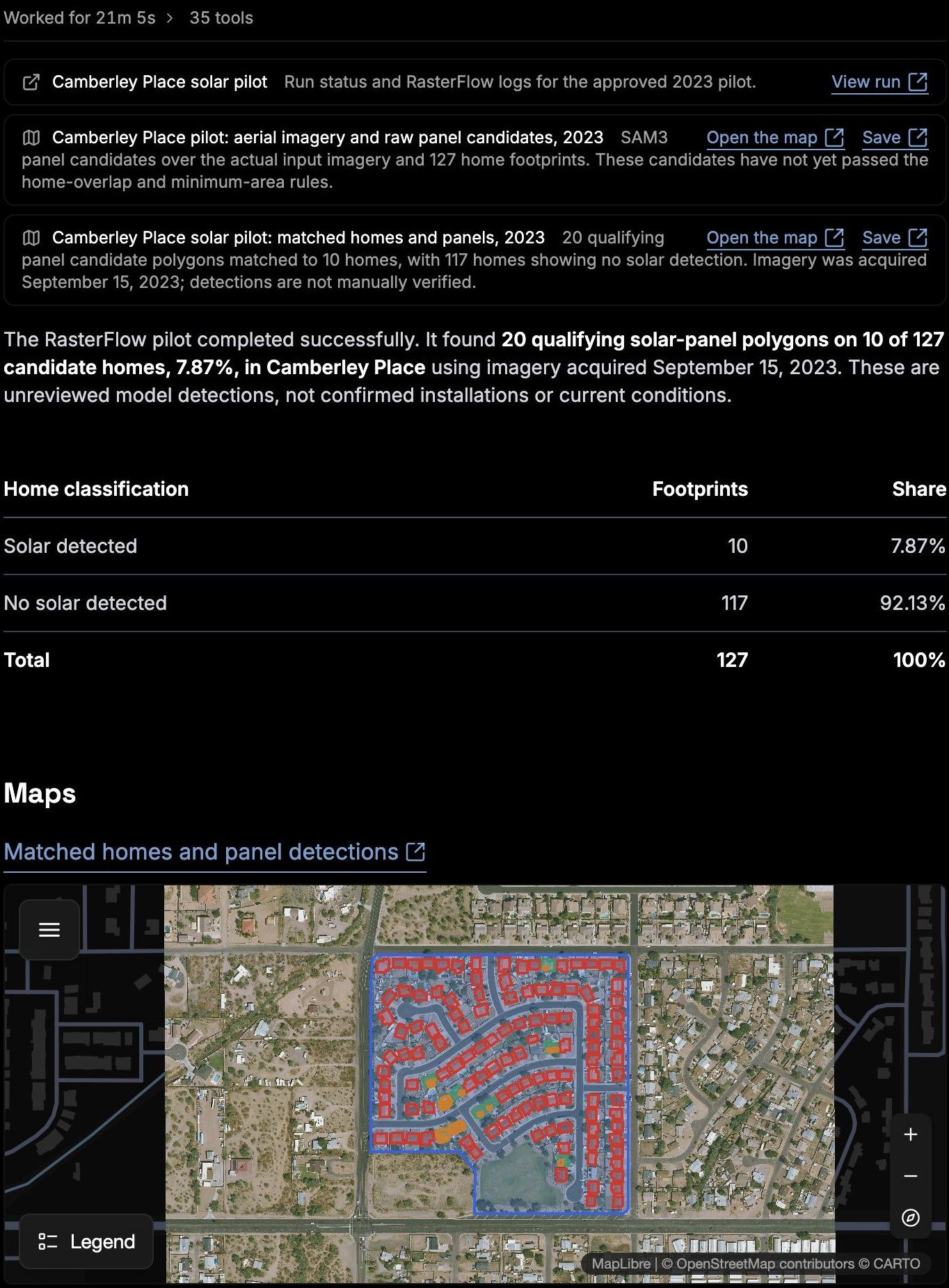
When Waldo runs a RasterFlow task, the answer links to the run and maps each output, such as the buildings in the area and the detected objects.
A RasterFlow result, with a link to the run and maps of its outputs
See what Waldo did
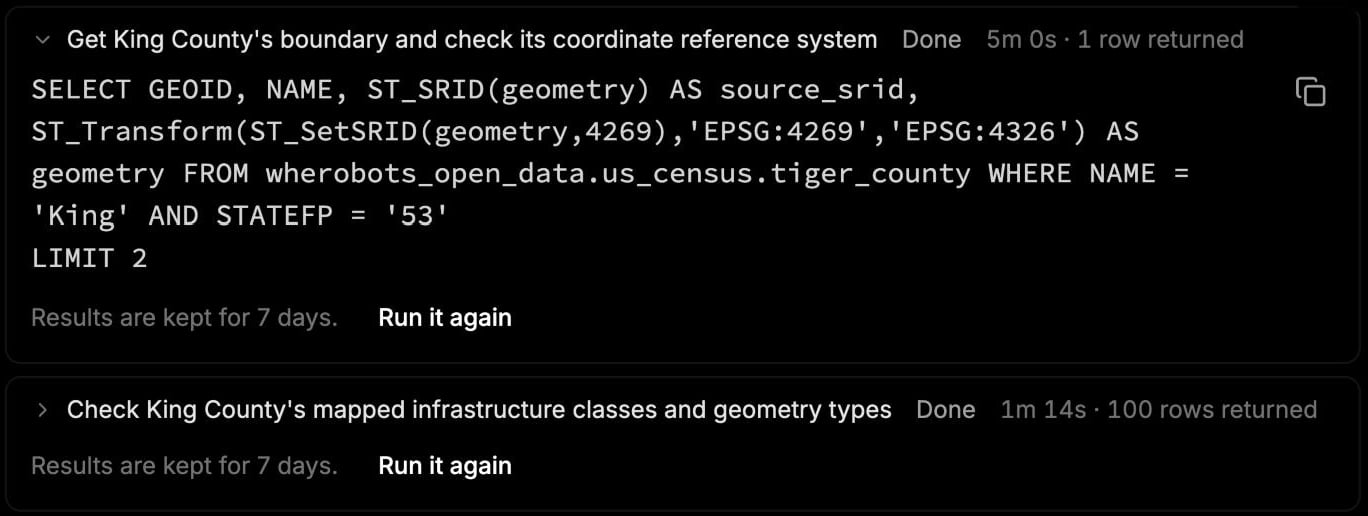
Click Worked at the top of an answer to see every step. Expand a step to see the code Waldo ran, how long it took, and how many rows it read. Click the copy icon to reuse the code in a notebook or Job Run.
The code behind a step
Approve actions
Waldo asks for your approval before it:
starts or stops a runtime,
runs a job, including a job that writes results or copies files,
creates a Python file, such as a .py script,
changes an existing file or notebook,
saves or updates a map,
runs a query that adds, changes, or deletes data, which it can do only if you have write access,
runs a billed task, such as a RasterFlow task, or
creates, changes, pauses, resumes, or runs a task schedule.
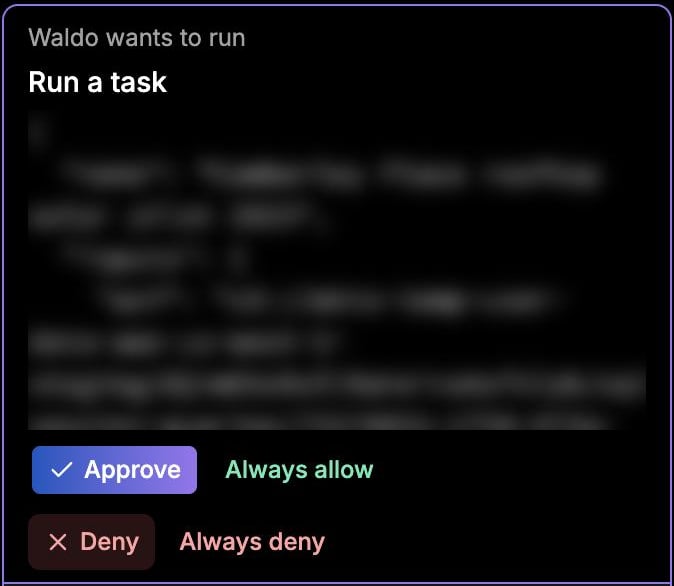
Waldo doesn’t ask before read-only actions, such as listing tables, reading data, and searching the web. By default, it also doesn’t ask before it creates a new notebook or a new file that isn’t Python, such as GeoJSON. To approve those too, set Create a file and Create a notebook to Ask in Settings > Waldo tools.An approval card appears in the chat, and Waldo waits until you answer. Choose one:
Option
What it does
Approve
Runs this call. Waldo asks again next time.
Always allow
Runs this call and future calls of the same tool without asking.
Deny
Skips this call.
Always deny
Skips this call and future calls of the same tool.
An approval card for a RasterFlow task. The task inputs are blurred.
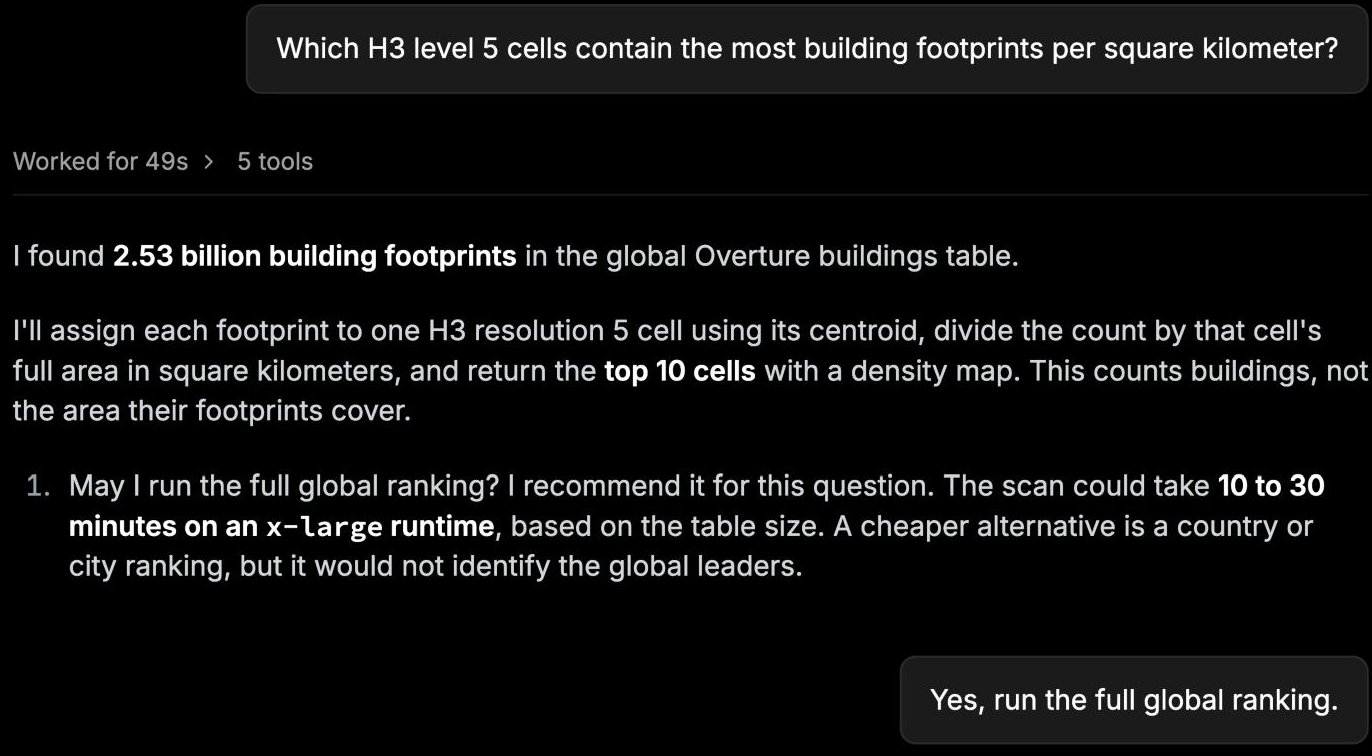
To change a tool you set to Always allow or Always deny, open Settings in Wherobots Cloud and go to Waldo tools. Each tool is set to Ask, Always allow, or Always deny. Set web search to Ask to approve each search.For a large job, such as a global scan, Waldo also states the expected size and time and asks before it starts.
Waldo asks before a large global scan
Open Waldo from any page
Click Ask Waldo on any page in Wherobots Cloud to open Waldo in a sidebar. The message box shows the page you’re on, such as a table, Job Run, saved map, Notebook Runtime, file, or RasterFlow run, and Waldo receives it with your message. To leave the page out, click the X next to it.
Follow up and refine
Keep asking in the same chat. Waldo uses the earlier messages as context. For example:
“Use half a mile instead of one mile for urban tracts.”
“Show only the rural tracts.”
“Save the results as GeoParquet in My Files.”
You can send a message while Waldo is working. Waldo reads it after the current step.
Files and notebooks
Waldo writes files, such as GeoJSON or a Python script, to My Files. It asks before it creates a Python file, changes an existing file, or runs a job that writes files. Waldo can also create a notebook and give you a link to open it.
Long-running tasks
Some tasks take more than a few minutes. Turn on Email when done at the top of the chat, or from the chat’s menu in the list, to get an email with the answer.
Manage chats
Your chats are listed under Recents on the left. Use Search chats to find one.
Open a chat’s menu in the list to pin it under Pinned, rename it, copy its link, archive it, or turn on Email when done.
Click New chat to start over. Start a new chat for an unrelated question.
Archive a chat you’re done with. An archived chat keeps its history but takes no new messages.
Chats are private. Only you can see and reply to your chats.
Use the thumbs up or thumbs down icons to rate an answer. Ratings help Wherobots improve Waldo.
Tips for better results
A good question names four things: the place, the measure, the definition, and the output.
Instead of
Try
Find towers on steep slopes
Find cell towers in King County, WA on slopes steeper than 15 degrees. Show them on a map.
Where are the downtowns?
Find the 10 densest clusters of Overture shops and restaurants in King County, WA. Show them on a map.
Flood risk in Texas
Count buildings within 100 meters of a river or lake in Harris County, TX, by ZIP code.
Name the data if you know it, such as “Overture buildings” or “my assets table”.
Give the data year if it matters, such as “2020 census tracts”.
Start small. Try one county before a whole state.
Check Waldo’s answers
Waldo can make mistakes. Check important results before you share them or act on them. Each answer gives you what you need to check it:
The steps. Every step and its code is under Worked.
The method. Answers name the datasets, definitions, and data dates used.
Missing data. If your catalogs lack what the question needs, Waldo stops and says so.
Check these before you rely on a result:
The definition. Did Waldo use the definition you meant? “Food desert” or “tower site” can mean different things.
The data and its date. Is the dataset right for your question, and recent enough?
The area. Did Waldo use an official boundary, not a hand-drawn box?
The numbers. Do the totals look plausible? Spot-check a few rows on the map.
The code. Copy the code and re-run it in a notebook if you plan to reuse it.
Troubleshooting
Problem
What to do
Waldo isn’t in the left navigation
An Admin turned Waldo off. Ask them to turn it on in Organization Settings > Preferences.
Look for an approval card in the chat, and approve or deny it.
The reply stopped streaming
Click Reconnect to this reply. Waldo keeps working while you’re disconnected.
Waldo says the data isn’t available
The dataset isn’t in your catalogs. Add it, or name a dataset that is.
A notebook from Waldo shows “No Kernel”
Select the Python 3 kernel, then run all cells.
Waldo stopped with a quota message
Your Organization’s token quota is used up. Contact your account team or support@wherobots.com.
An interrupted reply didn’t finish
Click Retry this reply, or ask the question again.
Per-chat cost doesn’t show in the chat yet. Check Usage History for compute usage.
Was this page helpful?
{"docsConfig":{"theme":"aspen","$schema":"https://www.mintlify.com/docs.json","name":"Wherobots","colors":{"primary":"#6612c5","light":"#6612c5","dark":"#6612c5"},"logo":{"light":"https://mintcdn.com/wherobots/q2h_5BmXeWMz6JRH/logo/light.png?fit=max\u0026auto=format\u0026n=q2h_5BmXeWMz6JRH\u0026q=85\u0026s=5a1512dbd3547c3df4e8f4779a1e4cfa","dark":"https://mintcdn.com/wherobots/q2h_5BmXeWMz6JRH/logo/dark.png?fit=max\u0026auto=format\u0026n=q2h_5BmXeWMz6JRH\u0026q=85\u0026s=8d84ac8734585eb38f09b1ea4c0d8e5c","href":"/"},"favicon":"https://mintcdn.com/wherobots/q2h_5BmXeWMz6JRH/favicon.png?fit=max\u0026auto=format\u0026n=q2h_5BmXeWMz6JRH\u0026q=85\u0026s=aa88d68dcd661ed008af0d0a8c4bcd47","api":{"playground":{"display":"interactive"},"examples":{"defaults":"required","languages":["curl","python","javascript","go","java"],"prefill":true}},"appearance":{"default":"light"},"navbar":{"links":[{"href":"/changelog","label":"Changelog"},{"href":"/support","label":"Support"}],"primary":{"type":"button","label":"Open Wherobots Cloud","href":"https://cloud.wherobots.com"}},"footer":{"socials":{"linkedin":"https://www.linkedin.com/company/wherobots","x":"https://x.com/wherobots","github":"https://github.com/wherobots","youtube":"https://www.youtube.com/channel/UCFC5QjLyQ3wanshI5xUH0aw","discord":"https://sedona.apache.org/1.5.2/community/contact"},"links":[{"header":"Resources","items":[{"label":"Support","href":"/support"},{"label":"Changelog","href":"/changelog"},{"label":"Cloud availability","href":"/availability"}]},{"header":"Legal","items":[{"label":"Terms of service","href":"/terms-of-service"},{"label":"Privacy policy","href":"/privacy-policy"}]}]},"seo":{"metatags":{"canonical":"https://docs.wherobots.com","googlebot":"index, follow","robots":"index, follow","keywords":"Managed Apache Sedona, Apache Sedona, Wherobots docs, Wherobots documentation, Iceberg tables, Spatial SQL API, Wherobots Cloud Python SDK, RasterFlow, Map Matching, Spatial Data Catalog, Wherobots Airflow Provider","description":"Official Wherobots Documentation. Learn how to conduct scalable spatial analysis with WherobotsDB—the serverless cloud platform from the creators of Apache Sedona.","google-site-verification":"ERHB94F_PoM_qpM06mYclqitx8bvFFskIdV7VT8DT30","indexing":"all"}},"fonts":{"heading":{"family":"Figtree"},"body":{"family":"Figtree"}},"styling":{"codeblocks":"system","latex":false},"integrations":{"amplitude":{"apiKey":"ee314e073a5b08c12a78aef591a50bc1"},"ga4":{"measurementId":"G-D4ED50QSVC"}},"contextual":{"options":["copy","view","download-spec"],"display":"header"},"navigation":{"pages":[]}},"deployment":{"deploymentMetadataValue":{"subdomain":"wherobots","hasAudioNarration":false,"actualSubdomain":"wherobots","customDomains":["docs.wherobots.com"],"gitSource":{"type":"github","owner":"wherobots","repo":"docs","deployBranch":"main","contentDirectory":"","isPrivate":true,"mountPath":"","label":""},"feedback":{"thumbs":true},"entitlements":{"AI_CHAT":{"status":"ENABLED"},"CONTEXTUAL_FEEDBACK":{"status":"ENABLED"},"CODE_SNIPPET_FEEDBACK":{"status":"ENABLED"},"WEB_MCP":{"status":"ENABLED"},"NARRATION":{"status":"ENABLED"}},"buildId":"6afcea6848022451a15bdd6f","clientVersion":"0.0.4177","searchFilterCounts":[{"language":"default","tag":"Reference","count":1836},{"language":"default","tag":"WherobotsDB","count":879},{"language":"default","tag":"Python","count":449},{"language":"default","tag":"SQL","count":422},{"language":"default","tag":"Geometry Functions","count":267},{"language":"default","tag":"DataFrame functions","count":209},{"language":"default","tag":"GeoPandas API","count":159},{"language":"default","tag":"GeoSeries","count":130},{"language":"default","tag":"Raster Functions","count":109},{"language":"default","tag":"Accessors","count":94}]},"assistantConfig":{"enableAskAiButton":true,"enableAskAiSearchBar":false},"basePath":"","hasChatPermissions":true,"hasWebMcpPermissions":true,"toggles":[{"name":"kill-isr","enabled":true,"variant":{"name":"disabled","enabled":false,"feature_enabled":true},"impressionData":false},{"name":"custom-rbac-roles","enabled":true,"variant":{"name":"disabled","enabled":false,"feature_enabled":true},"impressionData":false},{"name":"agent-mintlify-slack","enabled":true,"variant":{"name":"disabled","enabled":false,"feature_enabled":true},"impressionData":false},{"name":"agent-integrations-settings","enabled":true,"variant":{"name":"disabled","enabled":false,"feature_enabled":true},"impressionData":false},{"name":"rbac-expansion","enabled":true,"variant":{"name":"disabled","enabled":false,"feature_enabled":true},"impressionData":false},{"name":"automations-pr-grouping","enabled":true,"variant":{"name":"disabled","enabled":false,"feature_enabled":true},"impressionData":false},{"name":"custom-prefix","enabled":true,"variant":{"name":"disabled","enabled":false,"feature_enabled":true},"impressionData":false},{"name":"analytics-v7","enabled":true,"variant":{"name":"disabled","enabled":false,"feature_enabled":true},"impressionData":false},{"name":"user-flows-analytics","enabled":true,"variant":{"name":"disabled","enabled":false,"feature_enabled":true},"impressionData":false},{"name":"no-publish-flow","enabled":true,"variant":{"name":"disabled","enabled":false,"feature_enabled":true},"impressionData":false},{"name":"workos-onboarding","enabled":true,"variant":{"name":"disabled","enabled":false,"feature_enabled":true},"impressionData":false},{"name":"snapshot-serving-live","enabled":true,"variant":{"name":"disabled","enabled":false,"feature_enabled":true},"impressionData":false},{"name":"stripTemperatureMiddleware","enabled":true,"variant":{"name":"disabled","enabled":false,"feature_enabled":true},"impressionData":false},{"name":"support-platform-pylon-zendesk","enabled":true,"variant":{"name":"disabled","enabled":false,"feature_enabled":true},"impressionData":false},{"name":"snapshot-serving","enabled":true,"variant":{"name":"disabled","enabled":false,"feature_enabled":true},"impressionData":false},{"name":"instant-rollback","enabled":true,"variant":{"name":"disabled","enabled":false,"feature_enabled":true},"impressionData":false},{"name":"granular-notifications-server","enabled":true,"variant":{"name":"disabled","enabled":false,"feature_enabled":true},"impressionData":false},{"name":"granular-notifications","enabled":true,"variant":{"name":"disabled","enabled":false,"feature_enabled":true},"impressionData":false},{"name":"automations-fable","enabled":true,"variant":{"name":"disabled","enabled":false,"feature_enabled":true},"impressionData":false},{"name":"fixed-ai-action-pricing","enabled":true,"variant":{"name":"disabled","enabled":false,"feature_enabled":true},"impressionData":false},{"name":"automation-resolve-merge-conflict","enabled":true,"variant":{"name":"disabled","enabled":false,"feature_enabled":true},"impressionData":false},{"name":"scoped-publishing","enabled":true,"variant":{"name":"disabled","enabled":false,"feature_enabled":true},"impressionData":false},{"name":"mintql","enabled":true,"variant":{"name":"disabled","enabled":false,"feature_enabled":true},"impressionData":false},{"name":"page-level-analytics","enabled":true,"variant":{"name":"disabled","enabled":false,"feature_enabled":true},"impressionData":false},{"name":"editor-version-history-v2","enabled":true,"variant":{"name":"disabled","enabled":false,"feature_enabled":true},"impressionData":false},{"name":"billing-page-v2","enabled":true,"variant":{"name":"disabled","enabled":false,"feature_enabled":true},"impressionData":false},{"name":"full-page-search","enabled":true,"variant":{"name":"disabled","enabled":false,"feature_enabled":true},"impressionData":false},{"name":"workspace-projects","enabled":true,"variant":{"name":"disabled","enabled":false,"feature_enabled":true},"impressionData":false},{"name":"assistant-v5","enabled":true,"variant":{"name":"disabled","enabled":false,"feature_enabled":true},"impressionData":false},{"name":"fork-pr-previews","enabled":true,"variant":{"name":"disabled","enabled":false,"feature_enabled":true},"impressionData":false},{"name":"revalidation-jwt","enabled":true,"variant":{"name":"disabled","enabled":false,"feature_enabled":true},"impressionData":false},{"name":"workos-sso-scim","enabled":true,"variant":{"name":"disabled","enabled":false,"feature_enabled":true},"impressionData":false},{"name":"hobby-abuse-scan","enabled":true,"variant":{"name":"disabled","enabled":false,"feature_enabled":true},"impressionData":false},{"name":"dashboard-inbox","enabled":true,"variant":{"name":"disabled","enabled":false,"feature_enabled":true},"impressionData":false},{"name":"workos-signup","enabled":true,"variant":{"name":"disabled","enabled":false,"feature_enabled":true},"impressionData":false},{"name":"turbopuffer-dual-write","enabled":true,"variant":{"name":"disabled","enabled":false,"feature_enabled":true},"impressionData":false},{"name":"workos-enabled","enabled":true,"variant":{"name":"disabled","enabled":false,"feature_enabled":true},"impressionData":false},{"name":"approve-review-flow","enabled":true,"variant":{"name":"disabled","enabled":false,"feature_enabled":true},"impressionData":false},{"name":"editor-metadata","enabled":true,"variant":{"name":"disabled","enabled":false,"feature_enabled":true},"impressionData":false},{"name":"sso-setup-deadline-banner","enabled":true,"variant":{"name":"disabled","enabled":false,"feature_enabled":true},"impressionData":false},{"name":"turbopuffer-serve","enabled":true,"variant":{"name":"disabled","enabled":false,"feature_enabled":true},"impressionData":false},{"name":"live-agents","enabled":true,"variant":{"name":"disabled","enabled":false,"feature_enabled":true},"impressionData":false},{"name":"starter-pricing","enabled":true,"variant":{"name":"treatment","enabled":true,"payload":{"type":"string","value":"treatment"},"feature_enabled":true},"impressionData":false},{"name":"llms-txt-v2","enabled":true,"variant":{"name":"disabled","enabled":false,"feature_enabled":true},"impressionData":false},{"name":"wildcard-email-auth","enabled":true,"variant":{"name":"disabled","enabled":false,"feature_enabled":true},"impressionData":false}],"googleFontsInlined":true},"customCss":[],"page":{"pagePath":"develop/waldo/use-waldo","slug":"/develop/waldo/use-waldo","pageMetadata":{"title":"Work with Waldo","description":"Ask questions, approve actions, read and check answers, and manage chats in Waldo.","href":"/develop/waldo/use-waldo"},"description":{"compiledSource":"\"use strict\";\nconst {jsx: _jsx} = arguments[0];\nconst {useMDXComponents: _provideComponents} = arguments[0];\nfunction _createMdxContent(props) {\n const _components = {\n p: \"p\",\n ..._provideComponents(),\n ...props.components\n };\n return _jsx(_components.p, {\n children: \"Ask questions, approve actions, read and check answers, and manage chats in Waldo.\"\n });\n}\nfunction MDXContent(props = {}) {\n const {wrapper: MDXLayout} = {\n ..._provideComponents(),\n ...props.components\n };\n return MDXLayout ? _jsx(MDXLayout, {\n ...props,\n children: _jsx(_createMdxContent, {\n ...props\n })\n }) : _createMdxContent(props);\n}\nreturn {\n default: MDXContent\n};\n","frontmatter":{},"scope":{}},"pageType":"default","mdx":{"mdxSource":{"compiledSource":"\"use strict\";const{Fragment:_Fragment,jsx:_jsx,jsxs:_jsxs}=arguments[0];const{useMDXComponents:_provideComponents}=arguments[0];function _createMdxContent(props){const _components={a:`a`,code:`code`,li:`li`,ol:`ol`,p:`p`,strong:`strong`,tbody:`tbody`,td:`td`,th:`th`,thead:`thead`,tr:`tr`,ul:`ul`,..._provideComponents(),...props.components},{Frame,Heading,Note,OptimizedImage,Step,Steps,Table}=_components;if(!Frame)_missingMdxReference(`Frame`,true);if(!Heading)_missingMdxReference(`Heading`,true);if(!Note)_missingMdxReference(`Note`,true);if(!OptimizedImage)_missingMdxReference(`OptimizedImage`,true);if(!Step)_missingMdxReference(`Step`,true);if(!Steps)_missingMdxReference(`Steps`,true);if(!Table)_missingMdxReference(`Table`,true);return _jsxs(_Fragment,{children:[_jsxs(_components.p,{children:[`This page covers a Waldo chat from prompt to checked answer. To open Waldo and write your first prompt, see `,_jsx(_components.a,{href:`/get-started/waldo-quickstart`,children:`Give Waldo your first prompt`}),`.`]}),`\n`,_jsx(Note,{children:_jsxs(_components.p,{children:[_jsx(_components.strong,{children:`Waldo is in public preview.`}),` It’s available in every Organization Edition, including the free Professional Edition trial. Features and limits may change before general availability.`]})}),`\n`,_jsxs(_components.p,{children:[`A new chat opens on the `,_jsx(_components.strong,{children:`Ask Waldo`}),` page. Type in the `,_jsx(_components.strong,{children:`Ask about your data`}),` box, or click a suggested prompt to start.`]}),`\n`,_jsx(Frame,{caption:`A new Waldo chat`,children:_jsx(OptimizedImage,{src:`https://mintcdn.com/wherobots/pIL7XBACyDQjslj7/images/develop/waldo/empty-state.png?fit=max\u0026auto=format\u0026n=pIL7XBACyDQjslj7\u0026q=85\u0026s=e50f016a1fc42e09373557f39a836b30`,alt:`The Ask Waldo page with suggested prompts and the Ask about your data box`,\"data-og-width\":`2112`,width:`2112`,\"data-og-height\":`1360`,height:`1360`,\"data-path\":`images/develop/waldo/empty-state.png`,\"data-optimize\":`true`,\"data-opv\":`3`,srcset:`https://mintcdn.com/wherobots/pIL7XBACyDQjslj7/images/develop/waldo/empty-state.png?w=280\u0026fit=max\u0026auto=format\u0026n=pIL7XBACyDQjslj7\u0026q=85\u0026s=5c6fb800b0a5fb4efb27bb66f24edf2c 280w, https://mintcdn.com/wherobots/pIL7XBACyDQjslj7/images/develop/waldo/empty-state.png?w=560\u0026fit=max\u0026auto=format\u0026n=pIL7XBACyDQjslj7\u0026q=85\u0026s=428dec983f0f2a0e6c905eb5e7898120 560w, https://mintcdn.com/wherobots/pIL7XBACyDQjslj7/images/develop/waldo/empty-state.png?w=840\u0026fit=max\u0026auto=format\u0026n=pIL7XBACyDQjslj7\u0026q=85\u0026s=49324e7658531b9d2422a5bf99de2b89 840w, https://mintcdn.com/wherobots/pIL7XBACyDQjslj7/images/develop/waldo/empty-state.png?w=1100\u0026fit=max\u0026auto=format\u0026n=pIL7XBACyDQjslj7\u0026q=85\u0026s=10f902173e4b2e2e074838d8adfbfc8c 1100w, https://mintcdn.com/wherobots/pIL7XBACyDQjslj7/images/develop/waldo/empty-state.png?w=1650\u0026fit=max\u0026auto=format\u0026n=pIL7XBACyDQjslj7\u0026q=85\u0026s=e55d0c8aabd168d99061bf2ee1b83dc5 1650w, https://mintcdn.com/wherobots/pIL7XBACyDQjslj7/images/develop/waldo/empty-state.png?w=2500\u0026fit=max\u0026auto=format\u0026n=pIL7XBACyDQjslj7\u0026q=85\u0026s=986c11c9cad312d9935e4e7eaf7be899 2500w`})}),`\n`,_jsx(Heading,{level:`2`,id:`how-a-chat-works`,children:`How a chat works`}),`\n`,_jsxs(Steps,{children:[_jsx(Step,{title:`You give Waldo a prompt`,children:_jsx(_components.p,{children:`Name the place, what you want measured, and the output you want.`})}),_jsxs(Step,{title:`Waldo asks you to clarify`,children:[_jsx(_components.p,{children:`When a prompt has more than one reading, Waldo asks up to three questions and suggests a default for each. Answer them, or reply “use your defaults”.`}),_jsx(Frame,{caption:`Clarifying questions, each with a default`,children:_jsx(OptimizedImage,{src:`https://mintcdn.com/wherobots/cznO35op89Akau7K/images/develop/waldo/clarifying-questions.png?fit=max\u0026auto=format\u0026n=cznO35op89Akau7K\u0026q=85\u0026s=e091110bc8257f082390b71852d9abec`,alt:`Waldo asks clarifying questions, each with a default`,\"data-og-width\":`1432`,width:`1432`,\"data-og-height\":`932`,height:`932`,\"data-path\":`images/develop/waldo/clarifying-questions.png`,\"data-optimize\":`true`,\"data-opv\":`3`,srcset:`https://mintcdn.com/wherobots/cznO35op89Akau7K/images/develop/waldo/clarifying-questions.png?w=280\u0026fit=max\u0026auto=format\u0026n=cznO35op89Akau7K\u0026q=85\u0026s=a1f27390be212cfd41521ed1abde995e 280w, https://mintcdn.com/wherobots/cznO35op89Akau7K/images/develop/waldo/clarifying-questions.png?w=560\u0026fit=max\u0026auto=format\u0026n=cznO35op89Akau7K\u0026q=85\u0026s=41b1b645b02194e76be32a556eddbe59 560w, https://mintcdn.com/wherobots/cznO35op89Akau7K/images/develop/waldo/clarifying-questions.png?w=840\u0026fit=max\u0026auto=format\u0026n=cznO35op89Akau7K\u0026q=85\u0026s=4b078daec94c739b127e7a39f7af94a3 840w, https://mintcdn.com/wherobots/cznO35op89Akau7K/images/develop/waldo/clarifying-questions.png?w=1100\u0026fit=max\u0026auto=format\u0026n=cznO35op89Akau7K\u0026q=85\u0026s=46e5b911b20a9c23164145f302f36b99 1100w, https://mintcdn.com/wherobots/cznO35op89Akau7K/images/develop/waldo/clarifying-questions.png?w=1650\u0026fit=max\u0026auto=format\u0026n=cznO35op89Akau7K\u0026q=85\u0026s=1663aa21ebc7b67c397780981f7ab659 1650w, https://mintcdn.com/wherobots/cznO35op89Akau7K/images/develop/waldo/clarifying-questions.png?w=2500\u0026fit=max\u0026auto=format\u0026n=cznO35op89Akau7K\u0026q=85\u0026s=6805e844d59426221360b2c085fe28d3 2500w`})})]}),_jsx(Step,{title:`Waldo finds the data`,children:_jsx(_components.p,{children:`Waldo searches the catalogs you can access and checks table schemas.`})}),_jsxs(Step,{title:`Waldo writes and runs code`,children:[_jsx(_components.p,{children:`Waldo writes Python or SQL and runs it. Each step shows in the chat as it runs.`}),_jsx(Frame,{caption:`Each step Waldo ran, with its result`,children:_jsx(OptimizedImage,{src:`https://mintcdn.com/wherobots/pIL7XBACyDQjslj7/images/develop/waldo/working-steps.png?fit=max\u0026auto=format\u0026n=pIL7XBACyDQjslj7\u0026q=85\u0026s=08b457e30eaaf1f8a52225f44a388ffc`,alt:`Waldo's expanded steps, each with its status, run time, and rows returned`,\"data-og-width\":`1380`,width:`1380`,\"data-og-height\":`1236`,height:`1236`,\"data-path\":`images/develop/waldo/working-steps.png`,\"data-optimize\":`true`,\"data-opv\":`3`,srcset:`https://mintcdn.com/wherobots/pIL7XBACyDQjslj7/images/develop/waldo/working-steps.png?w=280\u0026fit=max\u0026auto=format\u0026n=pIL7XBACyDQjslj7\u0026q=85\u0026s=a0667997c88c812615190af93353135c 280w, https://mintcdn.com/wherobots/pIL7XBACyDQjslj7/images/develop/waldo/working-steps.png?w=560\u0026fit=max\u0026auto=format\u0026n=pIL7XBACyDQjslj7\u0026q=85\u0026s=7269287894799b864aff09d479e16c46 560w, https://mintcdn.com/wherobots/pIL7XBACyDQjslj7/images/develop/waldo/working-steps.png?w=840\u0026fit=max\u0026auto=format\u0026n=pIL7XBACyDQjslj7\u0026q=85\u0026s=0cf8fe4281453cd8611702f29b4fb3f9 840w, https://mintcdn.com/wherobots/pIL7XBACyDQjslj7/images/develop/waldo/working-steps.png?w=1100\u0026fit=max\u0026auto=format\u0026n=pIL7XBACyDQjslj7\u0026q=85\u0026s=1b6892909a57a293a2e4c54479b8b191 1100w, https://mintcdn.com/wherobots/pIL7XBACyDQjslj7/images/develop/waldo/working-steps.png?w=1650\u0026fit=max\u0026auto=format\u0026n=pIL7XBACyDQjslj7\u0026q=85\u0026s=b837dd23e60f80bd53ea57e17ad087d7 1650w, https://mintcdn.com/wherobots/pIL7XBACyDQjslj7/images/develop/waldo/working-steps.png?w=2500\u0026fit=max\u0026auto=format\u0026n=pIL7XBACyDQjslj7\u0026q=85\u0026s=b88d1bdd97190b3ef774694f70af2877 2500w`})})]}),_jsx(Step,{title:`Waldo asks before it uses compute or changes anything`,children:_jsxs(_components.p,{children:[`Starting a runtime, running a task, or changing a file needs your approval in the chat. See `,_jsx(_components.a,{href:`#approve-actions`,children:`Approve actions`}),`.`]})}),_jsx(Step,{title:`Waldo returns the answer`,children:_jsx(_components.p,{children:`A short summary, tables, a map card, and the method and data Waldo used.`})})]}),`\n`,_jsx(Heading,{level:`2`,id:`read-the-answer`,children:`Read the answer`}),`\n`,_jsx(_components.p,{children:`Each answer starts with the result in one or two sentences, then tables and a map card.`}),`\n`,_jsxs(_components.ul,{children:[`\n`,_jsxs(_components.li,{children:[_jsx(_components.strong,{children:`Maps.`}),` Click `,_jsx(_components.strong,{children:`Open the map`}),` to view the results in Wherobots Map. Click `,_jsx(_components.strong,{children:`Save`}),` to keep the map.`]}),`\n`,_jsxs(_components.li,{children:[_jsx(_components.strong,{children:`Tables.`}),` Key numbers and the top results.`]}),`\n`,_jsxs(_components.li,{children:[_jsx(_components.strong,{children:`Method and caveats.`}),` The datasets and definitions Waldo used, their dates, and what the result doesn’t cover.`]}),`\n`]}),`\n`,_jsx(Frame,{caption:`Results in Wherobots Map, with the Waldo chat alongside`,children:_jsx(OptimizedImage,{src:`https://mintcdn.com/wherobots/pIL7XBACyDQjslj7/images/develop/waldo/wherobots-map.jpg?fit=max\u0026auto=format\u0026n=pIL7XBACyDQjslj7\u0026q=85\u0026s=b156e69655168c2605545d8e72dd11b3`,alt:`Mesa rooftop solar results in Wherobots Map, with the layer list on the left and the Waldo sidebar showing an approval card`,\"data-og-width\":`1836`,width:`1836`,\"data-og-height\":`1200`,height:`1200`,\"data-path\":`images/develop/waldo/wherobots-map.jpg`,\"data-optimize\":`true`,\"data-opv\":`3`,srcset:`https://mintcdn.com/wherobots/pIL7XBACyDQjslj7/images/develop/waldo/wherobots-map.jpg?w=280\u0026fit=max\u0026auto=format\u0026n=pIL7XBACyDQjslj7\u0026q=85\u0026s=53fc24ceeac2e15b511be7147d120e79 280w, https://mintcdn.com/wherobots/pIL7XBACyDQjslj7/images/develop/waldo/wherobots-map.jpg?w=560\u0026fit=max\u0026auto=format\u0026n=pIL7XBACyDQjslj7\u0026q=85\u0026s=8c5dd016f1df690814155825cd3d8810 560w, https://mintcdn.com/wherobots/pIL7XBACyDQjslj7/images/develop/waldo/wherobots-map.jpg?w=840\u0026fit=max\u0026auto=format\u0026n=pIL7XBACyDQjslj7\u0026q=85\u0026s=bca1a24ef84ca53c24f6a90f33b6c92d 840w, https://mintcdn.com/wherobots/pIL7XBACyDQjslj7/images/develop/waldo/wherobots-map.jpg?w=1100\u0026fit=max\u0026auto=format\u0026n=pIL7XBACyDQjslj7\u0026q=85\u0026s=4c53fd78ef9c645c30637ade502fbbd2 1100w, https://mintcdn.com/wherobots/pIL7XBACyDQjslj7/images/develop/waldo/wherobots-map.jpg?w=1650\u0026fit=max\u0026auto=format\u0026n=pIL7XBACyDQjslj7\u0026q=85\u0026s=196ae0298f7db2bbcb9fc89e2159415b 1650w, https://mintcdn.com/wherobots/pIL7XBACyDQjslj7/images/develop/waldo/wherobots-map.jpg?w=2500\u0026fit=max\u0026auto=format\u0026n=pIL7XBACyDQjslj7\u0026q=85\u0026s=e288da3bdf839a088107f0890e85d962 2500w`})}),`\n`,_jsx(Frame,{caption:`The method, data, and caveats at the end of an answer`,children:_jsx(OptimizedImage,{src:`https://mintcdn.com/wherobots/pIL7XBACyDQjslj7/images/develop/waldo/method-and-caveats.png?fit=max\u0026auto=format\u0026n=pIL7XBACyDQjslj7\u0026q=85\u0026s=8a437f9bfcf778ab09094a83434bd7b8`,alt:`The method, data, and caveats at the end of an answer`,\"data-og-width\":`1364`,width:`1364`,\"data-og-height\":`1132`,height:`1132`,\"data-path\":`images/develop/waldo/method-and-caveats.png`,\"data-optimize\":`true`,\"data-opv\":`3`,srcset:`https://mintcdn.com/wherobots/pIL7XBACyDQjslj7/images/develop/waldo/method-and-caveats.png?w=280\u0026fit=max\u0026auto=format\u0026n=pIL7XBACyDQjslj7\u0026q=85\u0026s=41274b5e4513a0526ea67c0a1633efac 280w, https://mintcdn.com/wherobots/pIL7XBACyDQjslj7/images/develop/waldo/method-and-caveats.png?w=560\u0026fit=max\u0026auto=format\u0026n=pIL7XBACyDQjslj7\u0026q=85\u0026s=19f24f91969bf9b22bd5265629013a04 560w, https://mintcdn.com/wherobots/pIL7XBACyDQjslj7/images/develop/waldo/method-and-caveats.png?w=840\u0026fit=max\u0026auto=format\u0026n=pIL7XBACyDQjslj7\u0026q=85\u0026s=132f8d0c2efdad73e6aa86185f66f1a8 840w, https://mintcdn.com/wherobots/pIL7XBACyDQjslj7/images/develop/waldo/method-and-caveats.png?w=1100\u0026fit=max\u0026auto=format\u0026n=pIL7XBACyDQjslj7\u0026q=85\u0026s=4c85e8d8588e92897a785a21d624e7f9 1100w, https://mintcdn.com/wherobots/pIL7XBACyDQjslj7/images/develop/waldo/method-and-caveats.png?w=1650\u0026fit=max\u0026auto=format\u0026n=pIL7XBACyDQjslj7\u0026q=85\u0026s=e9c9205cb6964aace5a45fd0bf384f88 1650w, https://mintcdn.com/wherobots/pIL7XBACyDQjslj7/images/develop/waldo/method-and-caveats.png?w=2500\u0026fit=max\u0026auto=format\u0026n=pIL7XBACyDQjslj7\u0026q=85\u0026s=acb59b76248d0c32af53527fe9888bb3 2500w`})}),`\n`,_jsxs(_components.p,{children:[`When Waldo runs a `,_jsx(_components.a,{href:`/develop/rasterflow/index`,children:`RasterFlow`}),` task, the answer links to the run and maps each output, such as the buildings in the area and the detected objects.`]}),`\n`,_jsx(Frame,{caption:`A RasterFlow result, with a link to the run and maps of its outputs`,children:_jsx(OptimizedImage,{src:`https://mintcdn.com/wherobots/pIL7XBACyDQjslj7/images/develop/waldo/rasterflow-run-maps.jpg?fit=max\u0026auto=format\u0026n=pIL7XBACyDQjslj7\u0026q=85\u0026s=0534f4df765b9a4358feb5c2bb321df0`,alt:`A RasterFlow pilot result for Camberley Place in Mesa, Arizona, with a View run link, two map cards, a summary table, and a map of matched homes and panel detections over aerial imagery`,\"data-og-width\":`1364`,width:`1364`,\"data-og-height\":`1852`,height:`1852`,\"data-path\":`images/develop/waldo/rasterflow-run-maps.jpg`,\"data-optimize\":`true`,\"data-opv\":`3`,srcset:`https://mintcdn.com/wherobots/pIL7XBACyDQjslj7/images/develop/waldo/rasterflow-run-maps.jpg?w=280\u0026fit=max\u0026auto=format\u0026n=pIL7XBACyDQjslj7\u0026q=85\u0026s=75f98717df7a7f2362f69976ddd52c70 280w, https://mintcdn.com/wherobots/pIL7XBACyDQjslj7/images/develop/waldo/rasterflow-run-maps.jpg?w=560\u0026fit=max\u0026auto=format\u0026n=pIL7XBACyDQjslj7\u0026q=85\u0026s=10896a769b862f106d51bf6344208c37 560w, https://mintcdn.com/wherobots/pIL7XBACyDQjslj7/images/develop/waldo/rasterflow-run-maps.jpg?w=840\u0026fit=max\u0026auto=format\u0026n=pIL7XBACyDQjslj7\u0026q=85\u0026s=4534a2b6bc6c5e44e327c7ec23aeb1f0 840w, https://mintcdn.com/wherobots/pIL7XBACyDQjslj7/images/develop/waldo/rasterflow-run-maps.jpg?w=1100\u0026fit=max\u0026auto=format\u0026n=pIL7XBACyDQjslj7\u0026q=85\u0026s=0a0cd8c49f7b962dbadc22997d082877 1100w, https://mintcdn.com/wherobots/pIL7XBACyDQjslj7/images/develop/waldo/rasterflow-run-maps.jpg?w=1650\u0026fit=max\u0026auto=format\u0026n=pIL7XBACyDQjslj7\u0026q=85\u0026s=4ac08e06675ee8b4a984e4fb5bab18aa 1650w, https://mintcdn.com/wherobots/pIL7XBACyDQjslj7/images/develop/waldo/rasterflow-run-maps.jpg?w=2500\u0026fit=max\u0026auto=format\u0026n=pIL7XBACyDQjslj7\u0026q=85\u0026s=1e2b617ba75dc5002826dd3876a4123e 2500w`})}),`\n`,_jsx(Heading,{level:`2`,id:`see-what-waldo-did`,children:`See what Waldo did`}),`\n`,_jsxs(_components.p,{children:[`Click `,_jsx(_components.strong,{children:`Worked`}),` at the top of an answer to see every step. Expand a step to see the code Waldo ran, how long it took, and how many rows it read. Click the copy icon to reuse the code in a notebook or Job Run.`]}),`\n`,_jsx(Frame,{caption:`The code behind a step`,children:_jsx(OptimizedImage,{src:`https://mintcdn.com/wherobots/pIL7XBACyDQjslj7/images/develop/waldo/step-code.png?fit=max\u0026auto=format\u0026n=pIL7XBACyDQjslj7\u0026q=85\u0026s=94364a28230bb6136216fc9981b59361`,alt:`An expanded Waldo step showing the SQL it ran`,\"data-og-width\":`1368`,width:`1368`,\"data-og-height\":`516`,height:`516`,\"data-path\":`images/develop/waldo/step-code.png`,\"data-optimize\":`true`,\"data-opv\":`3`,srcset:`https://mintcdn.com/wherobots/pIL7XBACyDQjslj7/images/develop/waldo/step-code.png?w=280\u0026fit=max\u0026auto=format\u0026n=pIL7XBACyDQjslj7\u0026q=85\u0026s=f840694d07be51515141e900a5f66e50 280w, https://mintcdn.com/wherobots/pIL7XBACyDQjslj7/images/develop/waldo/step-code.png?w=560\u0026fit=max\u0026auto=format\u0026n=pIL7XBACyDQjslj7\u0026q=85\u0026s=d9a5c71666e764d3fdd0114b042f1ddc 560w, https://mintcdn.com/wherobots/pIL7XBACyDQjslj7/images/develop/waldo/step-code.png?w=840\u0026fit=max\u0026auto=format\u0026n=pIL7XBACyDQjslj7\u0026q=85\u0026s=28ca029d157e46b1dc143224d638e4f8 840w, https://mintcdn.com/wherobots/pIL7XBACyDQjslj7/images/develop/waldo/step-code.png?w=1100\u0026fit=max\u0026auto=format\u0026n=pIL7XBACyDQjslj7\u0026q=85\u0026s=6bff96727ad460d1b04bf439d90aa27d 1100w, https://mintcdn.com/wherobots/pIL7XBACyDQjslj7/images/develop/waldo/step-code.png?w=1650\u0026fit=max\u0026auto=format\u0026n=pIL7XBACyDQjslj7\u0026q=85\u0026s=64b12c6e8442978113fe8763dd625ca3 1650w, https://mintcdn.com/wherobots/pIL7XBACyDQjslj7/images/develop/waldo/step-code.png?w=2500\u0026fit=max\u0026auto=format\u0026n=pIL7XBACyDQjslj7\u0026q=85\u0026s=d1b86105f80fea06ac52765e925415e9 2500w`})}),`\n`,_jsx(Heading,{level:`2`,id:`approve-actions`,children:`Approve actions`}),`\n`,_jsx(_components.p,{children:`Waldo asks for your approval before it:`}),`\n`,_jsxs(_components.ul,{children:[`\n`,_jsx(_components.li,{children:`starts or stops a runtime,`}),`\n`,_jsx(_components.li,{children:`runs a job, including a job that writes results or copies files,`}),`\n`,_jsxs(_components.li,{children:[`creates a Python file, such as a `,_jsx(_components.code,{children:`.py`}),` script,`]}),`\n`,_jsx(_components.li,{children:`changes an existing file or notebook,`}),`\n`,_jsx(_components.li,{children:`saves or updates a map,`}),`\n`,_jsx(_components.li,{children:`runs a query that adds, changes, or deletes data, which it can do only if you have write access,`}),`\n`,_jsx(_components.li,{children:`runs a billed task, such as a RasterFlow task, or`}),`\n`,_jsxs(_components.li,{children:[`creates, changes, pauses, resumes, or runs a `,_jsx(_components.a,{href:`/develop/waldo/schedules`,children:`task schedule`}),`.`]}),`\n`]}),`\n`,_jsxs(_components.p,{children:[`Waldo doesn’t ask before read-only actions, such as listing tables, reading data, and searching the web. By default, it also doesn’t ask before it creates a new notebook or a new file that isn’t Python, such as GeoJSON. To approve those too, set `,_jsx(_components.strong,{children:`Create a file`}),` and `,_jsx(_components.strong,{children:`Create a notebook`}),` to `,_jsx(_components.strong,{children:`Ask`}),` in `,_jsx(_components.strong,{children:`Settings`}),` > `,_jsx(_components.strong,{children:`Waldo tools`}),`.`]}),`\n`,_jsx(_components.p,{children:`An approval card appears in the chat, and Waldo waits until you answer. Choose one:`}),`\n`,_jsxs(Table,{children:[_jsx(_components.thead,{children:_jsxs(_components.tr,{children:[_jsx(_components.th,{children:`Option`}),_jsx(_components.th,{children:`What it does`})]})}),_jsxs(_components.tbody,{children:[_jsxs(_components.tr,{children:[_jsx(_components.td,{children:_jsx(_components.strong,{children:`Approve`})}),_jsx(_components.td,{children:`Runs this call. Waldo asks again next time.`})]}),_jsxs(_components.tr,{children:[_jsx(_components.td,{children:_jsx(_components.strong,{children:`Always allow`})}),_jsx(_components.td,{children:`Runs this call and future calls of the same tool without asking.`})]}),_jsxs(_components.tr,{children:[_jsx(_components.td,{children:_jsx(_components.strong,{children:`Deny`})}),_jsx(_components.td,{children:`Skips this call.`})]}),_jsxs(_components.tr,{children:[_jsx(_components.td,{children:_jsx(_components.strong,{children:`Always deny`})}),_jsx(_components.td,{children:`Skips this call and future calls of the same tool.`})]})]})]}),`\n`,_jsx(Frame,{caption:`An approval card for a RasterFlow task. The task inputs are blurred.`,children:_jsx(OptimizedImage,{src:`https://mintcdn.com/wherobots/cznO35op89Akau7K/images/develop/waldo/approval-card.png?fit=max\u0026auto=format\u0026n=cznO35op89Akau7K\u0026q=85\u0026s=d59a93e129a79f394753bca364a3bf01`,alt:`The Waldo wants to run card for a RasterFlow task, with Approve, Always allow, Deny, and Always deny`,\"data-og-width\":`674`,width:`674`,\"data-og-height\":`586`,height:`586`,\"data-path\":`images/develop/waldo/approval-card.png`,\"data-optimize\":`true`,\"data-opv\":`3`,srcset:`https://mintcdn.com/wherobots/cznO35op89Akau7K/images/develop/waldo/approval-card.png?w=280\u0026fit=max\u0026auto=format\u0026n=cznO35op89Akau7K\u0026q=85\u0026s=509b6d640c795da43f5edac0c52032c3 280w, https://mintcdn.com/wherobots/cznO35op89Akau7K/images/develop/waldo/approval-card.png?w=560\u0026fit=max\u0026auto=format\u0026n=cznO35op89Akau7K\u0026q=85\u0026s=ffb24d8422dbbec4b9a52a3183efbe60 560w, https://mintcdn.com/wherobots/cznO35op89Akau7K/images/develop/waldo/approval-card.png?w=840\u0026fit=max\u0026auto=format\u0026n=cznO35op89Akau7K\u0026q=85\u0026s=494840df36c069cbc984738816ae8af1 840w, https://mintcdn.com/wherobots/cznO35op89Akau7K/images/develop/waldo/approval-card.png?w=1100\u0026fit=max\u0026auto=format\u0026n=cznO35op89Akau7K\u0026q=85\u0026s=f4c9dd63cf8050742daa619a8c01d3de 1100w, https://mintcdn.com/wherobots/cznO35op89Akau7K/images/develop/waldo/approval-card.png?w=1650\u0026fit=max\u0026auto=format\u0026n=cznO35op89Akau7K\u0026q=85\u0026s=d7de97ca4a919e8684c19f1dd5dcdfe0 1650w, https://mintcdn.com/wherobots/cznO35op89Akau7K/images/develop/waldo/approval-card.png?w=2500\u0026fit=max\u0026auto=format\u0026n=cznO35op89Akau7K\u0026q=85\u0026s=0b13f9e7d594fe803a3da4cdb07d16d5 2500w`})}),`\n`,_jsxs(_components.p,{children:[`To change a tool you set to `,_jsx(_components.strong,{children:`Always allow`}),` or `,_jsx(_components.strong,{children:`Always deny`}),`, open `,_jsx(_components.strong,{children:`Settings`}),` in Wherobots Cloud and go to `,_jsx(_components.strong,{children:`Waldo tools`}),`. Each tool is set to `,_jsx(_components.strong,{children:`Ask`}),`, `,_jsx(_components.strong,{children:`Always allow`}),`, or `,_jsx(_components.strong,{children:`Always deny`}),`. Set web search to `,_jsx(_components.strong,{children:`Ask`}),` to approve each search.`]}),`\n`,_jsx(_components.p,{children:`For a large job, such as a global scan, Waldo also states the expected size and time and asks before it starts.`}),`\n`,_jsx(Frame,{caption:`Waldo asks before a large global scan`,children:_jsx(OptimizedImage,{src:`https://mintcdn.com/wherobots/cznO35op89Akau7K/images/develop/waldo/asks-before-large-run.png?fit=max\u0026auto=format\u0026n=cznO35op89Akau7K\u0026q=85\u0026s=26f10fd440a4989dc341b391ba09ccb6`,alt:`Waldo states the size of a global scan and asks before it starts`,\"data-og-width\":`1372`,width:`1372`,\"data-og-height\":`756`,height:`756`,\"data-path\":`images/develop/waldo/asks-before-large-run.png`,\"data-optimize\":`true`,\"data-opv\":`3`,srcset:`https://mintcdn.com/wherobots/cznO35op89Akau7K/images/develop/waldo/asks-before-large-run.png?w=280\u0026fit=max\u0026auto=format\u0026n=cznO35op89Akau7K\u0026q=85\u0026s=98605bf64f545ea4d78ca28c0ec9d76d 280w, https://mintcdn.com/wherobots/cznO35op89Akau7K/images/develop/waldo/asks-before-large-run.png?w=560\u0026fit=max\u0026auto=format\u0026n=cznO35op89Akau7K\u0026q=85\u0026s=a1f1d2e6046678b14e41fb0ada0ea773 560w, https://mintcdn.com/wherobots/cznO35op89Akau7K/images/develop/waldo/asks-before-large-run.png?w=840\u0026fit=max\u0026auto=format\u0026n=cznO35op89Akau7K\u0026q=85\u0026s=661ca66d58d81e192330f762f3ee25de 840w, https://mintcdn.com/wherobots/cznO35op89Akau7K/images/develop/waldo/asks-before-large-run.png?w=1100\u0026fit=max\u0026auto=format\u0026n=cznO35op89Akau7K\u0026q=85\u0026s=64f9e5526d56859c4d69af09b56ada88 1100w, https://mintcdn.com/wherobots/cznO35op89Akau7K/images/develop/waldo/asks-before-large-run.png?w=1650\u0026fit=max\u0026auto=format\u0026n=cznO35op89Akau7K\u0026q=85\u0026s=8e346b3c85450e67d51297a9feabfbb9 1650w, https://mintcdn.com/wherobots/cznO35op89Akau7K/images/develop/waldo/asks-before-large-run.png?w=2500\u0026fit=max\u0026auto=format\u0026n=cznO35op89Akau7K\u0026q=85\u0026s=50d60addee833bd0c5b122ea8700aa75 2500w`})}),`\n`,_jsx(Heading,{level:`2`,id:`open-waldo-from-any-page`,children:`Open Waldo from any page`}),`\n`,_jsxs(_components.p,{children:[`Click `,_jsx(_components.strong,{children:`Ask Waldo`}),` on any page in Wherobots Cloud to open Waldo in a sidebar. The message box shows the page you’re on, such as a table, Job Run, saved map, Notebook Runtime, file, or RasterFlow run, and Waldo receives it with your message. To leave the page out, click the `,_jsx(_components.strong,{children:`X`}),` next to it.`]}),`\n`,_jsx(Heading,{level:`2`,id:`follow-up-and-refine`,children:`Follow up and refine`}),`\n`,_jsx(_components.p,{children:`Keep asking in the same chat. Waldo uses the earlier messages as context. For example:`}),`\n`,_jsxs(_components.ul,{children:[`\n`,_jsx(_components.li,{children:`“Use half a mile instead of one mile for urban tracts.”`}),`\n`,_jsx(_components.li,{children:`“Show only the rural tracts.”`}),`\n`,_jsx(_components.li,{children:`“Save the results as GeoParquet in My Files.”`}),`\n`]}),`\n`,_jsx(_components.p,{children:`You can send a message while Waldo is working. Waldo reads it after the current step.`}),`\n`,_jsx(Heading,{level:`2`,id:`files-and-notebooks`,children:`Files and notebooks`}),`\n`,_jsxs(_components.p,{children:[`Waldo writes files, such as GeoJSON or a Python script, to `,_jsx(_components.strong,{children:`My Files`}),`. It asks before it creates a Python file, changes an existing file, or runs a job that writes files. Waldo can also create a notebook and give you a link to open it.`]}),`\n`,_jsx(Heading,{level:`2`,id:`long-running-tasks`,children:`Long-running tasks`}),`\n`,_jsxs(_components.p,{children:[`Some tasks take more than a few minutes. Turn on `,_jsx(_components.strong,{children:`Email when done`}),` at the top of the chat, or from the chat’s menu in the list, to get an email with the answer.`]}),`\n`,_jsx(Heading,{level:`2`,id:`manage-chats`,children:`Manage chats`}),`\n`,_jsxs(_components.ul,{children:[`\n`,_jsxs(_components.li,{children:[`Your chats are listed under `,_jsx(_components.strong,{children:`Recents`}),` on the left. Use `,_jsx(_components.strong,{children:`Search chats`}),` to find one.`]}),`\n`,_jsxs(_components.li,{children:[`Open a chat’s menu in the list to pin it under `,_jsx(_components.strong,{children:`Pinned`}),`, rename it, copy its link, archive it, or turn on `,_jsx(_components.strong,{children:`Email when done`}),`.`]}),`\n`,_jsxs(_components.li,{children:[`Click `,_jsx(_components.strong,{children:`New chat`}),` to start over. Start a new chat for an unrelated question.`]}),`\n`,_jsx(_components.li,{children:`Archive a chat you’re done with. An archived chat keeps its history but takes no new messages.`}),`\n`,_jsx(_components.li,{children:`Chats are private. Only you can see and reply to your chats.`}),`\n`,_jsx(_components.li,{children:`Use the thumbs up or thumbs down icons to rate an answer. Ratings help Wherobots improve Waldo.`}),`\n`]}),`\n`,_jsx(Heading,{level:`2`,id:`tips-for-better-results`,children:`Tips for better results`}),`\n`,_jsx(_components.p,{children:`A good question names four things: the place, the measure, the definition, and the output.`}),`\n`,_jsxs(Table,{children:[_jsx(_components.thead,{children:_jsxs(_components.tr,{children:[_jsx(_components.th,{children:`Instead of`}),_jsx(_components.th,{children:`Try`})]})}),_jsxs(_components.tbody,{children:[_jsxs(_components.tr,{children:[_jsx(_components.td,{children:`Find towers on steep slopes`}),_jsx(_components.td,{children:`Find cell towers in King County, WA on slopes steeper than 15 degrees. Show them on a map.`})]}),_jsxs(_components.tr,{children:[_jsx(_components.td,{children:`Where are the downtowns?`}),_jsx(_components.td,{children:`Find the 10 densest clusters of Overture shops and restaurants in King County, WA. Show them on a map.`})]}),_jsxs(_components.tr,{children:[_jsx(_components.td,{children:`Flood risk in Texas`}),_jsx(_components.td,{children:`Count buildings within 100 meters of a river or lake in Harris County, TX, by ZIP code.`})]})]})]}),`\n`,_jsxs(_components.ul,{children:[`\n`,_jsxs(_components.li,{children:[_jsx(_components.strong,{children:`Name the data`}),` if you know it, such as “Overture buildings” or “my assets table”.`]}),`\n`,_jsxs(_components.li,{children:[_jsx(_components.strong,{children:`Give the data year`}),` if it matters, such as “2020 census tracts”.`]}),`\n`,_jsxs(_components.li,{children:[_jsx(_components.strong,{children:`Start small.`}),` Try one county before a whole state.`]}),`\n`]}),`\n`,_jsx(Heading,{level:`2`,id:`check-waldo’s-answers`,children:`Check Waldo’s answers`}),`\n`,_jsx(_components.p,{children:`Waldo can make mistakes. Check important results before you share them or act on them. Each answer gives you what you need to check it:`}),`\n`,_jsxs(_components.ul,{children:[`\n`,_jsxs(_components.li,{children:[_jsx(_components.strong,{children:`The steps.`}),` Every step and its code is under `,_jsx(_components.strong,{children:`Worked`}),`.`]}),`\n`,_jsxs(_components.li,{children:[_jsx(_components.strong,{children:`The method.`}),` Answers name the datasets, definitions, and data dates used.`]}),`\n`,_jsxs(_components.li,{children:[_jsx(_components.strong,{children:`Missing data.`}),` If your catalogs lack what the question needs, Waldo stops and says so.`]}),`\n`]}),`\n`,_jsx(_components.p,{children:`Check these before you rely on a result:`}),`\n`,_jsxs(_components.ol,{children:[`\n`,_jsxs(_components.li,{children:[_jsx(_components.strong,{children:`The definition.`}),` Did Waldo use the definition you meant? “Food desert” or “tower site” can mean different things.`]}),`\n`,_jsxs(_components.li,{children:[_jsx(_components.strong,{children:`The data and its date.`}),` Is the dataset right for your question, and recent enough?`]}),`\n`,_jsxs(_components.li,{children:[_jsx(_components.strong,{children:`The area.`}),` Did Waldo use an official boundary, not a hand-drawn box?`]}),`\n`,_jsxs(_components.li,{children:[_jsx(_components.strong,{children:`The numbers.`}),` Do the totals look plausible? Spot-check a few rows on the map.`]}),`\n`,_jsxs(_components.li,{children:[_jsx(_components.strong,{children:`The code.`}),` Copy the code and re-run it in a notebook if you plan to reuse it.`]}),`\n`]}),`\n`,_jsx(Heading,{level:`2`,id:`troubleshooting`,children:`Troubleshooting`}),`\n`,_jsxs(Table,{children:[_jsx(_components.thead,{children:_jsxs(_components.tr,{children:[_jsx(_components.th,{children:`Problem`}),_jsx(_components.th,{children:`What to do`})]})}),_jsxs(_components.tbody,{children:[_jsxs(_components.tr,{children:[_jsx(_components.td,{children:`Waldo isn’t in the left navigation`}),_jsxs(_components.td,{children:[`An Admin turned Waldo off. Ask them to turn it on in `,_jsx(_components.strong,{children:`Organization Settings`}),` > `,_jsx(_components.strong,{children:`Preferences`}),`.`]})]}),_jsxs(_components.tr,{children:[_jsx(_components.td,{children:`Waldo can’t reach your catalogs`}),_jsxs(_components.td,{children:[`Contact `,_jsx(_components.a,{href:`mailto:support@wherobots.com`,children:`support@wherobots.com`}),`.`]})]}),_jsxs(_components.tr,{children:[_jsx(_components.td,{children:`Waldo is waiting and nothing happens`}),_jsx(_components.td,{children:`Look for an approval card in the chat, and approve or deny it.`})]}),_jsxs(_components.tr,{children:[_jsx(_components.td,{children:`The reply stopped streaming`}),_jsxs(_components.td,{children:[`Click `,_jsx(_components.strong,{children:`Reconnect to this reply`}),`. Waldo keeps working while you’re disconnected.`]})]}),_jsxs(_components.tr,{children:[_jsx(_components.td,{children:`Waldo says the data isn’t available`}),_jsx(_components.td,{children:`The dataset isn’t in your catalogs. Add it, or name a dataset that is.`})]}),_jsxs(_components.tr,{children:[_jsx(_components.td,{children:`A notebook from Waldo shows “No Kernel”`}),_jsx(_components.td,{children:`Select the Python 3 kernel, then run all cells.`})]}),_jsxs(_components.tr,{children:[_jsx(_components.td,{children:`Waldo stopped with a quota message`}),_jsxs(_components.td,{children:[`Your Organization’s token quota is used up. Contact your account team or `,_jsx(_components.a,{href:`mailto:support@wherobots.com`,children:`support@wherobots.com`}),`.`]})]}),_jsxs(_components.tr,{children:[_jsx(_components.td,{children:`An interrupted reply didn’t finish`}),_jsxs(_components.td,{children:[`Click `,_jsx(_components.strong,{children:`Retry this reply`}),`, or ask the question again.`]})]})]})]}),`\n`,_jsxs(_components.p,{children:[`Per-chat cost doesn’t show in the chat yet. Check `,_jsx(_components.a,{href:`/develop/workload-history`,children:`Usage History`}),` for compute usage.`]})]})}function MDXContent(props={}){const{wrapper:MDXLayout}={..._provideComponents(),...props.components};return MDXLayout?_jsx(MDXLayout,{...props,children:_jsx(_createMdxContent,{...props})}):_createMdxContent(props)}return{default:MDXContent};function _missingMdxReference(id,component){throw new Error(`Expected `+(component?`component`:`object`)+\" `\"+id+\"` to be defined: you likely forgot to import, pass, or provide it.\")}","frontmatter":{},"scope":{"codeStyling":"system","config":{},"pageMetadata":{"title":"Work with Waldo","description":"Ask questions, approve actions, read and check answers, and manage chats in Waldo.","href":"/develop/waldo/use-waldo"}}},"mdxSourceWithNoJs":null},"mdxExtracts":{"tableOfContents":[{"title":"How a chat works","slug":"how-a-chat-works","depth":2,"children":[]},{"title":"Read the answer","slug":"read-the-answer","depth":2,"children":[]},{"title":"See what Waldo did","slug":"see-what-waldo-did","depth":2,"children":[]},{"title":"Approve actions","slug":"approve-actions","depth":2,"children":[]},{"title":"Open Waldo from any page","slug":"open-waldo-from-any-page","depth":2,"children":[]},{"title":"Follow up and refine","slug":"follow-up-and-refine","depth":2,"children":[]},{"title":"Files and notebooks","slug":"files-and-notebooks","depth":2,"children":[]},{"title":"Long-running tasks","slug":"long-running-tasks","depth":2,"children":[]},{"title":"Manage chats","slug":"manage-chats","depth":2,"children":[]},{"title":"Tips for better results","slug":"tips-for-better-results","depth":2,"children":[]},{"title":"Check Waldo’s answers","slug":"check-waldo’s-answers","depth":2,"children":[]},{"title":"Troubleshooting","slug":"troubleshooting","depth":2,"children":[]}],"codeExamples":{}},"jsLinks":["/_mintlify/custom/wherobots/af65d87e5cbbfaa8/redirect-default-hosts.js"],"subdomain":"wherobots","siteName":"Wherobots","title":"Work with Waldo - Wherobots","navMaps":{"firstHrefInVersion":{},"firstHrefInLanguage":{}},"lastModified":"2026-11-17T23:45:31.924Z","originalFileLocation":"develop/waldo/use-waldo.mdx"},"headHtml":"\u003cscript data-mint-head>(function(){var d=document.documentElement,p=null;if(!p){try{p=localStorage.getItem(\"isDarkMode\")}catch(e){}if(p==='true')p='dark';else if(p==='false')p='light';if(p!=='light'\u0026\u0026p!=='dark'\u0026\u0026p!=='system')p=\"light\"}var r=p==='system'?(matchMedia(\"(prefers-color-scheme: dark)\").matches?'dark':'light'):p;d.classList.remove(r==='dark'?'light':'dark');d.classList.add(r);d.setAttribute(\"data-theme-preference\",p)})();\u003c/script>\u003cmeta data-mint-head name=\"description\" content=\"Ask questions, approve actions, read and check answers, and manage chats in Waldo.\">\u003cmeta data-mint-head name=\"keywords\" content=\"Managed Apache Sedona, Apache Sedona, Wherobots docs, Wherobots documentation, Iceberg tables, Spatial SQL API, Wherobots Cloud Python SDK, RasterFlow, Map Matching, Spatial Data Catalog, Wherobots Airflow Provider\">\u003cmeta data-mint-head name=\"application-name\" content=\"Wherobots\">\u003cmeta data-mint-head name=\"generator\" content=\"Mintlify\">\u003cmeta data-mint-head name=\"robots\" content=\"index, follow\">\u003clink data-mint-head rel=\"icon\" type=\"image/png\" sizes=\"192x192\" href=\"/mintlify-assets/_mintlify/favicons/wherobots/pvz71JLOQQJkmmD3/_generated/favicon/android-chrome-192x192.png\" media=\"(prefers-color-scheme: light)\">\u003clink data-mint-head rel=\"apple-touch-icon\" type=\"image/png\" sizes=\"180x180\" href=\"/mintlify-assets/_mintlify/favicons/wherobots/pvz71JLOQQJkmmD3/_generated/favicon/apple-touch-icon.png\">\u003clink data-mint-head rel=\"icon\" type=\"image/png\" sizes=\"16x16\" href=\"/mintlify-assets/_mintlify/favicons/wherobots/pvz71JLOQQJkmmD3/_generated/favicon/favicon-16x16.png\" media=\"(prefers-color-scheme: light)\">\u003clink data-mint-head rel=\"icon\" type=\"image/png\" sizes=\"32x32\" href=\"/mintlify-assets/_mintlify/favicons/wherobots/pvz71JLOQQJkmmD3/_generated/favicon/favicon-32x32.png\" media=\"(prefers-color-scheme: light)\">\u003clink data-mint-head rel=\"shortcut icon\" type=\"image/x-icon\" href=\"/mintlify-assets/_mintlify/favicons/wherobots/pvz71JLOQQJkmmD3/_generated/favicon/favicon.ico\" media=\"(prefers-color-scheme: light)\">\u003clink data-mint-head rel=\"icon\" type=\"image/png\" sizes=\"192x192\" href=\"/mintlify-assets/_mintlify/favicons/wherobots/pvz71JLOQQJkmmD3/_generated/favicon-dark/android-chrome-192x192.png\" media=\"(prefers-color-scheme: dark)\">\u003clink data-mint-head rel=\"icon\" type=\"image/png\" sizes=\"16x16\" href=\"/mintlify-assets/_mintlify/favicons/wherobots/pvz71JLOQQJkmmD3/_generated/favicon-dark/favicon-16x16.png\" media=\"(prefers-color-scheme: dark)\">\u003clink data-mint-head rel=\"icon\" type=\"image/png\" sizes=\"32x32\" href=\"/mintlify-assets/_mintlify/favicons/wherobots/pvz71JLOQQJkmmD3/_generated/favicon-dark/favicon-32x32.png\" media=\"(prefers-color-scheme: dark)\">\u003clink data-mint-head rel=\"shortcut icon\" type=\"image/x-icon\" href=\"/mintlify-assets/_mintlify/favicons/wherobots/pvz71JLOQQJkmmD3/_generated/favicon-dark/favicon.ico\" media=\"(prefers-color-scheme: dark)\">\u003cmeta data-mint-head property=\"og:title\" content=\"Work with Waldo - Wherobots\">\u003cmeta data-mint-head property=\"og:description\" content=\"Ask questions, approve actions, read and check answers, and manage chats in Waldo.\">\u003cmeta data-mint-head property=\"og:site_name\" content=\"Wherobots\">\u003cmeta data-mint-head property=\"og:url\" content=\"https://docs.wherobots.com/develop/waldo/use-waldo\">\u003cmeta data-mint-head property=\"og:type\" content=\"website\">\u003cmeta data-mint-head property=\"og:image\" content=\"https://wherobots.mintlify.site/_mintlify/api/og/v2?division=Waldo\u0026amp;title=Work+with+Waldo\u0026amp;description=Ask+questions%2C+approve+actions%2C+read+and+check+answers%2C+and+manage+chats+in+Waldo.\u0026amp;theme=fbe4d6d3646e3c93cd4b4042\u0026amp;signature=955be84f4fcec2e38d4b63fc91ab53b5805194f3047dfb01ed260612e316cfa2\">\u003cmeta data-mint-head property=\"og:image:width\" content=\"1200\">\u003cmeta data-mint-head property=\"og:image:height\" content=\"630\">\u003cmeta data-mint-head name=\"twitter:card\" content=\"summary_large_image\">\u003cmeta data-mint-head name=\"twitter:title\" content=\"Work with Waldo - Wherobots\">\u003cmeta data-mint-head name=\"twitter:description\" content=\"Ask questions, approve actions, read and check answers, and manage chats in Waldo.\">\u003cmeta data-mint-head name=\"twitter:image\" content=\"https://wherobots.mintlify.site/_mintlify/api/og/v2?division=Waldo\u0026amp;title=Work+with+Waldo\u0026amp;description=Ask+questions%2C+approve+actions%2C+read+and+check+answers%2C+and+manage+chats+in+Waldo.\u0026amp;theme=fbe4d6d3646e3c93cd4b4042\u0026amp;signature=955be84f4fcec2e38d4b63fc91ab53b5805194f3047dfb01ed260612e316cfa2\">\u003cmeta data-mint-head name=\"twitter:image:width\" content=\"1200\">\u003cmeta data-mint-head name=\"twitter:image:height\" content=\"630\">\u003cmeta data-mint-head name=\"msapplication-config\" content=\"/mintlify-assets/_mintlify/favicons/wherobots/pvz71JLOQQJkmmD3/_generated/favicon/browserconfig.xml\">\u003cmeta data-mint-head name=\"apple-mobile-web-app-title\" content=\"Wherobots\">\u003cmeta data-mint-head name=\"msapplication-TileColor\" content=\"#6612c5\">\u003cmeta data-mint-head name=\"googlebot\" content=\"index, follow\">\u003cmeta data-mint-head name=\"google-site-verification\" content=\"ERHB94F_PoM_qpM06mYclqitx8bvFFskIdV7VT8DT30\">\u003cmeta data-mint-head name=\"indexing\" content=\"all\">\u003clink data-mint-head rel=\"canonical\" href=\"https://docs.wherobots.com/develop/waldo/use-waldo\">\u003clink data-mint-head rel=\"alternate\" type=\"application/xml\" href=\"/sitemap.xml\">\u003clink data-mint-head rel=\"alternate\" type=\"text/markdown\" href=\"/develop/waldo/use-waldo.md\">\u003cscript data-mint-head type=\"application/ld+json\">{\"@context\":\"https://schema.org\",\"@graph\":[{\"@type\":\"Organization\",\"@id\":\"https://docs.wherobots.com/#organization\",\"name\":\"Wherobots\",\"url\":\"https://docs.wherobots.com\",\"logo\":{\"@type\":\"ImageObject\",\"url\":\"https://mintcdn.com/wherobots/q2h_5BmXeWMz6JRH/logo/light.png?fit=max\u0026auto=format\u0026n=q2h_5BmXeWMz6JRH\u0026q=85\u0026s=5a1512dbd3547c3df4e8f4779a1e4cfa\"}},{\"@type\":\"WebSite\",\"@id\":\"https://docs.wherobots.com#website\",\"name\":\"Wherobots\",\"url\":\"https://docs.wherobots.com\",\"publisher\":{\"@id\":\"https://docs.wherobots.com/#organization\"}},{\"@type\":\"WebPage\",\"@id\":\"https://docs.wherobots.com/develop/waldo/use-waldo#webpage\",\"url\":\"https://docs.wherobots.com/develop/waldo/use-waldo\",\"name\":\"Work with Waldo\",\"description\":\"Ask questions, approve actions, read and check answers, and manage chats in Waldo.\",\"dateModified\":\"2026-11-17T23:45:31.924Z\",\"isPartOf\":{\"@id\":\"https://docs.wherobots.com#website\"},\"breadcrumb\":{\"@id\":\"https://docs.wherobots.com/develop/waldo/use-waldo#breadcrumb\"}},{\"@type\":\"BreadcrumbList\",\"@id\":\"https://docs.wherobots.com/develop/waldo/use-waldo#breadcrumb\",\"itemListElement\":[{\"@type\":\"ListItem\",\"position\":1,\"name\":\"Waldo\",\"item\":\"https://docs.wherobots.com/develop/waldo/overview\"},{\"@type\":\"ListItem\",\"position\":2,\"name\":\"Work with Waldo\",\"item\":\"https://docs.wherobots.com/develop/waldo/use-waldo\"}]},{\"@type\":[\"Article\",\"TechArticle\"],\"@id\":\"https://docs.wherobots.com/develop/waldo/use-waldo#article\",\"headline\":\"Work with Waldo\",\"name\":\"Work with Waldo\",\"description\":\"Ask questions, approve actions, read and check answers, and manage chats in Waldo.\",\"url\":\"https://docs.wherobots.com/develop/waldo/use-waldo\",\"mainEntityOfPage\":{\"@id\":\"https://docs.wherobots.com/develop/waldo/use-waldo#webpage\"},\"dateModified\":\"2026-11-17T23:45:31.924Z\",\"publisher\":{\"@id\":\"https://docs.wherobots.com/#organization\"},\"isPartOf\":{\"@id\":\"https://docs.wherobots.com#website\"}}]}\u003c/script>\u003cscript data-mint-head type=\"application/ld+json\">{\"@context\":\"https://schema.org\",\"@type\":\"WebSite\",\"name\":\"Wherobots\",\"publisher\":{\"@type\":\"Organization\",\"name\":\"Wherobots\"},\"provider\":{\"@type\":\"Organization\",\"name\":\"Mintlify\",\"url\":\"https://mintlify.com\"}}\u003c/script>","agentPointerHref":"/develop/waldo/use-waldo.md","siteName":"Wherobots","nav":{"global":null,"tabs":[{"tab":"Get started","pages":[{"title":"Get started","href":""}]},{"tab":"Build \u0026 Deploy","groups":[{"group":"Start here","icon":"rocket","pages":[{"title":"Build \u0026 Deploy","sidebarTitle":"Overview","href":"/develop/overview"},{"title":"Runtimes","href":"/develop/runtimes"},{"title":"API Keys","href":"/get-started/wherobots-cloud/api-keys"},{"title":"Wherobots Spatial SQL API and SDKs","href":"/develop/spatial-sql-api"},{"title":"Install Wherobots CLI","href":"/develop/cli"}]},{"group":"Waldo","icon":"sparkles","tag":"Preview","pages":[{"title":"Waldo","description":"Waldo is the AI agent in Wherobots Cloud for spatial data engineering, Earth observation, and geospatial analytics.","sidebarTitle":"Overview","href":"/develop/waldo/overview"},{"title":"Work with Waldo","href":"/develop/waldo/use-waldo"},{"title":"Schedule recurring tasks with Waldo","description":"Ask Waldo to turn a Python script into a task schedule that runs on an interval or a cron expression after the chat ends.","sidebarTitle":"Schedule recurring tasks","href":"/develop/waldo/schedules"},{"title":"Waldo security and privacy","sidebarTitle":"Security and privacy","href":"/develop/waldo/security-and-privacy"}]},{"group":"Notebooks","icon":"laptop-code","pages":[{"title":"Start Your First Notebook","href":"/get-started/wherobots-cloud/start-notebook"},{"title":"Notebook Runtime Management","href":"/develop/notebook-management/notebook-instance-management"},{"title":"Jupyter Notebook Management","href":"/develop/notebook-management/jupyter-notebook-management"},{"title":"Environment Presets","href":"/develop/notebook-management/environment-presets"}]},{"group":"Editors and AI assistants","icon":"microchip","pages":[{"title":"Get Started with Agentic Development","sidebarTitle":"Get Started","href":"/develop/agentic-tools"},{"title":"Set Up Wherobots in Your Editor","sidebarTitle":"Editors","href":"/develop/agentic-tools/editors"},{"title":"Set Up Wherobots in an AI Assistant","sidebarTitle":"AI assistants","href":"/develop/agentic-tools/ai-assistants"}]},{"group":"VS Code extension","icon":"code","pages":[{"title":"Workspaces \u0026 Usage","href":"/develop/vscode-extension/workspaces"},{"title":"Browse Your Data","sidebarTitle":"Browse Your Data","href":"/develop/vscode-extension/integrate-your-data"},{"title":"AI-Assisted Notebook Development","href":"/develop/vscode-extension/notebooks"},{"title":"Submit Job Runs","href":"/develop/vscode-extension/jobs"},{"title":"Extension Settings","sidebarTitle":"Settings","href":"/develop/vscode-extension/settings"}]},{"group":"MCP server and agent skills","icon":"plug","pages":[{"title":"Wherobots MCP Server","href":"/develop/mcp/mcp-server-overview"},{"title":"MCP Server Best Practices and Usage","href":"/develop/mcp/mcp-server-usage"},{"title":"Install Agent Skills","sidebarTitle":"Agent Skills","href":"/develop/agent-skills"}]},{"group":"dbt","icon":"cubes-stacked","pages":[{"title":"Wherobots dbt Adapter","href":"/develop/dbt/index"},{"title":"Materializations and Incremental Strategies","sidebarTitle":"Materializations","href":"/develop/dbt/materializations"},{"title":"Spatial Data in dbt Models","sidebarTitle":"Spatial data","href":"/develop/dbt/spatial-data"}]},{"group":"Apache Airflow","icon":"clock","pages":[{"title":"Wherobots Apache Airflow Provider","sidebarTitle":"Wherobots Airflow Provider","href":"/develop/airflow-provider"},{"title":"WherobotsRunOperator - Job Run Constructor","sidebarTitle":"WherobotsRunOperator","href":"/develop/run-operator"},{"title":"Wherobots SQL Operator","href":"/develop/sql-operator"}]},{"group":"Storage management","icon":"hard-drive","pages":[{"title":"Notebook and Data Storage","href":"/develop/storage-management/storage"},{"title":"File Explorer","sidebarTitle":"File Explorer","href":"/develop/storage-management/file-explorer"},{"title":"Managed Storage","href":"/develop/storage-management/managed-storage"},{"title":"S3 Storage Integration","href":"/develop/storage-management/s3-storage-integration"},{"title":"Setting up CORS","href":"/tutorials/wherobotsdb/tile-generation/cors"}]},{"group":"Task schedules","icon":"calendar-clock","pages":[{"title":"Create a schedule","href":"/develop/task-schedules/create-a-schedule"},{"title":"Scripts and processing windows","href":"/develop/task-schedules/scripts-and-windows"},{"title":"Monitor and recover","href":"/develop/task-schedules/monitor-and-recover"}]},{"group":"Deployment and monitoring","icon":"server","pages":[{"title":"Bring Your Own Cloud (BYOC)","href":"/develop/storage-management/byoc"},{"title":"Bring Your Own Spark (BYOS)","sidebarTitle":"BYOS overview","href":"/develop/deployment-options/byos-overview"},{"title":"Bring Your Own Spark (AWS EMR)","href":"/develop/deployment-options/byos-aws-emr"},{"title":"Bring Your Own Spark (Databricks)","href":"/develop/deployment-options/byos-databricks"},{"title":"Usage History","href":"/develop/workload-history"}]}]},{"tab":"Spatial Data Engineering","pages":[{"title":"Spatial Data Engineering","href":"/data-engineering"}]},{"tab":"AI for Earth","pages":[{"title":"AI for Earth","href":"/ai-for-earth"}]},{"tab":"Reference","pages":[{"title":"Reference","href":"/reference/overview"}]},{"tab":"Administration","pages":[{"title":"Administration","href":"/get-started/organization-management/overview"}]},{"tab":"Examples","pages":[{"title":"Examples","href":"/examples"}]},{"tab":"Changelog","pages":[{"title":"Changelog","href":"/changelog"}]},{"tab":"Terms \u0026 Support","pages":[{"title":"Terms \u0026 Support","href":"/terms-of-service"}]}]},"basePath":"","title":"Work with Waldo - Wherobots","deploymentId":"dpl_HhUetB7eHHDAmK9T1Teip38TgFx9","buildId":"dpl_HhUetB7eHHDAmK9T1Teip38TgFx9","dynamics":["07c022d89b","a74be98ba7"],"chunks":["Frame-DevImLcx.js","DynamicMarkdown-BGHukeRM.js","zoom-image-lightbox-DQG3o8Eu.js","lightbox-handle-r17bVUz3.js"]}