

Get Started
Get started running RasterFlow in Wherobots.
Roof Inspection Guide
Inspect a property portfolio for roofs and solar panels in one SAM3 run.
Detect Objects with SAM3
Detect objects in imagery from natural language text prompts.
RasterFlow Datasets
Learn about built-in datasets and how to bring your own.
RasterFlow Models
Learn about built-in models and how to bring your own.
Build Multiscales
Add overview levels to a Zarr store so it can be visualized interactively.
RasterFlow Visualization
View mosaics, predictions, and vectorized results on a map.
Storage Integration
Read and write RasterFlow results directly in your own S3 bucket.
Run as a Job
Submit RasterFlow workflows as automated Job Runs.
RasterFlow Billing
Learn how RasterFlow usage is metered in RasterFlow Spatial Units.
Reference
Browse the RasterFlow API documentation
RasterFlow replaces the previous Raster Inference feature. For more information, see the changelog.
Why choose RasterFlow?
RasterFlow runs geospatial raster processing tasks as managed workflows. It abstracts away the complexity of raster pipelines and distributed computing, allowing you to focus on your analysis rather than data engineering and infrastructure management. Key capabilities include:Planetary-scale processing
Planetary-scale processing
Process raster data at massive scale with optimized chunking, sharding, and parallel processing
Simple, high-level API
Simple, high-level API
Abstract away the complexity with pre-configured datasets and models—or bring your own datasets and models.
Build mosaics
Build mosaics
Combine multiple raster datasets into unified mosaics that are ready for further analysis
Run model inference
Run model inference
Apply machine learning models to massive raster datasets at scale
Vectorize results
Vectorize results
Convert raster predictions into vector geometries for spatial analysis
Build Multiscales
Build Multiscales
Add overview levels to mosaics and model outputs so they can be viewed interactively on a map
Custom workflows
Custom workflows
Build flexible pipelines with your own data, models, and processing parameters
Standard format support
Standard format support
Work with GeoTIFF, Zarr, and GeoParquet formats
Key concepts
The following concepts are fundamental to understanding how RasterFlow works:Mosaics
Mosaics
Mosaics are spatially-aligned raster datasets stored in Zarr format. RasterFlow can build mosaics from aerial and satellite imagery to prepare them for model inference. This process can combine one or more datasets across an Area of Interest (AOI) and a temporal dimension to create a single seamless input mosaic for inference.RasterFlow has workflows for building mosaics from the built-in datasets or your own imagery.
Model inference
Model inference
Run computer vision models on raster data at scale:
- Semantic Segmentation: Classify each pixel (e.g., land cover mapping)
- Regression: Predict continuous values (e.g., canopy height estimation in meters)
- Patch-based Processing: Handle large mosaics by dividing into manageable patches
Vectorization
Vectorization
Convert raster predictions to vector geometries:
- Threshold-based: Binarize continuous predictions
- Polygonization: Create polygon features from classified pixels
- Coordinate transformation: Reproject to desired CRS (e.g., WGS84)
Build Multiscales
Build Multiscales
RasterFlow writes mosaics and model outputs as Zarr stores at a single native resolution, which suits analysis but makes interactive viewing slow. Building multiscales reads an existing store and writes a new one that adds downsampled overview levels—an image pyramid—plus histogram statistics, so a map client can stream coarse tiles when you are zoomed out and full-resolution pixels when you zoom in. The source store is left unchanged.Build Multiscales with RasterFlow
Get started
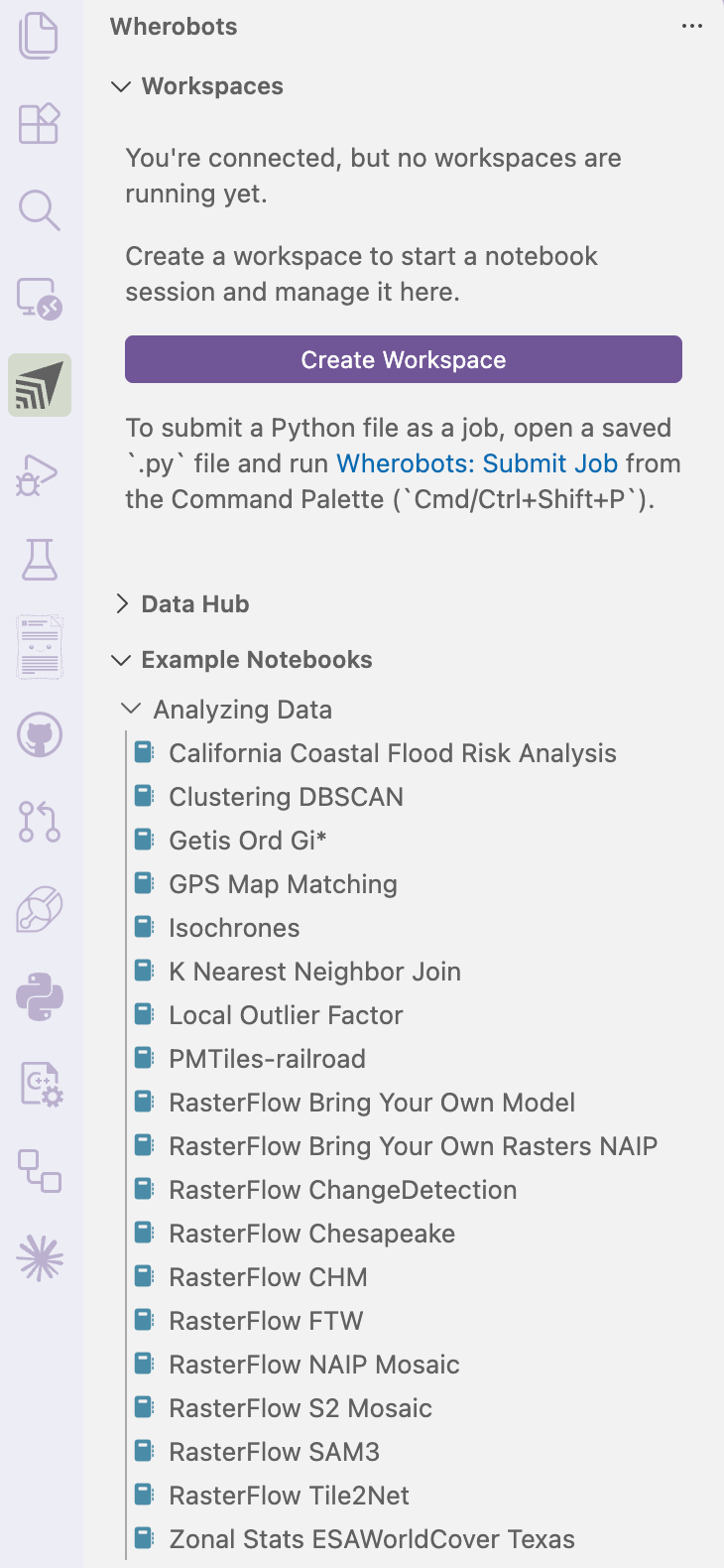
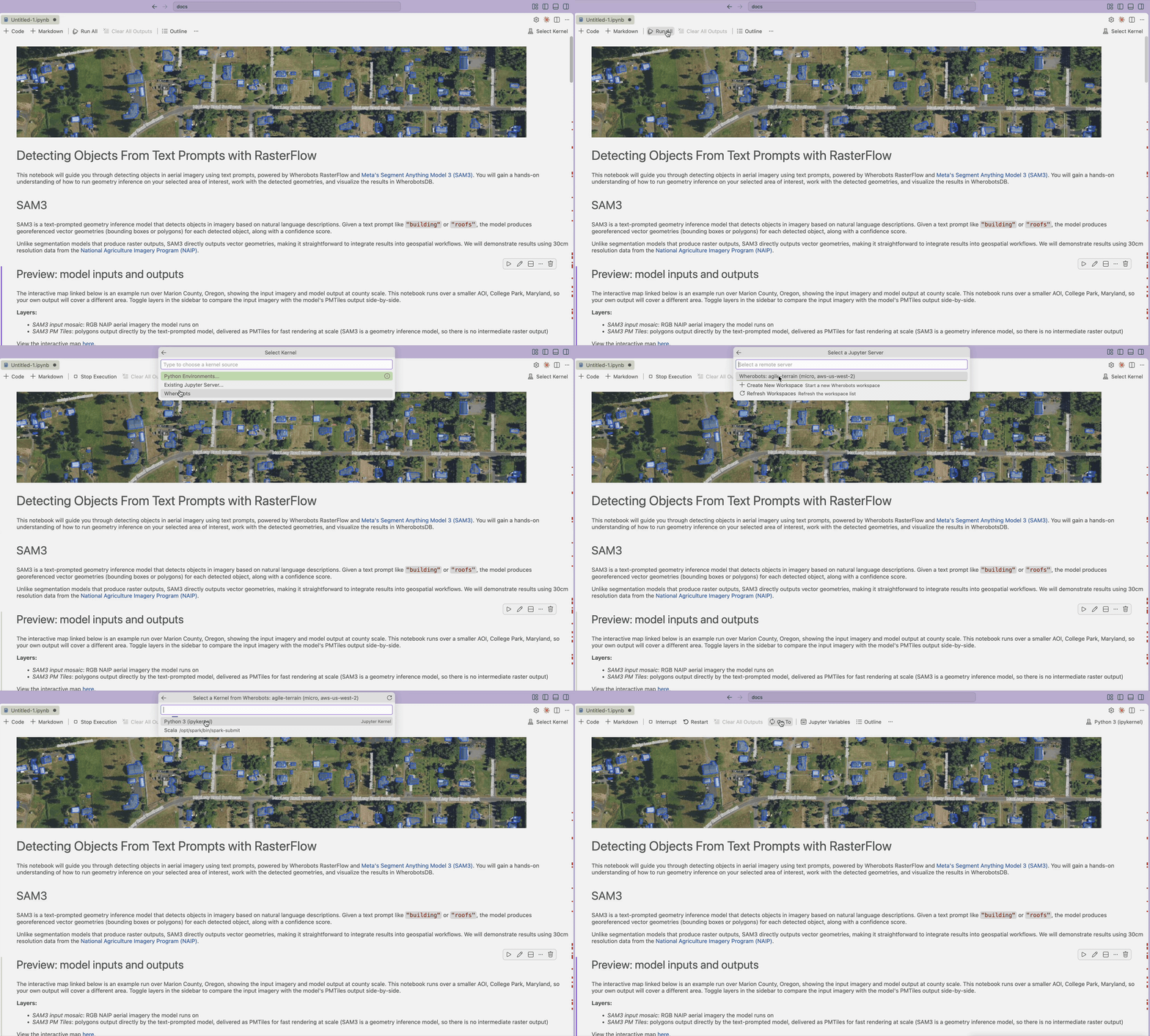
You can run RasterFlow from Wherobots Cloud or from your own editor with the Wherobots VS Code Extension. Both paths execute against a Wherobots runtime, so the RasterFlow code is identical.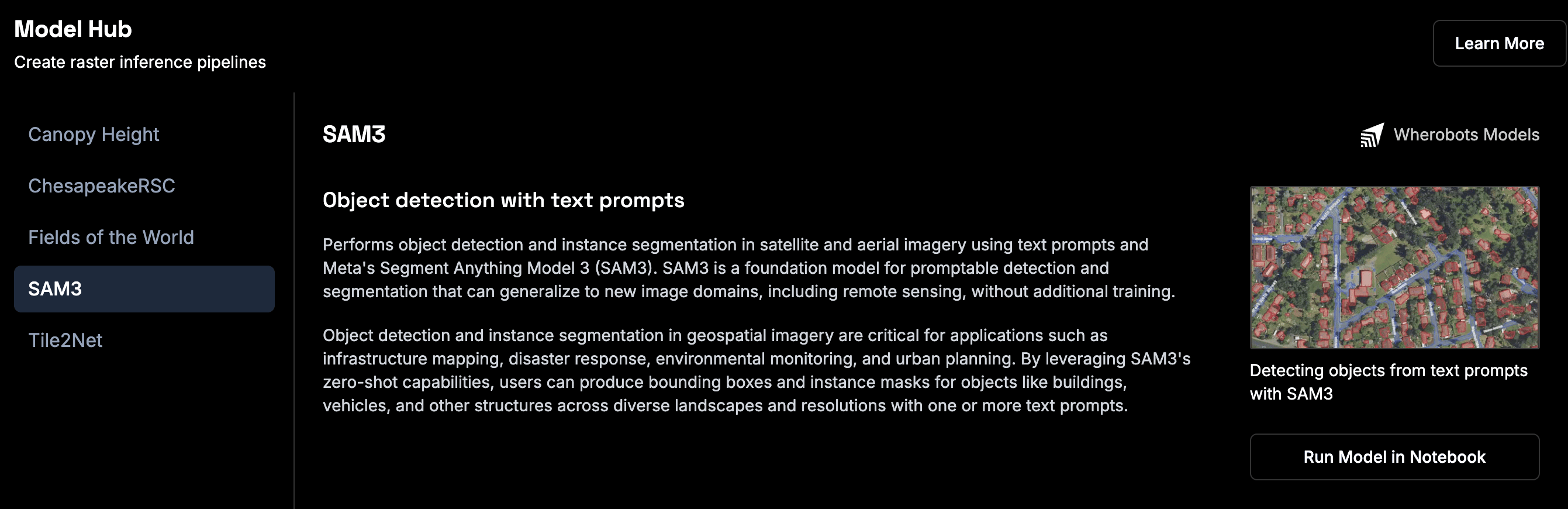
- Wherobots Cloud
- VS Code Extension
1
Go to the Model Hub
Login to Wherobots Cloud and try out one of the built-in models by running a RasterFlow notebook in the Model Hub.
2
Click Run Model in Notebook
Select your desired notebook and click Run model in Notebook to provision a runtime.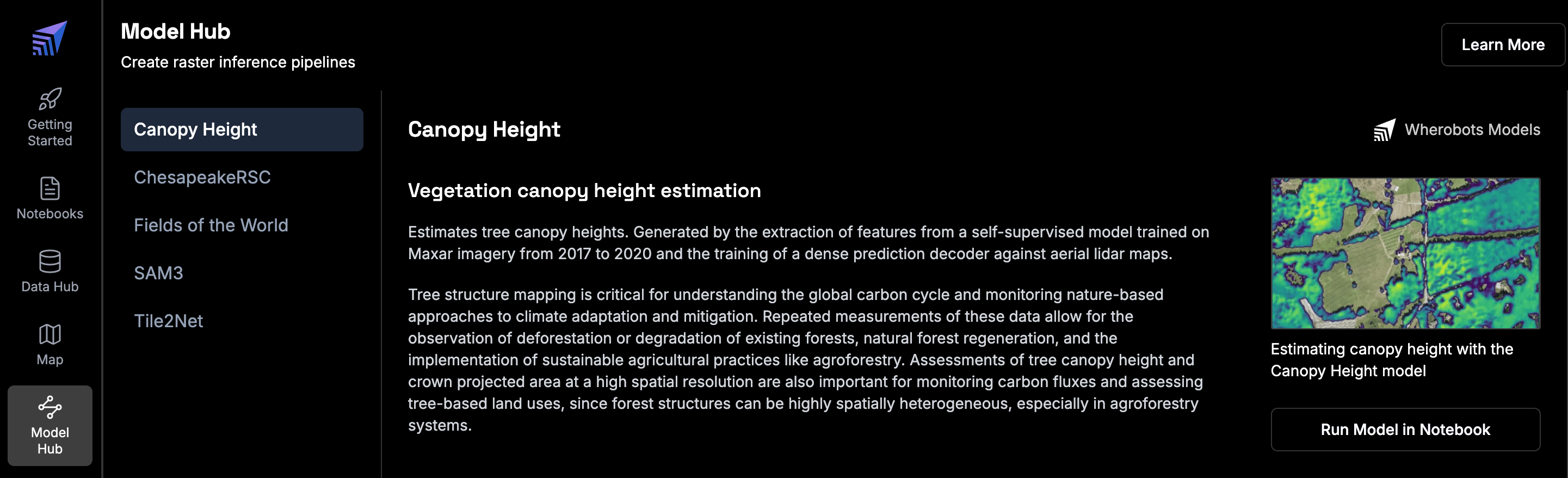
Clicking Run Model in Notebook from the Model Hub will open the solutions notebook with a Tiny runtime.
3
Run each cell
Click Run > Run all cells in JupyterLab.
Included example notebooks
RasterFlow comes pre-configured with five open-source models:- Meta SAM3 for text-prompted object detection
- Fields of the World for agricultural field boundaries
- Tile2Net for sidewalks and crosswalks
- Meta CHM v1 for canopy height
- ChesapeakeRSC for rural roads.
Run example notebooks
The following pre-configured model solutions notebooks are currently loaded in Wherobots Cloud to showcase the core features of RasterFlow:
Text-Prompted Object Detection
Detect objects in aerial imagery from natural language prompts and return georeferenced geometries using the Meta SAM3 model

Agricultural Field Mapping
Detect field boundaries from Sentinel-2 imagery and segment crop fields across regions using the Fields of the World model

Urban Infrastructure Detection
Identify sidewalks, crosswalks, and pedestrian pathways from high-resolution aerial imagery using the Tile2Net model

Canopy Height Estimation
Predict tree canopy heights from aerial imagery to monitor forest health and vegetation structure using the Meta CHM v1 model

Rural Road Detection
Identify roads in rural environments and map road networks using the ChesapeakeRSC model
RasterFlow use cases
Agricultural Field Mapping
Agricultural Field Mapping
- Detect field boundaries from Sentinel-2 imagery
- Segment crop fields across counties/regions
- Convert raster predictions to vector geometries
Urban Infrastructure Detection
Urban Infrastructure Detection
- Identify sidewalks, crosswalks, and pedestrian pathways
- Generate detailed maps for urban planning
- Analyze accessibility from high-resolution aerial imagery
Canopy Height Estimation
Canopy Height Estimation
- Predict tree canopy heights from aerial imagery
- Monitor forest health and vegetation structure
- Support conservation and urban forestry initiatives
Rural Road Detection
Rural Road Detection
- Identify roads, especially in rural environments
- Map road networks to support routing and navigation
- Detect road network changes to keep maps up to date
Text-Prompted Object Detection
Text-Prompted Object Detection
- Detect objects from a natural language prompt
- Return georeferenced bounding boxes or polygons with confidence scores
- Skip vectorization, since output is already vector
Seasonal Change Detection
Seasonal Change Detection
- Run a model over bi-temporal imagery stacked along the channel dimension
- Compare two seasons or years in a single inference pass
- Identify where predictions changed between time periods
Analysis-Ready Sentinel-2 Mosaics
Analysis-Ready Sentinel-2 Mosaics
- Build cloud-free median composites from Sentinel-2
- Use built-in planting and harvest season datasets, or a custom date window
- Return all 12 L2A spectral bands at 10m
High-Resolution Aerial Mosaics
High-Resolution Aerial Mosaics
- Build mosaics from built-in NAIP datasets
- Reproject source imagery onto your own output grid
- Produce 30cm and 60cm analysis-ready rasters
Bring Your Own Rasters
Bring Your Own Rasters
- Query a STAC catalog to discover imagery for an area of interest
- Create a GDAL Raster Tile Index (GTI) from STAC items
- Build a seamless mosaic from your own tiles with
build_gti_mosaics
Bring Your Own Model
Bring Your Own Model
- Export a custom PyTorch model to a RasterFlow-compatible format
- Register the model and run it as an inference task
- Apply your own architecture at scale over a mosaic
Next steps
- Try out the pre-configured model solutions notebooks in the Model Hub in Wherobots Cloud
- Run RasterFlow notebooks from your own editor with the Wherobots VS Code Extension
- Run RasterFlow as a Job for automated, production-scale processing
- Learn how RasterFlow usage is metered in RasterFlow Spatial Units
- Explore the Client API Reference to learn about all available methods
- Review Data Models to understand configuration options
API reference
For detailed API documentation, see:- Client API Reference -
RasterflowClientmethods - Data Models Reference - Enums and configuration objects
- Exceptions Reference - Error handling