

How Spatial Filter Push-down Works
WherobotsDB collects and records the spatial statistics of data files when writing data to the table. The spatial statistics includes the minimum bounding rectangle (MBR) of the geometries in the data file. When a spatial query is issued, WherobotsDB will first check the MBR of the geometries in the data file against the spatial filter. If the MBR doesn’t intersect with the spatial filter, WherobotsDB will skip reading the data file.WherobotsDB keeps these statistics for a
geometry(<srid>) column in the standard Apache Iceberg column bounds. For a geometry column with no declared CRS, it keeps them only on format-version 1 and 2 tables, so spatial filters on that column can’t skip data files on a format-version 3 table. See Upgrade Existing Geometry Tables.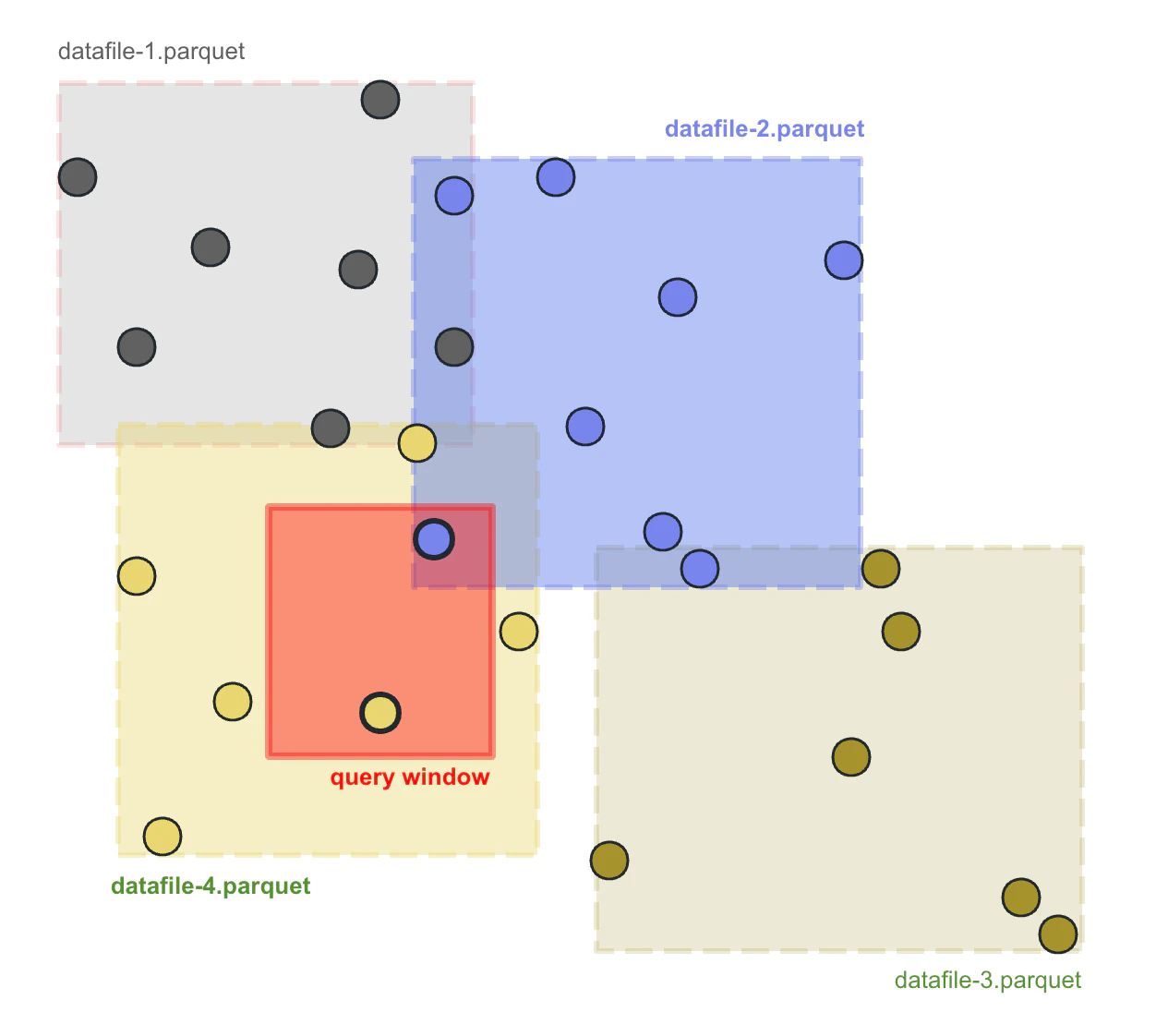
CREATE SPATIAL INDEX statement
WherobotsDB adds theCREATE SPATIAL INDEX statement for rewriting the table to sort the records by geometry column:
hilbert index strategy. hilbert will sort the data by the by the Hilbert index of specified geometry field. Hilbert index is based on a space filling curve called Hilbert curve, which is very efficient at sorting geospatial data by spatial proximity. You can specify the precision of the hilbert curve using the precision parameter. The precision parameter is the number of bits used to represent the Hilbert index. The higher the precision, the more accurate the sorting will be.
The two-argument form,
hilbert(<geometry_column>, <precision>), clusters over World Geodetic System 1984 (WGS84) longitude and latitude bounds, [-180, 180] and [-90, 90]. On a geometry(<srid>) column the declared CRS is checked against those bounds, so the statement is rejected when the column is in another CRS. Pass <minX>, <minY>, <maxX>, <maxY> to cluster a column in another CRS, as described in Clustering a column that is not WGS84.wherobots.db.test_table by the geometry column geom:
CREATE SPATIAL INDEX FOR is actually a syntax sugar for calling rewrite_data_files procedure:
rewrite_data_files procedure to CREATE SPATIAL INDEX FOR statement using the OPTIONS clause. For example, we can set the target file size to 10MB:
state = 'CA':
target-file-count option, as the CREATE SPATIAL INDEX statement will automatically determine the size of output data files based on the size of the table to balance the file size and the number of data files.
If the default behavior of CREATE SPATIAL INDEX is not desirable, users can specify the following options to control the number of data files:
target-file-count: The number of output data files. This option is useful when you want to rewrite the table to an expected number of data files. The exact number of data files may be different from the expected number due to various factors such as compression, heuristics for avoiding too large data files, etc.
Clustering a column that is not WGS84
Running the two-argument form on a column whose declared CRS is not WGS84 is rejected, and the message names both ways out:±20037508.34 meters on both axes, which is longitude ±180 and latitude ±85.0511:
±85.06, or ±20048966.10 meters.
Other Ways to Index Spatial Data
Except for theCREATE SPATIAL INDEX FOR statement, there are many other ways to index geospatial data in a table.
Partitioning by columns closely related to spatial property
If the data you are working with has at least one columns that are closely related to the spatial property, it is usually a good idea to partition the table using that column. For example, if you are working with a table containing census data, and the data has astate column indicating the state ID of the data, you can partition the table by state:
state partition works well for both regular queries with filters such as state = 'some_state' and spatial queries with filters such as ST_Intersects(geom, <query_window>). For the former, WherobotsDB skips data files whose state partition doesn’t match the filter. For the latter, it skips data files using their spatial statistics.
Partitioning by spatial proximity
If your dataset does not have a field to directly partition by, you can partition the dataset by the S2 cell ID of the geometry. This requires selecting a proper S2 resolution level suited for your dataset.s2 column set to the S2 cell ID of the geometry, and the values in geom have to carry the SRID of the column, as described in Matching the column CRS:
- Python
- Scala
- Java
Sorting by GeoHash
We can manually sort the table byST_GeoHash(<geometry_column>, <precision>) to cluster the data by spatial proximity:
- Python
- Scala
- Java
CREATE SPATIAL INDEX FOR for sorting the table over manually sorting the table. CREATE SPATIAL INDEX FOR will use the Hilbert curve to sort the table, which is more efficient than sorting by GeoHash.