> ## Documentation Index
> Fetch the complete documentation index at: https://docs.wherobots.com/llms.txt
> Use this file to discover all available pages before exploring further.
# RS_AsImage
Returns a HTML that when rendered using an HTML viewer or via a Jupyter Notebook, displays the raster as a square image of side length `imageWidth`. Optionally, an imageWidth parameter can be passed to RS\_AsImage in order to increase the size of the rendered image (default: 200).
This function only works for rasters with byte data, and bands ≤ 4 (Grayscale - RGBA). You can check the data type of an existing raster by using [RS\_BandPixelType](/reference/wherobots-db/raster-data/band-accessors/RS_BandPixelType) or create your own raster by passing `'B'` while using [RS\_MakeEmptyRaster](/reference/wherobots-db/raster-data/constructors/RS_MakeEmptyRaster).
## Signatures
```sql theme={"system"}
RS_AsImage(raster: Raster, imageWidth: Integer = 200)
```
## Parameters
The input raster.
The image width value.
## Return type
A string representation.
## Examples
```sql theme={"system"}
SELECT RS_AsImage(raster, 500) from rasters
SELECT RS_AsImage(raster) from rasters
```
```html theme={"system"}
" ";
```
## Display raster in Jupyter
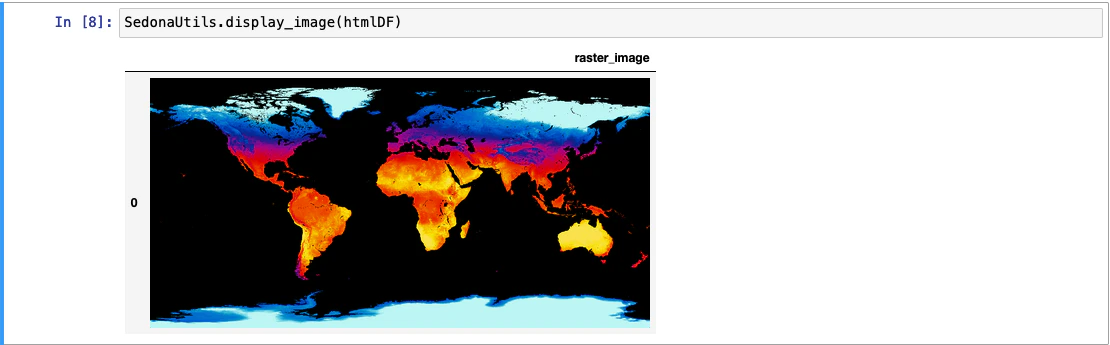
`SedonaUtils.display_image(df)` is a Python wrapper that renders raster images directly in a Jupyter notebook. It automatically detects raster columns in the DataFrame and applies `RS_AsImage` under the hood, so you don't need to call `RS_AsImage` yourself. You can also pass a DataFrame with pre-applied `RS_AsImage` HTML.
### — direct raster display (recommended)
```python theme={"system"}
from sedona.spark import SedonaUtils
df = (
sedona.read.format("binaryFile")
.load(DATA_DIR + "raster.tiff")
.selectExpr("RS_FromGeoTiff(content) as raster")
)
# Pass the raw raster DataFrame directly — RS_AsImage is applied automatically
SedonaUtils.display_image(df)
```
### — with explicit RS\_AsImage
```python theme={"system"}
htmlDF = df.selectExpr("RS_AsImage(raster, 500) as raster_image")
SedonaUtils.display_image(htmlDF)
```
";
```
## Display raster in Jupyter
`SedonaUtils.display_image(df)` is a Python wrapper that renders raster images directly in a Jupyter notebook. It automatically detects raster columns in the DataFrame and applies `RS_AsImage` under the hood, so you don't need to call `RS_AsImage` yourself. You can also pass a DataFrame with pre-applied `RS_AsImage` HTML.
### — direct raster display (recommended)
```python theme={"system"}
from sedona.spark import SedonaUtils
df = (
sedona.read.format("binaryFile")
.load(DATA_DIR + "raster.tiff")
.selectExpr("RS_FromGeoTiff(content) as raster")
)
# Pass the raw raster DataFrame directly — RS_AsImage is applied automatically
SedonaUtils.display_image(df)
```
### — with explicit RS\_AsImage
```python theme={"system"}
htmlDF = df.selectExpr("RS_AsImage(raster, 500) as raster_image")
SedonaUtils.display_image(htmlDF)
```
 ## Text-based visualization