> ## Documentation Index
> Fetch the complete documentation index at: https://docs.wherobots.com/llms.txt
> Use this file to discover all available pages before exploring further.
# Audit Logs
> Use Audit Logs to monitor key activity within your Wherobots Organization, enhance security, and maintain accountability. Learn how to view, filter, and export your logs for comprehensive organizational oversight.
Admins can view and export logs to monitor key activity and enhance organizational security and accountability
in the [**Audit Logs**](https://cloud.wherobots.com/organization/audit-logs) section of Wherobots Cloud.
For a comprehensive list of actions, see [List of Auditable Events](#list-of-auditable-events).
**What does the Audit Logs feature do?**
You can monitor actions related to:
* **Security Credentials:** Track the lifecycle of API keys and ingest credentials, ensuring proper access control.
* **File Management:** Observe modifications to files and directories, including uploads, deletions, and renames.
* **Job Execution:** Audit job run creation, cancellation, and log access for operational transparency.
* **Notebook Lifecycle:** Monitor the creation and deletion of notebooks for resource management.
* **Organizational Administration:** Review changes to user roles, environment settings, and security configurations.
* **Spatial Data Management:** Track modifications to spatial catalog tables.
* **Runtime Environments:** Audit the management of runtime presets and overrides.
## Before you start
Before using Audit Logs, ensure that you have the following required resources:
**What do I need before I get started?**
* A Wherobots **Professional**, **Innovation**, or **Enterprise** Edition Organization. Only paid Organization Editions can use Audit Logs.
* For more information on paid plans, see [Wherobots Pricing](https://wherobots.com/pricing/).
* To create a new Professional Edition Organization, see [Create a Professional Edition Organization](/get-started/wherobots-cloud/create-account/#create-a-professional-edition-organization).
* To create a new Innovation Edition Organization, see [Create an Innovation Edition Organization](/get-started/wherobots-cloud/create-account/#create-an-innovation-edition-organization).
* To upgrade your Community Edition Organization to a Professional Edition Organization, see [Upgrade Organization](/get-started/upgrade-organization/).
* To create a new Enterprise Edition Organization, see [Create an Enterprise Edition Organization](/get-started/wherobots-cloud/create-account/#create-an-enterprise-edition-organization).
* An **Admin** role within your Organization.
* To confirm that you're an Administrator, review your role in [**Organization Settings > Users**](https://cloud.wherobots.com/organization#users).
* (Optional) Wherobots **API key** to export logs with the [Audit Logs API endpoint](/get-started/organization-info/audit-logs/#schedule-a-log-export-using-the-api).
* For more information, see [API keys](/get-started/wherobots-cloud/api-keys/) in the Wherobots Documentation.
## Use Audit Logs
Complete the following steps to view your Audit Logs:
1. Go to [**Organization Settings > Audit Logs**](https://cloud.wherobots.com/organization/audit-logs).
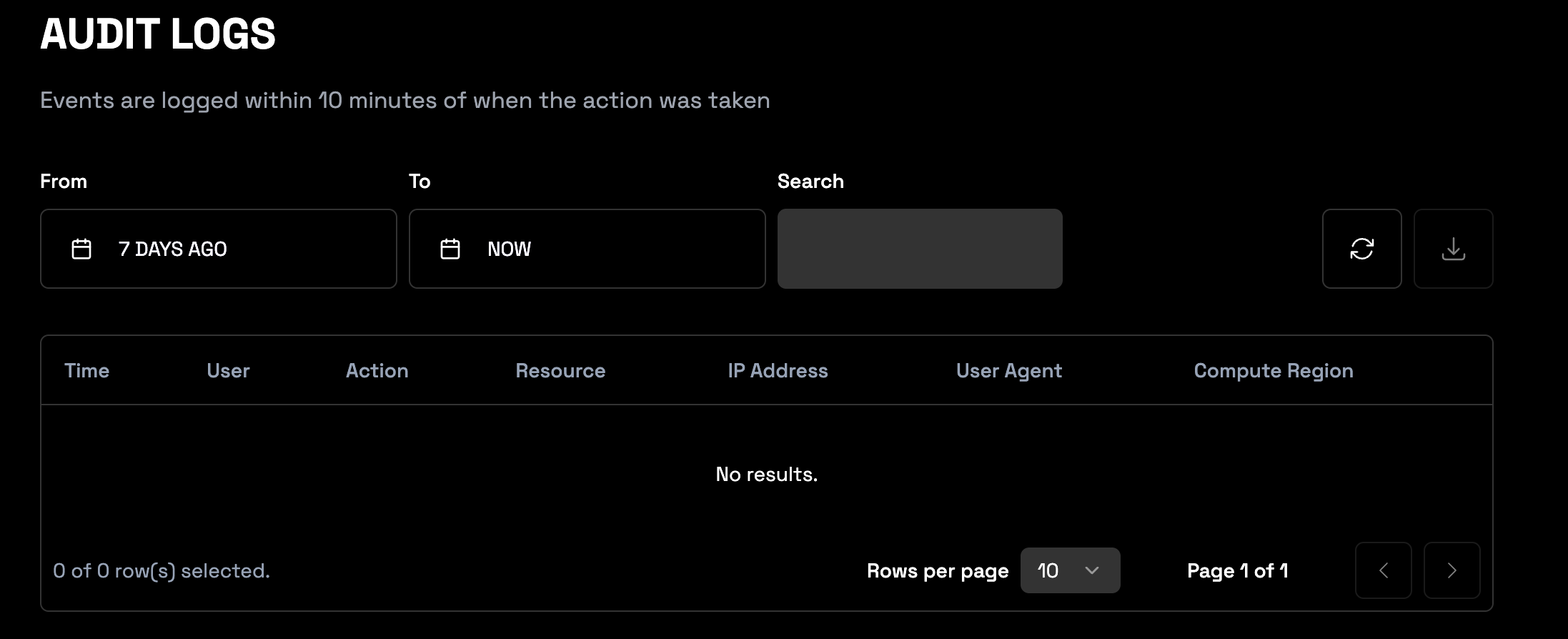 2. Review your logs.
* Use the pagination controls to navigate through multiple pages of logs.
* Change the amount of rows shown per page with the row per page dropdown menu.
### Filter your logs
Review the following table for information on how to filter your logs.
| Feature | Description |
| -------------------- | -------------------------------------------------------------------------------------------------------------------------------------------------------------------------------------------------------------------------------------------- |
| Date Range Filtering | Specify time range for audit logs.
2. Review your logs.
* Use the pagination controls to navigate through multiple pages of logs.
* Change the amount of rows shown per page with the row per page dropdown menu.
### Filter your logs
Review the following table for information on how to filter your logs.
| Feature | Description |
| -------------------- | -------------------------------------------------------------------------------------------------------------------------------------------------------------------------------------------------------------------------------------------- |
| Date Range Filtering | Specify time range for audit logs.
- Use **From** and **To** date selectors.
- **From** Date shortcuts: **Yesterday, 2, 7, 30, 90 DAYS AGO**. |
| Search | Use this search bar to filter logs by keywords. |
| Time | Time the action occurred within your Organization.
By default, the time displayed reflects your local timezone. You can adjust this setting within the [Wherobots Cloud Preferences](https://cloud.wherobots.com/settings/preferences). |
| User | Email address of the Wherobots Organization member who initiated the logged action. |
| Action | The auditable event. For a comprehensive list of actions, see [List of Auditable Events](#list-of-auditable-events). |
| Resource | The object or data affected by the logged action. |
| IP Address | The internet protocol (IP) address of the User who initiated the logged action. |
| User Agent | Information about the software used to make the request (e.g., browser, operating system). |
| Region | The compute region where your workload is running. For a full list of Wherobots' supported cloud regions, see [Cloud and Cloud Region Availability section](/availability#cloud-and-cloud-region-availability). |
## Export logs
You can export your logs on demand through the [Wherobots Cloud](#export-your-logs-in-wherobots-cloud) user interface or through the [Wherobots REST API](#schedule-a-log-export-using-the-api).
### Export your logs in Wherobots Cloud
Complete the following steps to export your Audit Logs:
1. Go to [**Organization Settings > Audit Logs**](https://cloud.wherobots.com/organization/audit-logs).
2. Click **EXPORT CSV** to download the filtered audit log data as a CSV file.
### Schedule a log export using the API
Wherobots retains event logs for 90 days. To preserve logs beyond this period, export them using the Audit Logs REST API endpoint.
For more information on this API endpoint, see [Audit Logs Export](https://docs.wherobots.com/references/audit-log-export/).
## List of Auditable Events
The following actions are logged with this feature:
| Type | Action Name |
| --------------------------- | -------------------------------------------------- |
| AWS Marketplace | LinkOrganizationToAwsMarketplace |
| AWS Marketplace | CancelAwsMarketplaceSubscription |
| Credential | CreateApiKeyCredential |
| Credential | GenerateIngestCredentials |
| Credential | RevokeApiKeyCredential |
| Credential | UpdateApiKeyCredential |
| File modifications | CreateDirectory |
| File modifications | DeleteFile |
| File modifications | DeleteDirectory |
| File modifications | DownloadFile |
| File modifications | RenameFile |
| File modifications | UploadFile |
| File modifications | GenerateUploadUrl |
| Storage Integration | CreateStorageIntegration |
| Storage Integration | DeleteStorageIntegration |
| Job Run | CancelJobRun |
| Job Run | CreateJobRun |
| Job Run | GetJobRunLogs |
| Notebook | CreateNotebook |
| Notebook | DestroyNotebook |
| Organizational Modification | RegisterOrganization |
| Organizational Modification | RegisterSamlUser |
| Organizational Modification | RegisterUser |
| Organization Settings | InviteUser |
| Organization Settings | DeleteInvite |
| Organization Settings | DeleteUser |
| Organization Settings | UpdateOrganizationDefaultDomain |
| Organization Settings | UpdateOrganizationDefaultEnvironmentOverridePreset |
| Organization Settings | UpdateOrganizationDefaultEnvironmentPreset |
| Organization Settings | UpdateOrganizationDefaultRuntime |
| Organization Settings | UpdateOrganizationDefaultRegion |
| Organization Settings | UpdateSamlConfiguration |
| Organization Settings | DeleteSamlConfiguration |
| Organization Settings | UpdateUserRole |
| Managed Catalog | CreateManagedCatalogTable |
| Managed Catalog | DeleteManagedCatalogTable |
| Managed Catalog | RenameManagedCatalogTable |
| Managed Catalog | UpdateManagedCatalogTable |
| Managed Catalog | CreateManagedCatalog |
| Foreign Catalog | CreateForeignCatalog |
| Foreign Catalog | UpdateForeignCatalog |
| Foreign Catalog | DeleteForeignCatalog |
| SQL Session | CreateSqlSession |
| SQL Session | DestroySqlSession |
| Runtime | DeleteEnvironmentOverridePresetRuntime |
| Runtime | DeleteEnvironmentPresetRuntime |
| Runtime | SaveEnvironmentOverridePresetRuntime |
| Runtime | SaveEnvironmentPresetRuntime |
## Feature Limitations
* While the Audit Logs feature tracks events as they happen, those events are available for query and export about 10 minutes later.
* This feature can only be accessed by the Wherobots Organization's Admin. For more information on the Admin role, see [Organization Roles](/get-started/organization-info/organization-roles/).
* Wherobots only keeps logs 90 days. To ensure that you don't lose access to any log information, [schedule a log export](#export-logs).