> ## Documentation Index
> Fetch the complete documentation index at: https://docs.wherobots.com/llms.txt
> Use this file to discover all available pages before exploring further.
# Wherobots Data Hub
> The Data Hub is the central interface for discovering and managing your data in Wherobots, including connecting external data sources and reviewing catalog schemas.
The [**Wherobots Data Hub**](https://cloud.wherobots.com/data-hub) is the central interface for reviewing catalog schemas and adding new data sources.
The Data Hub is also available in the [Wherobots VS Code Extension](/develop/vscode-extension/integrate-your-data).
Browse catalogs, schemas, and tables directly from your editor's sidebar, and use the built-in
MCP server to create notebooks from your data.
While the actual queries are run in **Wherobots Notebooks, Job Runs, or SQL Sessions**, the Data Hub is where you organize all your data as [**Havasu tables**](/develop/spatial-catalog/spatial-catalog/).
In **Wherobots Data Hub**, you can:
* Add external data sources from [Databricks Unity Catalog](/get-started/initial-storage/connect-to-unity-catalog/) or [Amazon S3 buckets](/develop/storage-management/s3-storage-integration/).
* Browse all connected catalogs and their schemas.
* Inspect detailed table metadata, including location, format, and ownership.
## Before you start
Before using this feature, you need the following:
* An **Account** within a Professional, Innovation, or Enterprise Edition Organization. For more information, see [Create a Wherobots Account](/get-started/wherobots-cloud/create-account/).
* While only a Wherobots **Admin** can add a new catalog, a Wherobots Organization
member with a **User** role can access already-integrated catalogs.
## View table details
When you select a table in the Data Hub, you can view key details, including: 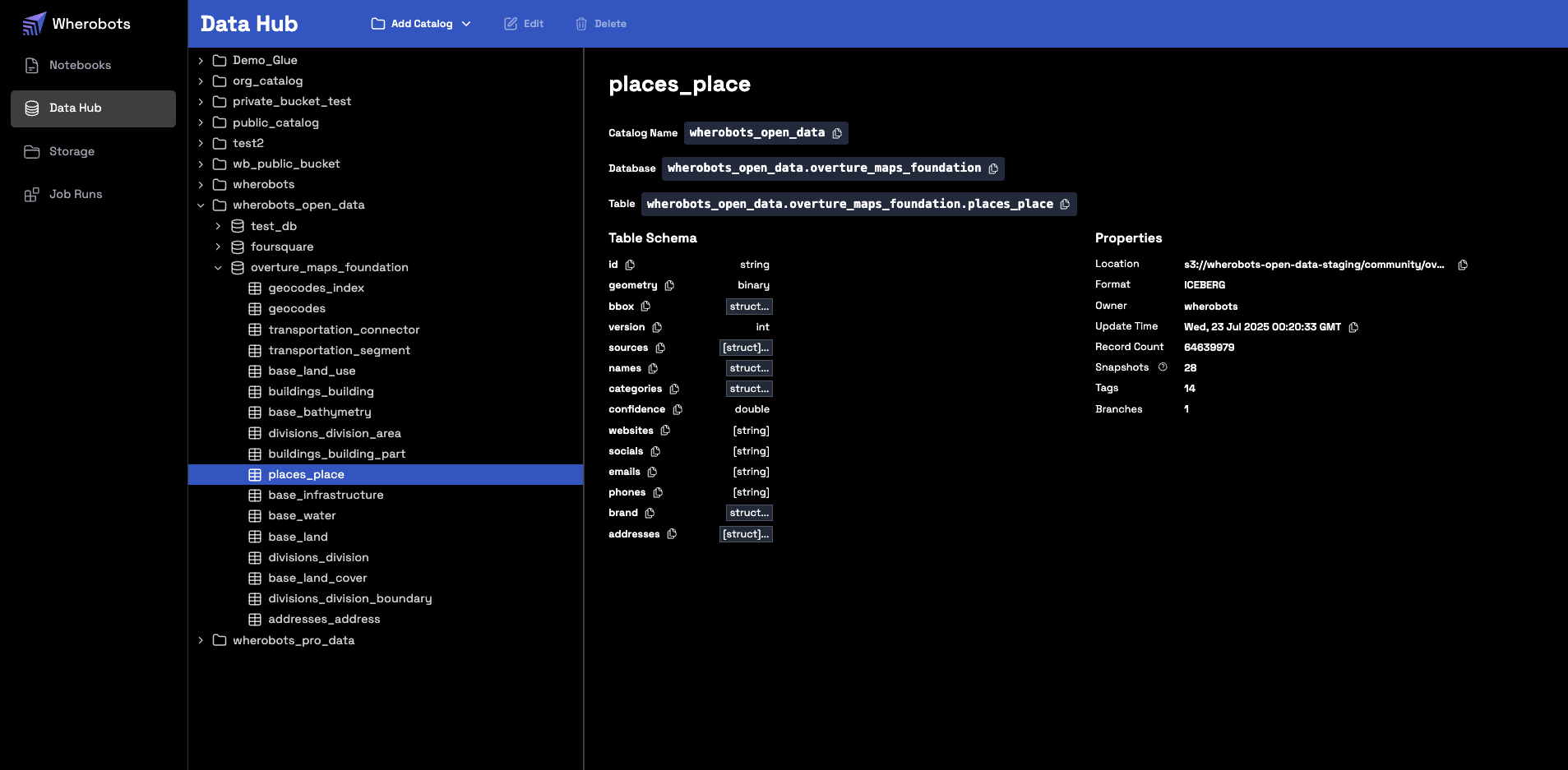 * **Column Schema**
* **Table Owner**
* **Table Location**
* **Table Format**
* **Update Time**
* **Record Count**
## Review catalog audit logs
Review your [**Audit Logs**](https://cloud.wherobots.com/organization/audit-logs) for [`SpatialCatalog` events](/get-started/organization-info/audit-logs/#list-of-auditable-events) in your Organization.
## Catalog Types
The **Data Hub** supports two types of catalogs: [Managed](#managed-catalog) and [Foreign](#foreign-catalog).
### Foreign catalog
A foreign catalog utilizes a zero-copy architecture, enabling you to query data directly where it resides without the need to move or copy it.
These external tables are also integrated into the **Wherobots Data Hub** for unified browsing alongside your other catalogs.
#### Create a foreign catalog Connection
Foreign catalogs are created by establishing a **Connection**, which stores the access credentials and path to the data source.
To create a catalog **Connection** in the **Wherobots Data Hub**, follow the step-by-step guide for your data source:
* [Connect to Databricks' Unity Catalog](/get-started/initial-storage/connect-to-unity-catalog/)
### Managed catalog
For Managed Catalogs, Wherobots manages and optimizes the catalogs' metadata.
Examples of Managed Catalogs are our built-in curated datasets and any catalogs you create from an S3 storage integration.
#### Review curated Datasets
For more information on reviewing Wherobots' built-in datasets, see [Curated Datasets](/tutorials/spatial-catalog/introduction/).
#### Create a Managed catalog
To create a Managed Catalog, follow the step-by-step guide for your data source:
* [Create a catalog from an S3 Bucket Integration](/develop/storage-management/s3-storage-integration/)
## Delete a catalog Connection
To delete a catalog that you've integrated into your Wherobots Organization do the following:
**Connection Deletion Scope**
Deleting a catalog within the Wherobots Data Hub only deletes the connection from Wherobots.
The source Databricks catalog will remain within your Databricks Workspace.
1. Confirm that you are an [**Admin**](https://cloud.wherobots.com/organization#users) within your Wherobots Organization.
2. Go to the [**Wherobots Data Hub**](https://cloud.wherobots.com/data-hub).
3. Select the catalog you wish to delete.
4. Click **Delete**.
* **Column Schema**
* **Table Owner**
* **Table Location**
* **Table Format**
* **Update Time**
* **Record Count**
## Review catalog audit logs
Review your [**Audit Logs**](https://cloud.wherobots.com/organization/audit-logs) for [`SpatialCatalog` events](/get-started/organization-info/audit-logs/#list-of-auditable-events) in your Organization.
## Catalog Types
The **Data Hub** supports two types of catalogs: [Managed](#managed-catalog) and [Foreign](#foreign-catalog).
### Foreign catalog
A foreign catalog utilizes a zero-copy architecture, enabling you to query data directly where it resides without the need to move or copy it.
These external tables are also integrated into the **Wherobots Data Hub** for unified browsing alongside your other catalogs.
#### Create a foreign catalog Connection
Foreign catalogs are created by establishing a **Connection**, which stores the access credentials and path to the data source.
To create a catalog **Connection** in the **Wherobots Data Hub**, follow the step-by-step guide for your data source:
* [Connect to Databricks' Unity Catalog](/get-started/initial-storage/connect-to-unity-catalog/)
### Managed catalog
For Managed Catalogs, Wherobots manages and optimizes the catalogs' metadata.
Examples of Managed Catalogs are our built-in curated datasets and any catalogs you create from an S3 storage integration.
#### Review curated Datasets
For more information on reviewing Wherobots' built-in datasets, see [Curated Datasets](/tutorials/spatial-catalog/introduction/).
#### Create a Managed catalog
To create a Managed Catalog, follow the step-by-step guide for your data source:
* [Create a catalog from an S3 Bucket Integration](/develop/storage-management/s3-storage-integration/)
## Delete a catalog Connection
To delete a catalog that you've integrated into your Wherobots Organization do the following:
**Connection Deletion Scope**
Deleting a catalog within the Wherobots Data Hub only deletes the connection from Wherobots.
The source Databricks catalog will remain within your Databricks Workspace.
1. Confirm that you are an [**Admin**](https://cloud.wherobots.com/organization#users) within your Wherobots Organization.
2. Go to the [**Wherobots Data Hub**](https://cloud.wherobots.com/data-hub).
3. Select the catalog you wish to delete.
4. Click **Delete**.