> ## Documentation Index
> Fetch the complete documentation index at: https://docs.wherobots.com/llms.txt
> Use this file to discover all available pages before exploring further.
# Wherobots Spatial SQL API and SDKs
The Wherobots Spatial SQL API allows programmatic integration with Wherobots Cloud, enabling direct SDK access to execute Spatial SQL queries.
Powered by WherobotsDB with Apache Sedona at its core, this distributed engine scales for large dataset computation and analytics with Wherobots Cloud managing the underlying infrastructure.
Connecting to the API starts a **SQL Session** on your selected WherobotsDB runtime, where Wherobots securely executes and fully manages the compute for your queries.
We provide client SDKs in Java and in Python to easily connect and interact with WherobotsDB through the Spatial SQL API, as well as an Airflow Provider to build your spatial ETL DAGs; all of them are open-source and available on package registries, as well as on [Wherobots' GitHub page](https://github.com/wherobots).
Currently the API has a hard limit of 1000 rows on returned results. This doesn't affect computations on the clusters, just the amount of data the API or the drivers send back on the wire.
## API keys
To authenticate and use the Spatial SQL APIs and SDKs, we often require an API key. For more information, see [API Keys](/get-started/wherobots-cloud/api-keys/).
## Python DB-API driver
To access Wherobots DB, we provide a [Python DB-API implementation](https://github.com/wherobots/wherobots-python-dbapi). The driver is a PEP-0249 compatible driver to programmatically connect to a Wherobots DB runtime and execute Spatial SQL queries.
### Installation
If you use [Poetry](https://python-poetry.org) in your project, add the dependency with `poetry add`:
```sh theme={"system"}
poetry add wherobots-python-dbapi
```
Otherwise, just `pip install` it:
```sh theme={"system"}
pip install wherobots-python-dbapi
```
### Usage
Usage follows the typical pattern of establishing the connection, acquiring a cursor, and executing SQL queries through it:
```py example-wb-spatial-sql-api.py theme={"system"}
import logging
from wherobots.db import connect
from wherobots.db.region import Region
from wherobots.db.runtime import Runtime
# Optionally, setup logging to get information about the driver's
# activity.
logging.basicConfig(
stream=sys.stdout,
level=logging.INFO,
format="%(asctime)s.%(msecs)03d %(levelname)s %(name)20s: %(message)s",
datefmt="%Y-%m-%d %H:%M:%S",
)
# Get your API key, or securely read it from a local file.
api_key = '...'
with connect(
host="api.cloud.wherobots.com",
api_key=api_key,
# runtime parameter specifies the compute resources allocated for the runtime environment.
# Replace 'Runtime.TINY' with the desired runtime size, for example:
# - For a small runtime: runtime=Runtime.SMALL
# - For a medium runtime: runtime=Runtime.MEDIUM
runtime=Runtime.TINY,
# region parameter establishes a connection to a specified AWS cloud provider region.
# Replace 'Region.AWS_US_WEST_2' with the desired AWS region, for example:
# - For AWS US East (N. Virginia): region=Region.AWS_US_EAST_1
region=Region.AWS_US_WEST_2) as conn:
curr = conn.cursor()
sql = """
SELECT
id,
names['primary'],
geometry,
population
FROM
wherobots_open_data.overture_maps_foundation.divisions
WHERE subtype = 'country'
SORT BY population DESC
LIMIT 10
"""
curr.execute(sql)
results = curr.fetchall()
results.show()
```
The `Cursor` supports the context manager protocol, so you can use it within a `with` statement when needed:
```python theme={"system"}
with connect(...) as conn:
with conn.cursor() as curr:
curr.execute(...)
results = curr.fetchall()
results.show()
```
It also implements the `close()` method, as suggested by the PEP-2049 specification, to support situations where the cursor is wrapped in a `contextmanager.closing()`.
### Runtime and region selection
You can choose the Wherobots runtime you want to use with the `runtime` parameter, passing in one of the `Runtime` `enum` values.
For guidance on runtime sizing and selection, see [Runtimes](/develop/runtimes/).
For supported AWS regions and their `Region` `enum` values, see [Region `enum` values](/develop/runtimes/#region-enum-values).
### Version selection
When creating a session, you can set the version parameter to one of the following values:
* `"latest"`: (Default) The most recent, stable production version. This resolves to the **WherobotsDB v2** line. Your session will default to this if the parameter is omitted.
* `VERSION-STRING`: An explicit version number to set your session to a specific Wherobots release (e.g., `"2.1.0"` or `"1.11.8"`). You can find the Wherobots versions available in your [Environment Presets](/develop/notebook-management/environment-presets). The `connect()` method takes some additional parameters that can be useful for optimizing performance, controlling data formats, and managing connections:
* `"preview"`: Currently, this selection now points to the same `"latest"` version but `"preview"` will be deprecated in the future in favor of `"latest"`.
| Parameter | Type | Description | Default |
| ------------------------- | ----------------------------- | ---------------------------------------------------------------- | --------------------------------- |
| `results_format` | `ResultsFormat` enum | Format for receiving query results. | `arrow` (Arrow encoding) |
| `data_compression` | `DataCompression` enum | Compression algorithm for receiving query results. | `brotli` (Brotli compression) |
| `geometry_representation` | `GeometryRepresentation` enum | Encoding of geometry columns returned to the client application. | `ewkt` (EWKT string) |
| `session_type` | `"single"` or `"multi"` | Establishes connection type to a Wherobots runtime. | `"single"` (Exclusive connection) |
Consider the `"multi"` session type for potential cost savings, but be mindful of performance impacts from shared resources. You might need to adjust cluster size if slowdowns occur, which could affect overall cost.
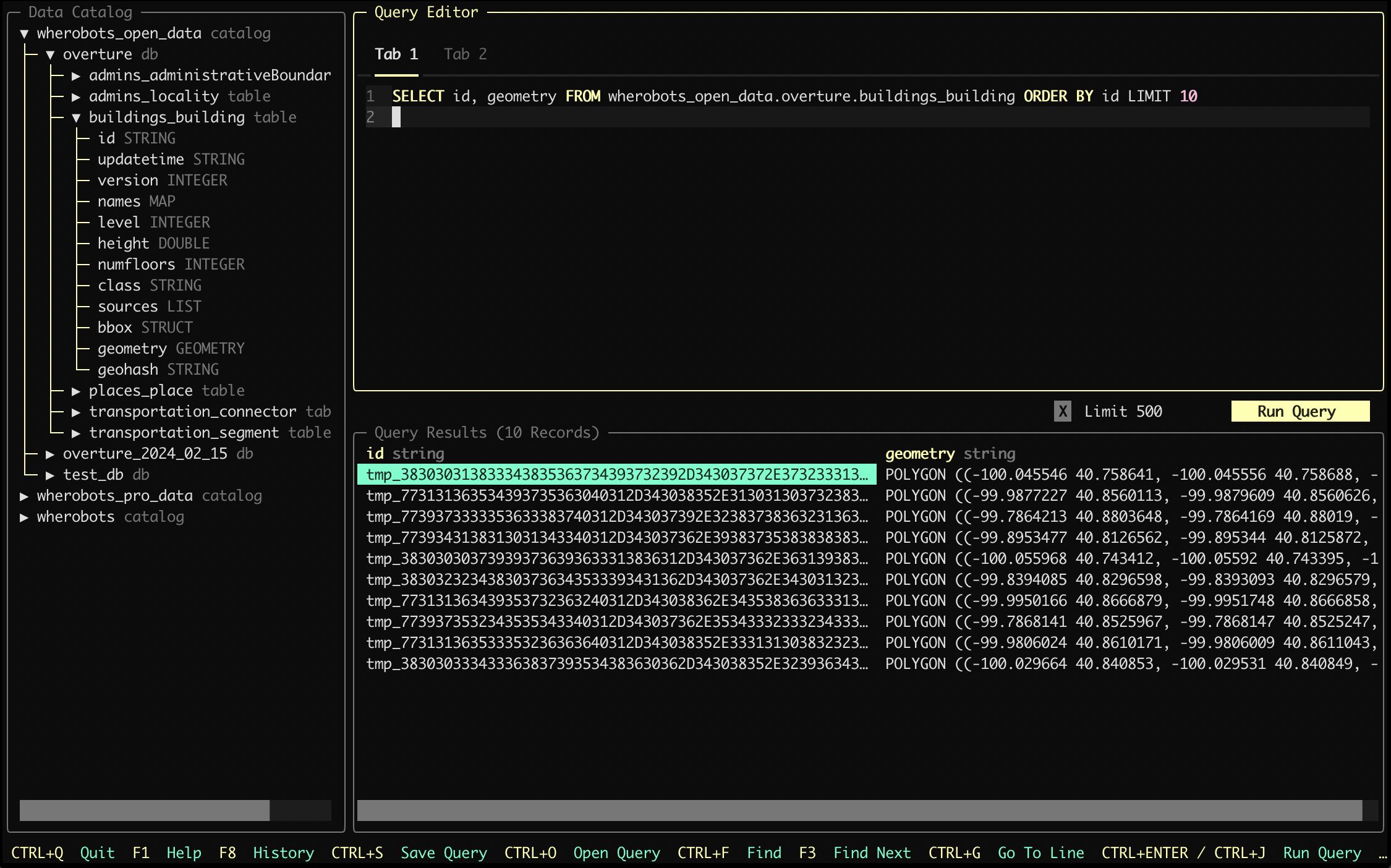
## Harlequin-wherobots SQL IDE for your terminal
As an example usage for our [Python DB-API driver](#python-db-api-driver), we also integrated with [Harlequin](https://harlequin.sh/).
### Quick start guide
Detailed usage guide is available as part of Harlequin's [Wherobots Adapter](https://harlequin.sh/docs/wherobots/index) documentation.
```sh theme={"system"}
# Install Harlequin with Wherobots adapter
pip install harlequin-wherobots
# Start harlequin
harlequin -a wherobots --api-key --runtime TINY --region AWS_US_WEST_2
```
 ## JDBC (type 4) driver
We provide an open-source Java library that implements a JDBC (Type 4) driver for connecting to WherobotsDB.
### Installation (JDBC type 4)
To start building Java applications around the Wherobots JDBC driver, add the following line to your `build.gradle` file's dependency section:
```makefile theme={"system"}
implementation "com.wherobots:wherobots-jdbc-driver"
```
### Usage (JDBC type 4)
In your application, you only need to work with Java's JDBC APIs from the `java.sql` package:
```java theme={"system"}
import com.wherobots.db.Region;
import com.wherobots.db.Runtime;
import java.sql.Connection;
import java.sql.DriverManager;
import java.sql.ResultSet;
import java.sql.Statement;
import java.util.Properties;
// Get your API key, or securely read it from a local file.
String apiKey = "...";
Properties props = new Properties();
props.setProperty("apiKey", apiKey);
props.setProperty("runtime", Runtime.TINY.toString());
props.setProperty("region", Region.AWS_US_WEST_2.toString());
try (Connection conn = DriverManager.getConnection("jdbc:wherobots://api.cloud.wherobots.com", props)) {
String sql = """
SELECT
id,
names['primary'] AS name,
geometry,
population
FROM
wherobots_open_data.overture_maps_foundation.divisions
WHERE subtype = 'country'
SORT BY population DESC
LIMIT 10
""";
Statement stmt = conn.createStatement();
try (ResultSet rs = stmt.executeQuery(sql)) {
while (rs.next()) {
System.out.printf("%s: %s %f %s\n",
rs.getString("id"),
rs.getString("name"),
rs.getDouble("population"),
rs.getString("geometry"));
}
}
}
```
For more information and future releases, see our [driver on GitHub](https://github.com/wherobots/wherobots-jdbc-driver).
## Wherobots SQL Driver TypeScript SDK
This is the TypeScript SDK for interacting with WherobotsDB. This package implements a Node.js client that programmatically connects to a WherobotsDB runtime and executes Spatial SQL queries.
### Prerequisites (TypeScript SDK)
The following resources are needed to run the Wherobots SQL Driver's TypeScript SDK:
1. Node.js version 18 or higher
2. TypeScript version 5.x (if using TypeScript)
### Installation (TypeScript SDK)
To complete the installation, run the following command:
```bash theme={"system"}
npm install wherobots-sql-driver
```
### Usage (TypeScript SDK)
#### Example: Executing SQL statement and printing results
This example:
* Establishes the connection to WherobotsDB with an `async` function
* Calls `async` methods to execute SQL queries through this connection.
```ts theme={"system"}
import { Connection, Runtime } from "wherobots-sql-driver";
(async () => {
const conn = await Connection.connect({
// replace "YOUR-WHEROBOTS-API-KEY" with the key created above
// or alternatively the key can be set with the `WHEROBOTS_API_KEY` environment variable
apiKey: "YOUR-WHEROBOTS-API-KEY",
runtime: Runtime.TINY,
});
const results = await conn.execute("SHOW SCHEMAS IN wherobots_open_data");
console.log(JSON.stringify(results.toArray(), null, 2));
conn.close();
})();
```
Running this example returns the results of the query as JSON:
```json theme={"system"}
[
{
"namespace": "overture_maps_foundation"
},
{
"namespace": "test_db"
}
]
```
##### Code example explanation
1. Calling `Connection.connect()` asynchronously establishes a SQL Session connection in Wherobots Cloud and returns a `Connection` instance.
2. Calling the connection's `execute()` methods runs the given SQL statement and asynchronously returns the result as an [Apache Arrow Table](https://arrow.apache.org/docs/js/classes/Arrow_dom.Table.html) instance.
3. The Arrow Table instance is converted to a primitive by calling `toArray()`, and then printed to the console as formatted JSON with `JSON.stringify()`.
4. Calling the connection's `close()` method tears down the SQL Session connection.
###### Running the example (TypeScript SDK)
1. Paste the contents of the above code example into a file called `wherobots-example.js`
2. Run the example with: `node wherobots-example.js`
1. Paste the contents of the above code example into a file called `wherobots-example.ts`
2. Run the example with: `npx tsx wherobots-example.ts`
#### Runtime and region selection (TypeScript SDK)
Select your desired Wherobots runtime using the runtime parameter and specifying a runtime `enum` value. For guidance on runtime sizing and selection, see [Runtimes](/develop/runtimes/).
### Additional parameters to `connect()`
The `Connection.connect()` function can take the following additional options:
* `sessionType`: `"single"` or `"multi"`; if set to `"single"`, then each call to `Connection.connect()` establishes an exclusive connection to a Wherobots runtime; if set to "multi", then multiple `Connection.connect()` calls with the same arguments and credentials will connect to the same shared Wherobots runtime; `"single"` is the default.
Consider multi-session for potential cost savings, but be mindful of performance impacts from shared resources. You might need to adjust cluster size if slowdowns occur, which could affect overall cost.
* `resultsFormat`: one of the `ResultsFormat` `enum` values; Arrow encoding is the default and most efficient format for receiving query results.
Currently, only Arrow encoding is supported
* `dataCompression`: one of the `DataCompression` `enum` values; Brotli compression is the default and the most efficient compression algorithm for receiving query results.
Currently, only Brotli compression is supported
* `geometryRepresentation`: one of the `GeometryRepresentation` `enum` values; selects the encoding of geometry columns returned to the client application. The default is EWKT (string) and the most convenient for human inspection while still being usable by geospatial data manipulation libraries.
* `region`: The region where the SQL session compute region. For more information, see [Region `enum` values](/develop/runtimes/#region-enum-values).
#### Additional parameters to `execute()`
The `Connection#execute` method can take an optional second argument, `options`:
* `options.signal`: an `AbortSignal` which can be used to cancel the execution (optional)
## JDBC (type 4) driver
We provide an open-source Java library that implements a JDBC (Type 4) driver for connecting to WherobotsDB.
### Installation (JDBC type 4)
To start building Java applications around the Wherobots JDBC driver, add the following line to your `build.gradle` file's dependency section:
```makefile theme={"system"}
implementation "com.wherobots:wherobots-jdbc-driver"
```
### Usage (JDBC type 4)
In your application, you only need to work with Java's JDBC APIs from the `java.sql` package:
```java theme={"system"}
import com.wherobots.db.Region;
import com.wherobots.db.Runtime;
import java.sql.Connection;
import java.sql.DriverManager;
import java.sql.ResultSet;
import java.sql.Statement;
import java.util.Properties;
// Get your API key, or securely read it from a local file.
String apiKey = "...";
Properties props = new Properties();
props.setProperty("apiKey", apiKey);
props.setProperty("runtime", Runtime.TINY.toString());
props.setProperty("region", Region.AWS_US_WEST_2.toString());
try (Connection conn = DriverManager.getConnection("jdbc:wherobots://api.cloud.wherobots.com", props)) {
String sql = """
SELECT
id,
names['primary'] AS name,
geometry,
population
FROM
wherobots_open_data.overture_maps_foundation.divisions
WHERE subtype = 'country'
SORT BY population DESC
LIMIT 10
""";
Statement stmt = conn.createStatement();
try (ResultSet rs = stmt.executeQuery(sql)) {
while (rs.next()) {
System.out.printf("%s: %s %f %s\n",
rs.getString("id"),
rs.getString("name"),
rs.getDouble("population"),
rs.getString("geometry"));
}
}
}
```
For more information and future releases, see our [driver on GitHub](https://github.com/wherobots/wherobots-jdbc-driver).
## Wherobots SQL Driver TypeScript SDK
This is the TypeScript SDK for interacting with WherobotsDB. This package implements a Node.js client that programmatically connects to a WherobotsDB runtime and executes Spatial SQL queries.
### Prerequisites (TypeScript SDK)
The following resources are needed to run the Wherobots SQL Driver's TypeScript SDK:
1. Node.js version 18 or higher
2. TypeScript version 5.x (if using TypeScript)
### Installation (TypeScript SDK)
To complete the installation, run the following command:
```bash theme={"system"}
npm install wherobots-sql-driver
```
### Usage (TypeScript SDK)
#### Example: Executing SQL statement and printing results
This example:
* Establishes the connection to WherobotsDB with an `async` function
* Calls `async` methods to execute SQL queries through this connection.
```ts theme={"system"}
import { Connection, Runtime } from "wherobots-sql-driver";
(async () => {
const conn = await Connection.connect({
// replace "YOUR-WHEROBOTS-API-KEY" with the key created above
// or alternatively the key can be set with the `WHEROBOTS_API_KEY` environment variable
apiKey: "YOUR-WHEROBOTS-API-KEY",
runtime: Runtime.TINY,
});
const results = await conn.execute("SHOW SCHEMAS IN wherobots_open_data");
console.log(JSON.stringify(results.toArray(), null, 2));
conn.close();
})();
```
Running this example returns the results of the query as JSON:
```json theme={"system"}
[
{
"namespace": "overture_maps_foundation"
},
{
"namespace": "test_db"
}
]
```
##### Code example explanation
1. Calling `Connection.connect()` asynchronously establishes a SQL Session connection in Wherobots Cloud and returns a `Connection` instance.
2. Calling the connection's `execute()` methods runs the given SQL statement and asynchronously returns the result as an [Apache Arrow Table](https://arrow.apache.org/docs/js/classes/Arrow_dom.Table.html) instance.
3. The Arrow Table instance is converted to a primitive by calling `toArray()`, and then printed to the console as formatted JSON with `JSON.stringify()`.
4. Calling the connection's `close()` method tears down the SQL Session connection.
###### Running the example (TypeScript SDK)
1. Paste the contents of the above code example into a file called `wherobots-example.js`
2. Run the example with: `node wherobots-example.js`
1. Paste the contents of the above code example into a file called `wherobots-example.ts`
2. Run the example with: `npx tsx wherobots-example.ts`
#### Runtime and region selection (TypeScript SDK)
Select your desired Wherobots runtime using the runtime parameter and specifying a runtime `enum` value. For guidance on runtime sizing and selection, see [Runtimes](/develop/runtimes/).
### Additional parameters to `connect()`
The `Connection.connect()` function can take the following additional options:
* `sessionType`: `"single"` or `"multi"`; if set to `"single"`, then each call to `Connection.connect()` establishes an exclusive connection to a Wherobots runtime; if set to "multi", then multiple `Connection.connect()` calls with the same arguments and credentials will connect to the same shared Wherobots runtime; `"single"` is the default.
Consider multi-session for potential cost savings, but be mindful of performance impacts from shared resources. You might need to adjust cluster size if slowdowns occur, which could affect overall cost.
* `resultsFormat`: one of the `ResultsFormat` `enum` values; Arrow encoding is the default and most efficient format for receiving query results.
Currently, only Arrow encoding is supported
* `dataCompression`: one of the `DataCompression` `enum` values; Brotli compression is the default and the most efficient compression algorithm for receiving query results.
Currently, only Brotli compression is supported
* `geometryRepresentation`: one of the `GeometryRepresentation` `enum` values; selects the encoding of geometry columns returned to the client application. The default is EWKT (string) and the most convenient for human inspection while still being usable by geospatial data manipulation libraries.
* `region`: The region where the SQL session compute region. For more information, see [Region `enum` values](/develop/runtimes/#region-enum-values).
#### Additional parameters to `execute()`
The `Connection#execute` method can take an optional second argument, `options`:
* `options.signal`: an `AbortSignal` which can be used to cancel the execution (optional)