> ## Documentation Index
> Fetch the complete documentation index at: https://docs.wherobots.com/llms.txt
> Use this file to discover all available pages before exploring further.
# MCP Server Best Practices and Usage
> Learn how to effectively use the Wherobots MCP server for geospatial data exploration and query generation.
The Wherobots Model Context Protocol (MCP) server helps you explore spatial data and generate geospatial SQL through natural language.
For installation instructions, [configure the MCP Server](/develop/agentic-tools).
The Wherobots MCP server is hosted in `us-west-2`. When used, MCP clients communicate with this service.
If you need the MCP server to be hosted in alternative regions, please file a request at [support@wherobots.com](mailto:support@wherobots.com).
## Use cases for the MCP server
The MCP server is optimized for tasks such as:
Understand what datasets are available across your organization's catalogs, databases, and tables.
Generate geospatial analysis workflows as ready-to-run notebooks.
Perform initial dataset analysis and assess data quality.
Get help writing and optimizing spatial SQL operations.
Receive guidance on geospatial concepts, functions, and best practices.
## Common tasks
The MCP server excels at helping you understand and work with your spatial data through:
* **Schema Discovery**: Prompt to understand table structures and relationships.
* **Query Optimization**: Get suggestions for improving spatial query performance.
* **Best Practices**: Receive guidance on spatial data analysis techniques based on your datasets and the Wherobots documentation.
For guidance on writing spatial SQL queries, including common pitfalls and complete examples, see [Writing Effective Spatial Queries in Wherobots](/develop/write-spatial-queries).
For a video walkthrough of the MCP server in action, see [Video: Automating Geospatial Discovery and Query Generation](/develop/mcp/mcp-server-automating-geospatial-workflows).
### Example prompts
| Task | Example prompt |
| ------------------------- | ---------------------------------------------------------------------------------------------------------- |
| Catalog discovery | "What catalogs are available in my Organization?" or "Show me the data hierarchy for the Overture catalog" |
| Dataset exploration | "What's in the Overture buildings table?" |
| Data quality checks | "Check the quality of location data in this dataset" |
| SQL generation | "What are the cities that I'll pass through if I drive from LA to NYC" |
| Questions about Wherobots | "What Wherobots ST functions are limited to Paid Organizations" |
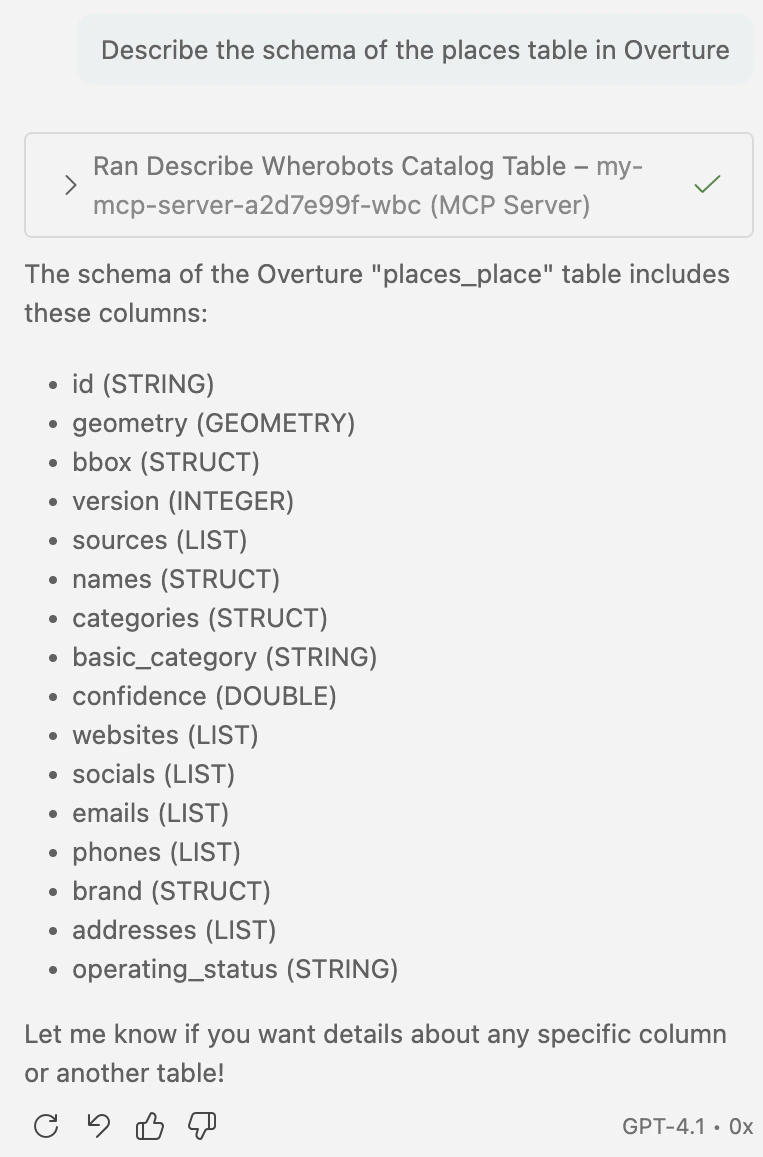
#### Exploring Overture dataset schema
For example, you can ask about the details in a specific dataset, such as:
 ## Initializing the MCP server
To ensure the MCP server is ready for efficient operation, you can ask preliminary questions.
Performing these tasks helps the MCP server adapt to your organization's datasets and helps ensure
more accurate responses to subsequent queries.
1. Dataset exploration queries
Use natural language prompts to retrieve schema details or summarize the contents of specific datasets.
Example:
> *"What's in the Overture buildings table?"*
2. General geospatial queries
Ask basic geospatial questions to initialize the server's natural language processing capabilities.
Example:
> *"What Wherobots ST functions are limited to Paid Organizations?"*
## Usage considerations
Consider the following best practices and limitations when using the Wherobots MCP server integration:
* **Models dictate query success**: Performance improves significantly with the latest advanced AI models available in Copilot (for example, the latest version of Claude Opus, Gemini Pro, or GPT Codex models)
* **Compute constraints**: The MCP server runs on Tiny runtime by default, and queries timeout after 15 minutes unless configured otherwise.
* **Configurable timeout**: To configure the MCP server query timeout, open `Wherobots: Open Settings` from the Command Palette in VS Code, then edit `wherobotsjobsubmit.mcpServerQueryTimeout` and modify the timeout value as needed.
* **Stalled queries**: If queries stall, configure the MCP runtime settings. Open `Wherobots: Open Settings` from the Command Palette and update `wherobotsjobsubmit.mcpServerRuntimeId` to a larger runtime. You can also adjust `wherobotsjobsubmit.mcpServerRuntimeRegion` if needed.
* **Complex operations**: Large-scale operations like planetary-scale analysis or isochrones may timeout.
### Cost considerations
* **Professional, Innovation, and Enterprise Organizations**
* You are only billed for MCP server usage when you execute a query on Wherobots from the MCP server.
* When executing queries on Wherobots from the MCP server, a SQL Session will start on a Tiny runtime.
* SQL Sessions terminate after 5 minutes of inactivity.
* Query execution contributes to [Spatial Unit (SU)](/develop/runtimes#what-are-spatial-units) consumption and will be categorized as SQL Session consumption.
* **Usage tracking**: Query execution activity appears in [**Workload History**](https://cloud.wherobots.com/workloads) as SQL Session usage.
* **Copilot requests**: Usage counts toward your GitHub Copilot usage limits. For more information, see [Requests in GitHub Copilot](https://docs.github.com/en/copilot/concepts/billing/copilot-requests) in the GitHub Documentation.
### Stop the MCP Server
When you are finished asking Wherobots-related questions, it is important to stop the MCP server.
Stopping the server ensures that no additional charges are incurred from the MCP server and that resources are freed for other tasks.
To stop the MCP server in VS Code:
1. Open the Command Palette (`Cmd+Shift+P` on Mac, `Ctrl+Shift+P` on Windows/Linux).
2. Type and select **MCP: List Servers**.
3. Select the name of your server from the list.
4. Click **Stop Server**.
## Initializing the MCP server
To ensure the MCP server is ready for efficient operation, you can ask preliminary questions.
Performing these tasks helps the MCP server adapt to your organization's datasets and helps ensure
more accurate responses to subsequent queries.
1. Dataset exploration queries
Use natural language prompts to retrieve schema details or summarize the contents of specific datasets.
Example:
> *"What's in the Overture buildings table?"*
2. General geospatial queries
Ask basic geospatial questions to initialize the server's natural language processing capabilities.
Example:
> *"What Wherobots ST functions are limited to Paid Organizations?"*
## Usage considerations
Consider the following best practices and limitations when using the Wherobots MCP server integration:
* **Models dictate query success**: Performance improves significantly with the latest advanced AI models available in Copilot (for example, the latest version of Claude Opus, Gemini Pro, or GPT Codex models)
* **Compute constraints**: The MCP server runs on Tiny runtime by default, and queries timeout after 15 minutes unless configured otherwise.
* **Configurable timeout**: To configure the MCP server query timeout, open `Wherobots: Open Settings` from the Command Palette in VS Code, then edit `wherobotsjobsubmit.mcpServerQueryTimeout` and modify the timeout value as needed.
* **Stalled queries**: If queries stall, configure the MCP runtime settings. Open `Wherobots: Open Settings` from the Command Palette and update `wherobotsjobsubmit.mcpServerRuntimeId` to a larger runtime. You can also adjust `wherobotsjobsubmit.mcpServerRuntimeRegion` if needed.
* **Complex operations**: Large-scale operations like planetary-scale analysis or isochrones may timeout.
### Cost considerations
* **Professional, Innovation, and Enterprise Organizations**
* You are only billed for MCP server usage when you execute a query on Wherobots from the MCP server.
* When executing queries on Wherobots from the MCP server, a SQL Session will start on a Tiny runtime.
* SQL Sessions terminate after 5 minutes of inactivity.
* Query execution contributes to [Spatial Unit (SU)](/develop/runtimes#what-are-spatial-units) consumption and will be categorized as SQL Session consumption.
* **Usage tracking**: Query execution activity appears in [**Workload History**](https://cloud.wherobots.com/workloads) as SQL Session usage.
* **Copilot requests**: Usage counts toward your GitHub Copilot usage limits. For more information, see [Requests in GitHub Copilot](https://docs.github.com/en/copilot/concepts/billing/copilot-requests) in the GitHub Documentation.
### Stop the MCP Server
When you are finished asking Wherobots-related questions, it is important to stop the MCP server.
Stopping the server ensures that no additional charges are incurred from the MCP server and that resources are freed for other tasks.
To stop the MCP server in VS Code:
1. Open the Command Palette (`Cmd+Shift+P` on Mac, `Ctrl+Shift+P` on Windows/Linux).
2. Type and select **MCP: List Servers**.
3. Select the name of your server from the list.
4. Click **Stop Server**.